web
You’re offline. This is a read only version of the page.
close
Skip to main content

Notifications

Announcements

No record found.

Community site session details

Community site session details

Session Id :
Microsoft Dynamics CRM (Archived)

Need help with uninstalling a solution

(0) ShareShare
ReportReport
Posted on by

I have a few questions on uninstalling a solution, as this is my first time to have such serious issues on an uninstall.

I have a list of all of the dependencies, but when it lists Forms that are dependent and the field is not on that form, how do you get around this?  In other words, I cannot delete the field because it has dependent components...a Report and 4 Forms, but this field is not on any of these forms.

Also, I see a dependency to a Report, but there is no Report by that name listed (under View = All); is there somewhere else I need to check?

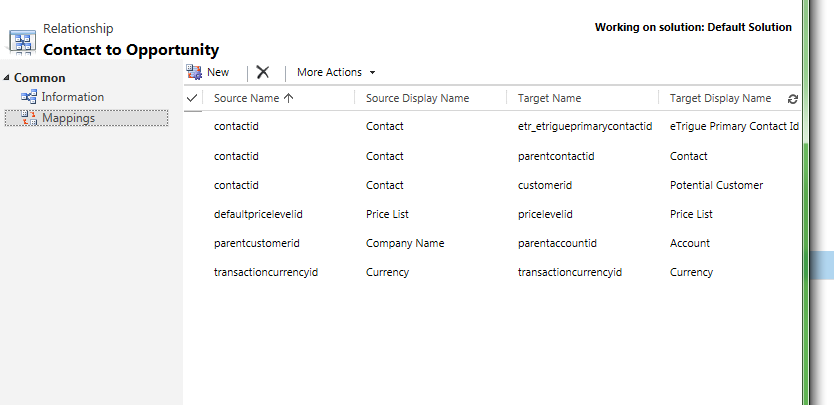
Finally, I have some relationships including these fields, but I cannot delete the mappings applicable to the field I need to delete; is there an answer for this?
*This post is locked for comments

I have the same question (0)
  • Mahendar Pal Profile Picture
    45,095 on at

    Are you trying to uninstall (delete) un-managed solution ?? if yes, then you need to manually remove all the dependent component first only then you will be able to delete it because of the dependency check. If you are getting any error while deleting your component, check for the error details, you could also share it here.

  • rmcanally65 Profile Picture
    on at

    Mahendar:

    This is a managed solution.

  • Mahendar Pal Profile Picture
    45,095 on at

    Managed components should remove their dependent components automatically, but it may be there is some changes done using managed solution components.

    You should be able to see your report name under All reports including subreports. Are you getting any error while trying to delete mapping, if yes can you share it here so that someone can check ??

  • rmcanally65 Profile Picture
    on at

    Mahendar:

    In the Relationship above, I cannot delete the first mapping (I am guessing because contactid is a primary field)

    Unhandled Exception: System.ServiceModel.FaultException`1[[Microsoft.Xrm.Sdk.OrganizationServiceFault, Microsoft.Xrm.Sdk, Version=6.0.0.0, Culture=neutral, PublicKeyToken=31bf3856ad364e35]]: System.Web.HttpUnhandledException: Microsoft Dynamics CRM has experienced an error. Reference number for administrators or support: #E5B85995Detail:

    <OrganizationServiceFault xmlns:i="www.w3.org/.../XMLSchema-instance&quot; xmlns="schemas.microsoft.com/.../Contracts&quot;>

     <ErrorCode>-2147220970</ErrorCode>

     <ErrorDetails xmlns:d2p1="schemas.datacontract.org/.../System.Collections.Generic&quot; />

     <Message>System.Web.HttpUnhandledException: Microsoft Dynamics CRM has experienced an error. Reference number for administrators or support: #E5B85995</Message>

     <Timestamp>2015-03-13T16:09:09.2287214Z</Timestamp>

     <InnerFault>

       <ErrorCode>-2147196411</ErrorCode>

       <ErrorDetails xmlns:d3p1="schemas.datacontract.org/.../System.Collections.Generic&quot; />

       <Message>Cannot create or delete a system AttributeMap.</Message>

       <Timestamp>2015-03-13T16:09:09.2287214Z</Timestamp>

       <InnerFault i:nil="true" />

       <TraceText i:nil="true" />

     </InnerFault>

     <TraceText i:nil="true" />

    </OrganizationServiceFault>

    How do I eliminate this first mapping so I can remove the managed solution?

  • Verified answer
    Mahendar Pal Profile Picture
    45,095 on at

    You can't remove primary mapping because it is result of the relationship, it is created by system, so for that you have to remove relationship between these entities and mapping will be deleted by system.

  • rmcanally65 Profile Picture
    on at

    Mahendar:

    I am seeing now that the uninstalling of a managed solution seems to be, if not impossible, highly unlikely or damaging to other areas.  It seems that you are not able to really delete the attributes, relationships, entities, etc. of that solution.  I think we will have to simply depreciate the parts and let them remain.

    But to another point:  this solution (or at least this version) is not compatible with 2015, so this was the reason for the need for this uninstall in the first place.

Under review

Thank you for your reply! To ensure a great experience for everyone, your content is awaiting approval by our Community Managers. Please check back later.

Helpful resources

Quick Links

Responsible AI policies

As AI tools become more common, we’re introducing a Responsible AI Use…

Neeraj Kumar – Community Spotlight

We are honored to recognize Neeraj Kumar as our Community Spotlight honoree for…

Leaderboard > 🔒一 Microsoft Dynamics CRM (Archived)

#1
SA-08121319-0 Profile Picture

SA-08121319-0 4

#1
Calum MacFarlane Profile Picture

Calum MacFarlane 4

#3
Alex Fun Wei Jie Profile Picture

Alex Fun Wei Jie 2

Last 30 days Overall leaderboard

Featured topics

Product updates

Dynamics 365 release plans



