web
You’re offline. This is a read only version of the page.
close
Skip to main content

Announcements

No record found.

News and Announcements icon
Community site session details

Community site session details

Session Id :
Microsoft Dynamics AX (Archived)

Update accounting distribution on a PO

(0) ShareShare
ReportReport
Posted on by

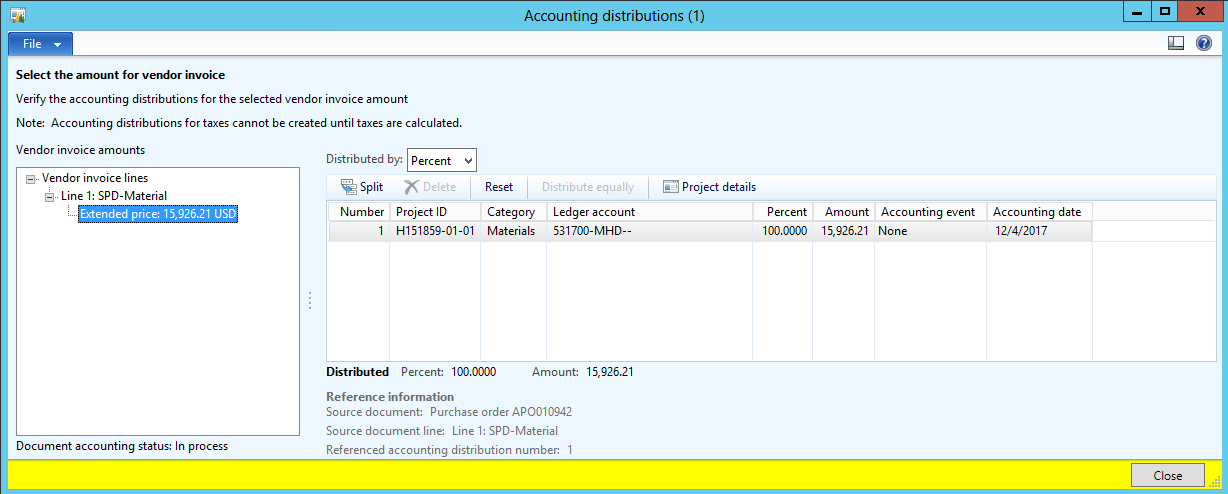
Is it possible to update the GL account on the accounting distribution form for an invoice? We are currently seeing issues that invoices are being posted to the wrong GL based on the posting profile setup. There was a change a couple of weeks ago and the PO's that were created and confirmed before the change are posting based on the old profile. In the interim we'd like to update the accounting distribution to post to the correct GL account. Is this possible? has anyone else run into the same issue before? 
accounting-distribution.png

*This post is locked for comments

I have the same question (0)
  • Verified answer
    Ludwig Reinhard Profile Picture
    Microsoft Employee on at

    Hi Carlos,

    If you modify and reconfirm those Purchase Orders is the new account used?

    Can you actually make a modification in the accounting distribution form that you attached. That is, can you for example select the reset or split button? (Please don't 'test' in your live system when trying out things here).

    Best regards,

    Ludwig

  • Community Member Profile Picture
    on at

    Ludwig,

    That worked when creating new lines. Existing lines would still post to the old posting profile but at least we can identify those and work around it.

    -- Carlos

  • Community Member Profile Picture
    on at

    hello,

    I would like to to the same - change the GL-account-dimensions on the 'acounting distributions'-form.

    But every button (reset,split,....) is greyed out, so disabled.  Why is this not possible ?

    Thx

    Ferry

  • HolliV Profile Picture
    235 on at

    Did you ever get an answer about why the Split and Delete are grayed out?

  • Suggested answer
    Ludwig Reinhard Profile Picture
    Microsoft Employee on at

    Hi HolliV,

    It depends on where you open the form.

    If you open it through the PO invoice form, things should be editable provided that you have the correct role assigned.

    Best regards,

    Ludwig

  • HolliV Profile Picture
    235 on at

    What role do you think allows it?  I'm logged in as System Admin and can't edit.  When you say it depends on the screen are you opening via the pending invoices menu choice?   

  • Suggested answer
    Ludwig Reinhard Profile Picture
    Microsoft Employee on at

    Hello HolliV,

    Yes, I open it through the pending vendor invoice menu.

    There you should be able to edit accounts and dimensions in the lines details section. If you open the distribution form from the pending vendor invoice header you can't do that.

    Best regards,

    Ludwig

Under review

Thank you for your reply! To ensure a great experience for everyone, your content is awaiting approval by our Community Managers. Please check back later.

Helpful resources

Quick Links

Introducing the 2026 Season 1 community Super Users

Congratulations to our 2026 Super Stars!

Congratulations to our 2025 Community Spotlights

Thanks to all of our 2025 Community Spotlight stars!

Leaderboard > 🔒一 Microsoft Dynamics AX (Archived)

#1
Joris dG Profile Picture

Joris dG 5

#2
Sagar Suman Profile Picture

Sagar Suman 2 Super User 2026 Season 1

#2
Alexey Lekanov Profile Picture

Alexey Lekanov 2

Last 30 days Overall leaderboard

Featured topics

Product updates

Dynamics 365 release plans
