web
You’re offline. This is a read only version of the page.
close
Skip to main content

Notifications

Announcements

No record found.

Community site session details

Community site session details

Session Id :
Microsoft Dynamics CRM (Archived)

How to filter drop down in Sub grid?

(0) ShareShare
ReportReport
Posted on by

Hi,

I have order entity which contains field Unit(m, kg etc.). I have sub grid for the products and when an existing product is chosen to be added to the sub grid in-line input field appears where the user input can write some string and a drop down with suggested products that match this string show. 0537.order.jpg
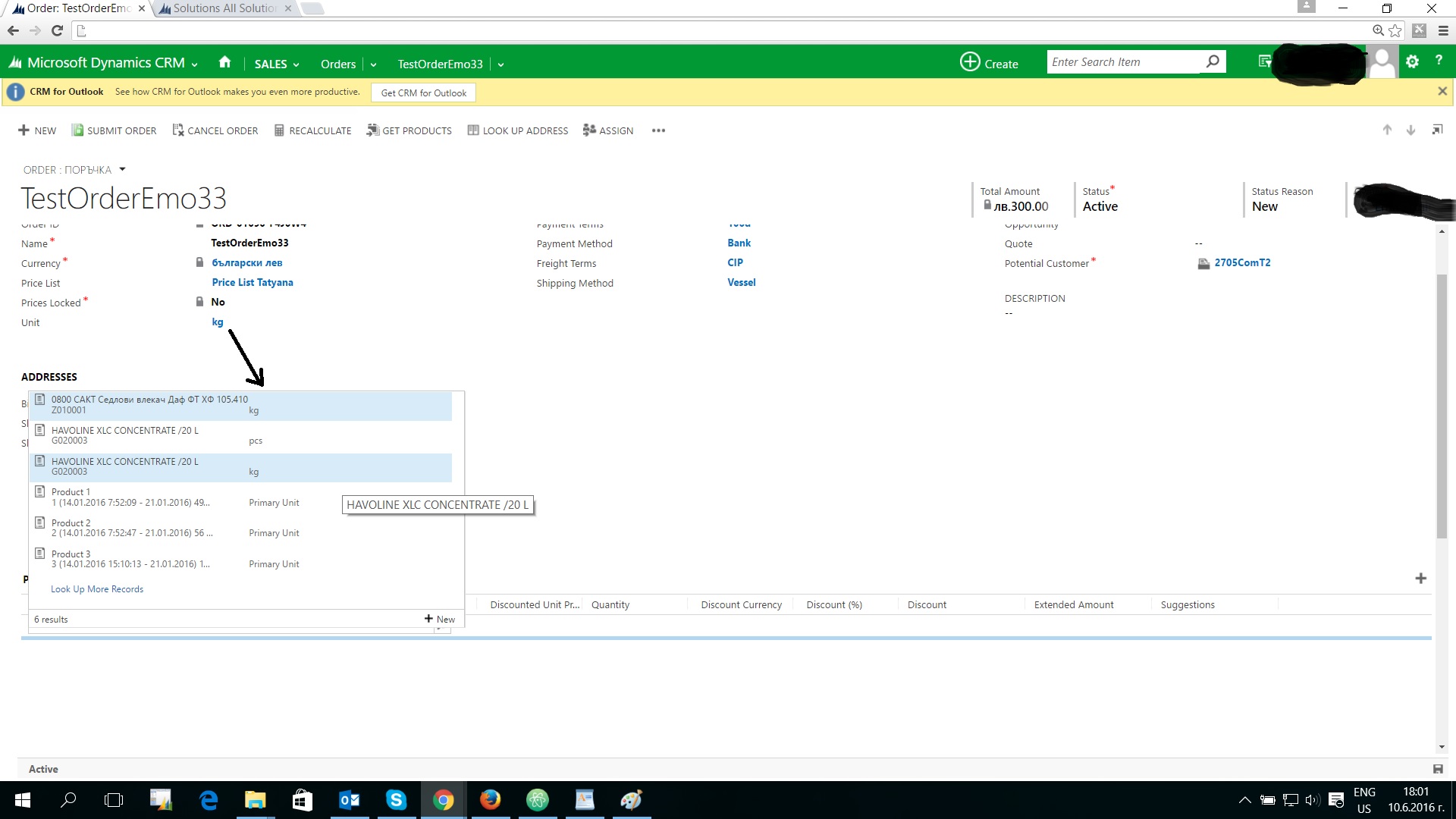
Every product has unit by which it is measured. I want to filter the suggested products by the value from the field "Unit" in the Order entity. In the example from the picture I have chosen kg, so in the drop down only product measured with kg must appear(only these that appear in blue).

I have made JS web resource:

         var unit = getValue("prista_unit");
         var unitId = unit[0].id;
         console.log(unitId);

         //Create FetchXML for sub grid to filter records based on category
         var fetchXml ="<fetch version='1.0' output-format='xml-platform' mapping='logical' distinct='true'>" +
                          "<entity name='pricelevel'>" +
                            "<attribute name='name' />" +
                            "<attribute name='transactioncurrencyid' />" +
                            "<attribute name='enddate' />" +
                            "<attribute name='egindate' />" +
                            "<attribute name='statecode' />" +
                            "<attribute name='pricelevelid' />" +
                            "<order attribute='name' descending='false' />" +
                            "<link-entity name='productpricelevel' from='pricelevelid' to='pricelevelid' alias='aa'>" +
                              "<filter type='and'>" +
                                "<condition attribute='uomid' operator='eq' value=' + unitId + '/>" +
                                "</filter>" +
                              "</link-entity>" +
                          "</entity>" +
                        "</fetch>";
        console.log(Xrm.Page.getControl("Dialog_lookup_salesorderdetailsGrid_i_IMenu"));
        Xrm.Page.getControl("Dialog_lookup_salesorderdetailsGrid_i_IMenu").addCustomFilter(fetchXML);

         objSubGrid.control.Refresh();


The problem is that Xrm.Page.getControl can't reach the drop down. i think it is because the web resource is OnLoad and the drop down with suggestions appears after the user chooses to add Existing product. I have two questions:

1. I am not sure that I refer to the right control id. I inspected the element using chrome, but still not sure that is the right element id. Is there a certain way to find the id of the element using the solution menu?

2. How can I filter the drop down using JS web resource?

This is on CRM 2015. 

*This post is locked for comments

I have the same question (0)
  • Community Member Profile Picture
    on at

    Hi -

    As for accessing and applying filters to SubGrids, you might take a look at this link:

    http://www.bobylog.com/microsoft-dynamics-crm-2015-subgrid-lookup-filter/

    It offers some helpful, albeit Un-supported ways of accessing and modifying SubGrid fetchXml.

  • Emo10 Profile Picture
    on at

    There is property used in the code gridControl.$c_0.$I_4.$3M_3.$3_6. How it is and how can I find the relevant one for my case?

  • Community Member Profile Picture
    on at

    Hi -

    Try this: gridControl.$c_0.$N_4.$Y_3;

    I am going to do some research to see if I can give you a safer approach.

    "This is a javascript chain properties path and it looks odd because is obfuscated by Microsoft team to protect their intellectual property on the javascript source code.

    In our projects we experienced different properties for different versions of CRM and different type of grids. For example for “Turbo SubGrid” the property is completely different. If this is your case then you have to search for where is “addPreSearch” callback function and yes it can take time until you find it. If this is critical for your business we recommend you to contact Bobylog Sales Department on sales[@]bobylog.com for a quotation and a CRM developer will be allocated to assist with your issue." ~ Mike (www.bobylog.com/microsoft-dynamics-crm-2015-subgrid-lookup-filter)

  • Community Member Profile Picture
    on at

    DELETE

Under review

Thank you for your reply! To ensure a great experience for everyone, your content is awaiting approval by our Community Managers. Please check back later.

Helpful resources

Quick Links

Responsible AI policies

As AI tools become more common, we’re introducing a Responsible AI Use…

Neeraj Kumar – Community Spotlight

We are honored to recognize Neeraj Kumar as our Community Spotlight honoree for…

Leaderboard > 🔒一 Microsoft Dynamics CRM (Archived)

#1
SA-08121319-0 Profile Picture

SA-08121319-0 4

#1
Calum MacFarlane Profile Picture

Calum MacFarlane 4

#3
Alex Fun Wei Jie Profile Picture

Alex Fun Wei Jie 2

Last 30 days Overall leaderboard

Featured topics

Product updates

Dynamics 365 release plans
