web
You’re offline. This is a read only version of the page.
close
Skip to main content

Notifications

Announcements

Community site session details

Community site session details

Session Id :
Finance | Project Operations, Human Resources, ...
Answered

How to fix some text not displayed correctly on screen?

(0) ShareShare
ReportReport
Posted on by 596

Hi guys,

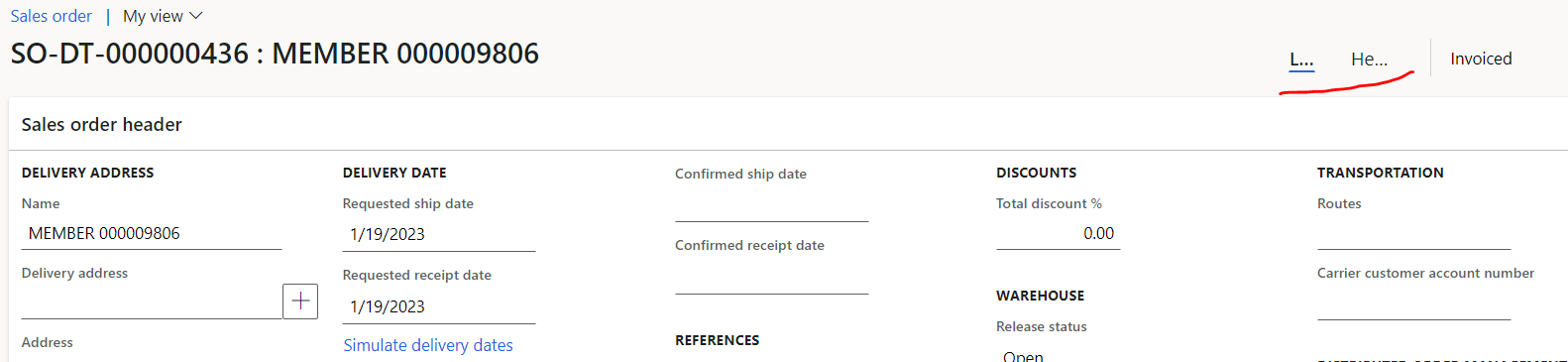
In my screen right now, when I open some standard form like Sales Order or Purchase Order and go to its detail, there are some texts not displayed correctly, like below:
pastedimage1676624120068v1.png

I tried to scale the browser screen down and up, the text will be stay like that, with some "...", I'm using Edge, btw. I haven't tried on other browser because I intend to keep using Edge.

Another information, I used to display this either in my laptop (15in) or in my monitor which 24in, the display also same. 

Has someone experience the same ? 

Thanks

I have the same question (0)
  • Suggested answer
    GirishS Profile Picture
    27,829 Moderator on at

    Hi Lars Volt,

    Seems this is bug. Refer to the below thread which talks about the same issue. On the thread it was mentioned that after upgrading to 10.0.32 it works properly.

    Which version are you using?

    https://community.dynamics.com/365/financeandoperations/f/dynamics-365-for-finance-and-operations-forum/479388/purchase-order-line-and-header-not-display-proper

    Thanks,

    Girish S.

  • Voltes Profile Picture
    596 on at

    Hi Girish,

    I'm on version 10.0.31, Seems I have to wait for 10.0.32 then. On that thread you're shared, doesn't say what feature, right ? Do you know what is the feature ? although it is also mentioned it will activate by default.

    Thanks

  • Verified answer
    GirishS Profile Picture
    27,829 Moderator on at

    Yes that feature is enabled by default in 10.0.31 version. Name of the feature as mentioned in the thread is "Removal of header/lines proxy button".

    Check whether any possibility of disabling these from feature management form.

    Thanks,

    Girish S.

  • Voltes Profile Picture
    596 on at

    Hi Girish,

    Yes, after checked the feature, I need to enable it. I guess it will be automatic on 10.0.32

    Solved. Thanks.

Under review

Thank you for your reply! To ensure a great experience for everyone, your content is awaiting approval by our Community Managers. Please check back later.

Helpful resources

Quick Links

Responsible AI policies

As AI tools become more common, we’re introducing a Responsible AI Use…

Congratulations to our 2025 Community Spotlights

Thanks to all of our 2025 Community Spotlight stars!

Leaderboard > Finance | Project Operations, Human Resources, AX, GP, SL

#1
André Arnaud de Calavon Profile Picture

André Arnaud de Cal... 695 Super User 2026 Season 1

#2
Abhilash Warrier Profile Picture

Abhilash Warrier 360 Super User 2026 Season 1

#3
BillurSamdancioglu Profile Picture

BillurSamdancioglu 288 Most Valuable Professional

Last 30 days Overall leaderboard

Product updates

Dynamics 365 release plans
