web
You’re offline. This is a read only version of the page.
close
Skip to main content

Notifications

Announcements

No record found.

Community site session details

Community site session details

Session Id :
Microsoft Dynamics AX (Archived)

Problem posting vendor invoice - procurement

(0) ShareShare
ReportReport
Posted on by

The situation is as follows:
- While posting the vendor invoice, ax client crashed and when we went back to see what happened and in which state the document is, it says invoice is pending.
- When we try to post the pending invoice, it show the error like show in pic below, like it is no longer confirmed.

0447.0.jpg

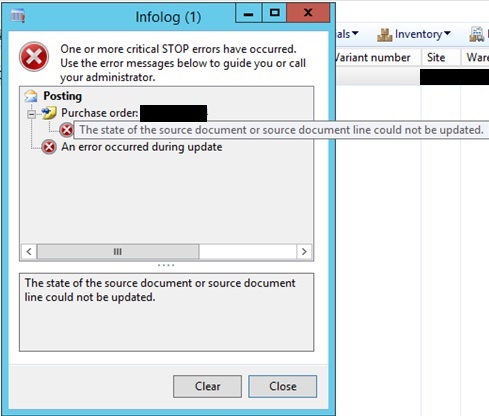
Ok, trying to confirm it again, but getting the error message below:
"The state of the source document or source document line could not be updated."
2514.1.jpg

Do you have any ideas what sort of inconsistency occured and what to do to fix the problem?

Regards,
Doc

*This post is locked for comments

I have the same question (0)
  • Ludwig Reinhard Profile Picture
    Microsoft Employee on at

    Hello Doc,

    Can you open the purchase order and select the confirm button once again? It seems that sombody made some changes to the PO that need to be confirmed before the invoice can be posted.

    Once this is done I would recommend that you delete the pending invoice and create/enter a new one.

    Hope that helps,

    Ludwig

  • Community Member Profile Picture
    on at

    Hello Ludwig,

    Can you see the second screnshot, it is the error that the system gives me upon trying to confirm it again.

    So I cannot confirm it as it throws the error shown in the seconf screen.

  • Ludwig Reinhard Profile Picture
    Microsoft Employee on at

    Hi Doc Sportello,

    Do you have change management activated?

    In Addition, can you check whether a prepayment has been applied to the invoice? If so, please check the following hotfix if it resolves your issue

    KB 3070195"The state of the source document line could not be updated" error when trying to post on-hold invoices with prepayment application lines

    Hope this helps,

    Ludwig

  • Community Member Profile Picture
    on at

    Hi Ludwig,

    Thanks for the hotfix I'll see if it works.

    We do not have change management activated.

  • Community Member Profile Picture
    on at

    Hello again Ludwig,

    There was no prepayment applied to the invoice, and it looks like there's some table data inconsistency, not sure if there is any corrective report for this kind of problems in procurement documents, or this is supposed to be done by some manual fix in tables, but nothing helps so far...

  • Suggested answer
    Ludwig Reinhard Profile Picture
    Microsoft Employee on at

    Hello Doc Sportello,

    Are you aware of any system modifications that have been made and that might cause this issue?

    Do you have a developer around who might be able to help you debugging this issue?

    I believe this would be the first thing to do rather than trying to fix something at the table level without knowing the underlying reason.

    Would be great if you could keep us update on this issue.

    Many thanks and all the best,

    Ludwig

  • Community Member Profile Picture
    on at

    I don't think there are modifications but I can check in AOT, I could debug myself as I have previous .Net and C# experience and I pretty much understand the code, but I'm not sure where to start, where is the most suitable position for a breakpoint.

Under review

Thank you for your reply! To ensure a great experience for everyone, your content is awaiting approval by our Community Managers. Please check back later.

Helpful resources

Quick Links

Responsible AI policies

As AI tools become more common, we’re introducing a Responsible AI Use…

Neeraj Kumar – Community Spotlight

We are honored to recognize Neeraj Kumar as our Community Spotlight honoree for…

Leaderboard > 🔒一 Microsoft Dynamics AX (Archived)

#1
Martin Dráb Profile Picture

Martin Dráb 4 Most Valuable Professional

#1
Priya_K Profile Picture

Priya_K 4

#3
MyDynamicsNAV Profile Picture

MyDynamicsNAV 2

Last 30 days Overall leaderboard

Featured topics

Product updates

Dynamics 365 release plans
