web
You’re offline. This is a read only version of the page.
close
Skip to main content

Notifications

Announcements

No record found.

Community site session details

Community site session details

Session Id :
Microsoft Dynamics CRM (Archived)

CRM SQL server timeout error when sharing Account

(0) ShareShare
ReportReport
Posted on by

Hi all,

When I try to share some Account entities with teams, I am receiving an SQL server timeout error after the bat fills about halfway.
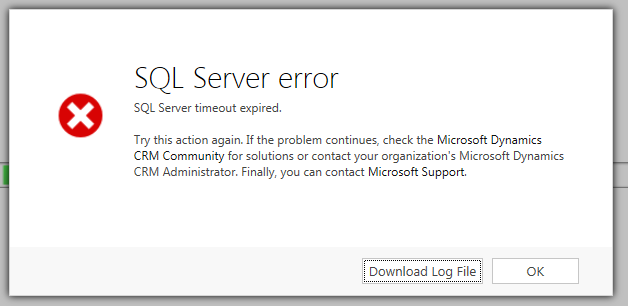
The timeout normally occurs after around 30 seconds. The log file shows the following:

Unhandled Exception: System.ServiceModel.FaultException`1[[Microsoft.Xrm.Sdk.OrganizationServiceFault, Microsoft.Xrm.Sdk, Version=6.0.0.0, Culture=neutral, PublicKeyToken=31bf3856ad364e35]]: System.Web.HttpUnhandledException: Microsoft Dynamics CRM has experienced an error. Reference number for administrators or support: #7858D628Detail:
<OrganizationServiceFault xmlns:i="http://www.w3.org/2001/XMLSchema-instance" xmlns="http://schemas.microsoft.com/xrm/2011/Contracts">
<ErrorCode>-2147220970</ErrorCode>
<ErrorDetails xmlns:d2p1="http://schemas.datacontract.org/2004/07/System.Collections.Generic" />
<Message>System.Web.HttpUnhandledException: Microsoft Dynamics CRM has experienced an error. Reference number for administrators or support: #7858D628</Message>
<Timestamp>2015-01-29T13:20:35.7745462Z</Timestamp>
<InnerFault>
<ErrorCode>-2147204783</ErrorCode>
<ErrorDetails xmlns:d3p1="http://schemas.datacontract.org/2004/07/System.Collections.Generic" />
<Message>SQL timeout expired.</Message>
<Timestamp>2015-01-29T13:20:35.7745462Z</Timestamp>
<InnerFault i:nil="true" />
<TraceText i:nil="true" />
</InnerFault>
<TraceText i:nil="true" />
</OrganizationServiceFault>

This appears only to happen for some Accounts and not others when trying to share with the same team. The Accounts, when shared, also share contacts through cascading relationships. I have tried restarting the sql server and also the sql services. The CRM server event viewer shows errors and warnings:

Query execution time of 30.2 seconds exceeded the threshold of 10 seconds. Thread: 24; Database: orgname_MSCRM; Server:servername; Query: exec p_CascadeGrantAccess 'c1e6190b-d17e-e411-b9d0-005056b55392', 9, 1, '24a3fc19-ef17-e411-ae18-005056b55392', 1, 134217729.

Any advice appreciated - thanks

*This post is locked for comments

I have the same question (0)
  • Wayne Walton Profile Picture
    13,730 on at

    Try disabling the cascading for your account relationships and see if one is causing the timeout.  You might have an unusually large amount of records relating to an account.  That doesn't solve the problem outright, but it should point to the relationship causing the issue.

  • Community Member Profile Picture
    on at

    Thanks Wayne - I changed it from 'Parental' to 'Configurable cascading' and I can now share the account. However surely Dynamics should be able to handle less than 100k contact records. e.g. I share an Account which I know has around 500 contacts yet I am getting the error. Yet previously, I was able to share an Account which I know has 30,000 contacts.

    Do you know of any sharing limitations e.g. size of a table in database? or where I can extend the query execution time to allow it to remain as a 'Parental' relationship?...

    Thanks

  • Wayne Walton Profile Picture
    13,730 on at

    Well, you could go into SQL Server Management Studio and change the command timeout from 30 seconds to something longer, but that's obviously just a Band-Aid.  I would suspect that it's not just Contacts, but perhaps all the activity on some Contacts that's causing the timeout.  

    Sharing at the Account level is like the biggest impact option there is, since it's parental to so much stuff, and that cascades through multiple entities, and their child entities as well.  

    If it remains a major issue, I would recommend scheduling a time to enable SQL Profiler and run the query again.  Maybe some insight into what specifically is hanging up the query can be gained there.  

  • Community Member Profile Picture
    on at

    Wayne, thanks for the tips. I understand that it has a large impact, but we have alot of users who only deal with certain accounts (and contacts of those accounts). i.e. 5 teams, some deal with org 1 and org 2, some deal with org 2, 3 and 4 etc. The only effective way to do this as far as I am aware is sharing the accounts because ownership/security roles has already been explored but not possible.

    The timeout for SQL Server is currently 0 which means, according to the dialog, that there is no timeout...so why would the error be occuring?

    thanks

  • Community Member Profile Picture
    on at

    Sorry - should have also added that I can't even amend an existing share to revoke the 'Append' permissions for a team without getting the error...I also checked the PrincipalObjectAccess table and it has around 300,000 records. I've heard of users reporting millions

  • Community Member Profile Picture
    on at

    Quite interestingly, I tried it on the UAT environment rather than the development environment. I was able to share Accounts no problem with all teams, revoke some rights as well and there are around 400,000 records in the POA table. I think the 'sql timeout error' must be stemming from another error, so I guess I will have to try and use this sql profile to check it out.

  • Wayne Walton Profile Picture
    13,730 on at

    What are the differences between your UAT and dev?  if there are real hardware differences, that might be worth exploring as well.

    I've seen mystery issues like this stem because the SQL Server drives were virtualized and it was causing access issues at the VM level.

  • Community Member Profile Picture
    on at

    Our UAT has a clustered sql server. It seems to run the 'share' command in about 15 seconds. I ran the SQL profiler twice and it gets to 30seconds on the dev environment and then bombs out as expected

    . Do you know where I can change this setting on my dev environment to increase a little to see if that helps? We're using SQL Server 2012 but as our execution time-out is zero, why is it stopping at 30 seconds?

    Thank you again for all your help

  • Suggested answer
    Mahadeo Matre Profile Picture
    17,021 on at

    Hi,

    Here are some links on how to resolve timeout issue

    nishantrana.me/.../sql-server-timeout-expired-in-crm

    billoncrmtech.blogspot.com/.../sql-timeouts-in-crm-generic-sql-error.html

    support.microsoft.com/.../en-us

    Hope this will help to solve your problem.

    Thanks

  • Community Member Profile Picture
    on at

    Hi Colinmc,

    Please try the below steps and let us know if it helps :

    [HKEY_LOCAL_MACHINE\Software\Microsoft\MSCRM[OLEDBTimeout]...............]: 86400
    [HKEY_LOCAL_MACHINE\Software\Microsoft\MSCRM[ExtendedTimeout]............]: 1000000
     
    However, if you are still facing timeout issues it could be because of huge processing happening in the background and the Systems default ports (5000) are running out.

    Could you please check the following registry keys on Both CRM and SQL server, If they do not exist then we may have to create them.

    **Please note that creation of the registry keys will take effect only after reboot.
     
    MaxUserPort (This helps to prevent port exhaustion)
    1. Click Start | Run | regedit 
    2. Locate and then click the following subkey:
    HKEY_LOCAL_MACHINE\System\CurrentControlSet\Services\Tcpip\Parameters 
    3.  On the Edit menu, point to New , click DWORD Value , and then type MaxUserPort . 
    4.  Double-click MaxUserPort , and then set a decimal value to a number greater than 5000 (Default value is 5000, and the valid range is 5000-65534, use 65000 to max out the ports).
    Note: This parameter controls the maximum port number that is used when a program requests any available user port from the system. Typically, ephemeral (short-lived) ports are allocated between the values of 1024 and 5000 inclusive. By default, the number of available ports is 3977, because the first available non-reserved port is 1024. 
    http://technet.microsoft.com/en-us/library/cc938196.aspx 

    AND

    TcpTimedWaitDelay (This releases unused ports as quickly as possible. The lower the value, the quicker they release.)
    1.  Click Start | Run | regedit 
    2.  Locate and then click the following registry subkey:
    HKEY_LOCAL_MACHINE\System\CurrentControlSet\Services\Tcpip\Parameters 
    3.  Click Edit | New | DWORD Value | TcpTimedWaitDelay
    4.  Double-click TcpTimedWaitDelay , and then set a decimal value of 30. (Value is represented in seconds and the valid range is 30-300 decimal.)
    Note: This value determines the length of time that a connection stays in the TIME_WAIT state when being closed. While a connection is in the TIME_WAIT state, the socket pair cannot be reused. This is also known as the 2MSL state because the value should be twice the maximum segment lifetime on the network. For more information, see RFC 793.
    5.  Exit Registry Editor. 
    6.  Restart the server. 
    http://technet.microsoft.com/en-us/library/cc938217.aspx


    Vineet N.
    Microsoft Dynamics CRM Support

Under review

Thank you for your reply! To ensure a great experience for everyone, your content is awaiting approval by our Community Managers. Please check back later.

Helpful resources

Quick Links

Responsible AI policies

As AI tools become more common, we’re introducing a Responsible AI Use…

Neeraj Kumar – Community Spotlight

We are honored to recognize Neeraj Kumar as our Community Spotlight honoree for…

Leaderboard > 🔒一 Microsoft Dynamics CRM (Archived)

#1
SA-08121319-0 Profile Picture

SA-08121319-0 4

#1
Calum MacFarlane Profile Picture

Calum MacFarlane 4

#3
Alex Fun Wei Jie Profile Picture

Alex Fun Wei Jie 2

Last 30 days Overall leaderboard

Featured topics

Product updates

Dynamics 365 release plans
