web
You’re offline. This is a read only version of the page.
close
Skip to main content

Announcements

No record found.

News and Announcements icon
Community site session details

Community site session details

Session Id :
Small and medium business | Business Central, N...
Answered

What is the standard Warehouse flow in Navision 2018?

(0) ShareShare
ReportReport
Posted on by 5,039

Hi Community,

I wonder if anyone can advise what is the standard warehouse flow?

For example below:

Creation of BOM > Production > Creation of Item etc.

Thank you!

I have the same question (0)
  • Verified answer
    Community Member Profile Picture
    on at

    Josh,

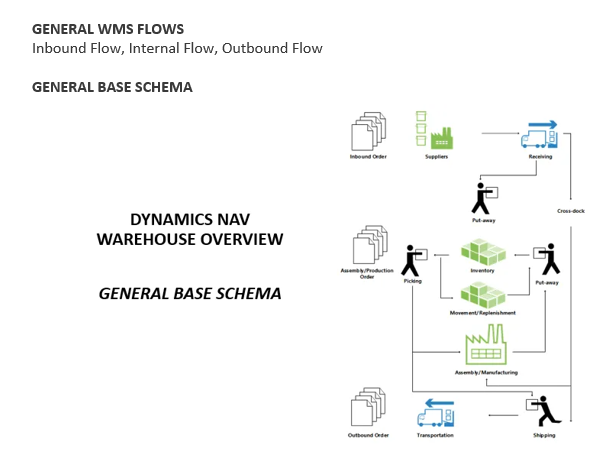
    pastedimage1644506820039v1.png

    I will review the Warehouse Flows related to Manufacturing since that is what you are talking about...

    1. User Creates a Released Production Order

    2. In Released Production Order generate the Inventory Pick or Warehouse Pick (Advanced)

    3. Pick and Post the Inventory Pick or Register the Warehouse Pick (Advanced)

    4. Consume the Picked Components in Consumption Journal or Production Journal

    5. Produced Finished Product on Output Journal or Production Journal

    6. Now you have the Output Finished Good and need to perform Inventory Put-away or Warehouse Movement. On Released Production Order generate these documents

    You are done.  If on the Location you have Require Pick and Put-away and you have your Bins setup for Picking and then the Production Inbound and Outbound Bins will be needed.

    Hope I answered your questions.

    Thanks,

    Steve

  • joshtechsolutions Profile Picture
    5,039 on at

    Thanks Steve!

  • joshtechsolutions Profile Picture
    5,039 on at

    Hi Steve,

    In the list of the Production Order, may I ask where does Work center and Routing belongs?

    Thank you!

  • Verified answer
    Community Member Profile Picture
    on at

    Josh,

    Work Centers are part of Routings and the Operational steps within a Production Order. The Work Center operation steps could have Routing Link Codes that point to the components it requires in a specific step. It is not required to have a Routing Link but if the Routing is long, with a lot of components, you can set this up to limit pulling all the components at once.

    Hope this helps.

    Thanks,

    Steve

Under review

Thank you for your reply! To ensure a great experience for everyone, your content is awaiting approval by our Community Managers. Please check back later.

Helpful resources

Quick Links

Introducing the 2026 Season 1 community Super Users

Congratulations to our 2026 Super Stars!

Meet the Microsoft Dynamics 365 Contact Center Champions

We are thrilled to have these Champions in our Community!

Congratulations to the April Top 10 Community Leaders

These are the community rock stars!

Leaderboard > Small and medium business | Business Central, NAV, RMS

#1
OussamaSabbouh Profile Picture

OussamaSabbouh 1,957 Super User 2026 Season 1

#2
YUN ZHU Profile Picture

YUN ZHU 956 Super User 2026 Season 1

#3
Teagen Boll Profile Picture

Teagen Boll 645 Super User 2026 Season 1

Last 30 days Overall leaderboard

Featured topics

Product updates

Dynamics 365 release plans
