web
You’re offline. This is a read only version of the page.
close
Skip to main content

Notifications

Announcements

No record found.

Community site session details

Community site session details

Session Id :
Microsoft Dynamics CRM (Archived)

Dynamics CRM 2015 Plugin accessing ASP.NET XML WebService

(0) ShareShare
ReportReport
Posted on by

Hi,

I am developing a plugin which calls a web service but i am getting this error: 

Insufficient permissions for setting the configuration section 'defaultProxy'. I am setting my proxy credentials using code like so:

WebService service = new WebService();

            NetworkCredential credentials = new NetworkCredential("username", "password", "domain");
            WebProxy proxy = new WebProxy();
            proxy.Credentials = credentials;
            service.Proxy = proxy;

I tried to generate a proxy class using SvcUtil.exe but the error still appears.

SubmitTransactionRequestBody body =
                        new SubmitTransactionRequestBody("param1", "param2", "param3", "param4", param5, "param6");
                    SubmitTransactionRequest req = new SubmitTransactionRequest(body);
                    BasicHttpBinding myBinding = new BasicHttpBinding();
                    myBinding.Name = "serviceSoap";
                    myBinding.Security.Mode = BasicHttpSecurityMode.None;
                    myBinding.Security.Transport.ClientCredentialType = HttpClientCredentialType.None;
                    myBinding.Security.Transport.ProxyCredentialType = HttpProxyCredentialType.None;
                    myBinding.Security.Message.ClientCredentialType = BasicHttpMessageCredentialType.UserName;
                    EndpointAddress endPointAddress = new EndpointAddress("serviceUrl");
                    ChannelFactory<serviceSoap> factory = new ChannelFactory<serviceSoap>(myBinding, endPointAddress);
                    serviceSoap channel = factory.CreateChannel();
                    SubmitTransactionResponse res = channel.SubmitTransaction(req);
                    factory.Close();
                    string requestResponse = res.Body.SubmitTransactionResult.ToString();

I tested both methods on a Console Application and its working fine. I don't know where i am missing it.

The version of CRM is 2015, it's hosted on premise, the isolation mode is None, and assembly is stored in database. See screenshot below
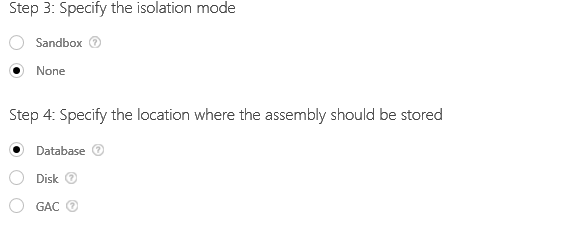
1033.plugin.PNG

*This post is locked for comments

I have the same question (0)
  • Tobias Koller Profile Picture
    on at

    hi,

    I never had this problems but maybe this link will help you.

    https://support.microsoft.com/en-us/kb/2580188

    there is also a workaround described:

    "To work around this issue, use the methods in the System.Configuration.Configuration class instead of in the System.Configuration.ConfigurationManager class."

    how do you access your configuration (plugin/webservice)?

    Like I wrote: I never had this problem but just trying to help with some links ;)

  • Edgias Mudzukwa Profile Picture
    on at

    When I add the web reference in Visual Studio, the following configuration will be added to the app.config of the plugin

    <?xml version="1.0" encoding="utf-8" ?>
    <configuration>
        <configSections>
            <sectionGroup name="applicationSettings" type="System.Configuration.ApplicationSettingsGroup, System, Version=4.0.0.0, Culture=neutral, PublicKeyToken=b77a5c561934e089" >
                <section name="section_name" type="System.Configuration.ClientSettingsSection, System, Version=4.0.0.0, Culture=neutral, PublicKeyToken=b77a5c561934e089" requirePermission="false" />
            </sectionGroup>
        </configSections>
        <system.serviceModel>
            <bindings />
            <client />
        </system.serviceModel>
        <applicationSettings>
            <section_name>
                <setting name="setting_name"
                    serializeAs="String">
                    <value>web_service_url</value>
                </setting>
            </section_name>
        </applicationSettings>
    </configuration>


    And this class will be automatically genereated

    [global::System.Runtime.CompilerServices.CompilerGeneratedAttribute()]
        [global::System.CodeDom.Compiler.GeneratedCodeAttribute("Microsoft.VisualStudio.Editors.SettingsDesigner.SettingsSingleFileGenerator", "12.0.0.0")]
        public sealed partial class Settings : global::System.Configuration.ApplicationSettingsBase {
            
            private static Settings defaultInstance = ((Settings)(global::System.Configuration.ApplicationSettingsBase.Synchronized(new Settings())));
            
            public static Settings Default {
                get {
                    return defaultInstance;
                }
            }
            
            [global::System.Configuration.ApplicationScopedSettingAttribute()]
            [global::System.Diagnostics.DebuggerNonUserCodeAttribute()]
            [global::System.Configuration.SpecialSettingAttribute(global::System.Configuration.SpecialSetting.WebServiceUrl)]
            [global::System.Configuration.DefaultSettingValueAttribute("webservice_url")]
            public string setting_name {
                get {
                    return ((string)(this["setting_name"]));
                }
            }
        }


    I tried to add the configuration to web.config of CRM but to no avail. The reference class is the one which makes use of the above code.

  • Suggested answer
    KZee Profile Picture
    on at

    Hi,

    You need to provide the webservice path to the endpoint object because you cannot read that information from the CRM web.config.

    Following links explain how to consume an Asp.Net and a WCF webservice in a crm plugin.

    mscrmmindfire.wordpress.com/.../calling-external-web-service-from-a-crm-2011-plug-in

    code.msdn.microsoft.com/How-to-call-External-WCF-42c4490d

    I hope this helps.

  • Edgias Mudzukwa Profile Picture
    on at

    Hi Kashif,

    "You need to provide the web service path to the endpoint object because you cannot read that information from the CRM web.config." Where should i specify this path? As you can see from my original question I had followed the example on the second link you provided and I got that error.

  • Edgias Mudzukwa Profile Picture
    on at

    Hi Kashif,

    I followed the example on the first link and it seems to be working. If you don't mind explaining, what is the difference between the examples shown on those links?

    Regards,

Under review

Thank you for your reply! To ensure a great experience for everyone, your content is awaiting approval by our Community Managers. Please check back later.

Helpful resources

Quick Links

Responsible AI policies

As AI tools become more common, we’re introducing a Responsible AI Use…

Neeraj Kumar – Community Spotlight

We are honored to recognize Neeraj Kumar as our Community Spotlight honoree for…

Leaderboard > 🔒一 Microsoft Dynamics CRM (Archived)

#1
SA-08121319-0 Profile Picture

SA-08121319-0 4

#1
Calum MacFarlane Profile Picture

Calum MacFarlane 4

#3
Alex Fun Wei Jie Profile Picture

Alex Fun Wei Jie 2

Last 30 days Overall leaderboard

Featured topics

Product updates

Dynamics 365 release plans



