web
You’re offline. This is a read only version of the page.
close
Skip to main content

Announcements

News and Announcements icon
Community site session details

Community site session details

Session Id :
Small and medium business | Business Central, N...
Answered

Pages for certain users are having issues

(0) ShareShare
ReportReport
Posted on by 37

Hi 

I am having an issue only some users are having their boolean buttons misplaced on the page.

The page works fine for me and other users.  
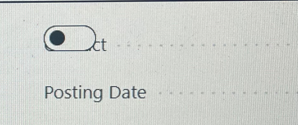
pastedimage1655954134660v1.png

They have tried zoom in and out but the boolean button is stuck in the wrong place. 

I can understand if their personalized page was corrupted. 

But the user was not using a personalized page so there is nothing to delete. 

Has anyone encountered this? 

I have the same question (0)
  • IB-29041624-0 Profile Picture
    1,191 Moderator on at

    Never seen anything like that.

    Is it a standard page or a customized page?

    If it is a standard page, what page is it?

    If it is a customized page i would look at the code.

  • Predator75 Profile Picture
    37 on at

    The page is customized and it was working fine for all users.

    Then only one user is affected yesterday. The other users could cover for him so I assumed that they are fine. I am not able to see any issues with the page when I login.

    There was another customized page with issues for another user but it is likely to be due to the personalized page.

  • Nitin Verma Profile Picture
    21,812 Moderator on at

    Hi,

    can you please login with Ignito Mode of web browser and check that if there is still issue?

    Thanks.

  • Verified answer
    SebastiaanH Profile Picture
    25 on at

    Hi,

    Are you running Google Chrome perhaps?

    Version 103.0.5060.53 shifted the layout.

    Edge and other browser seem to not have this problem.

    Previous Chrome version was also stable.

    Regards,

    Sebastiaan

  • Predator75 Profile Picture
    37 on at

    You are spot on. When I ran the latest version of Chrome, all the issues started.

  • Predator75 Profile Picture
    37 on at

    Just one more point to add. 

    As Chrome engine is used by Edge and Brave, now latest version of both browsers are having the same issue. 

  • LearnBC Profile Picture
    240 on at

    this was happened after the BC latest Update 20.4, Many users are facing issue like this on Microsoft basic pages itself. i think i will fix asap from MS side

  • TMNielsen Profile Picture
    58 on at

    That is strange because we only see the problem in Edge. In Chrome we have no problem - and I assume that Chrome is also using the Chrome engine.

  • Predator75 Profile Picture
    37 on at

    You need to be on the latest version of Chrome. I was not able to simulate the trouble until I started updating all my browsers.

  • Suggested answer
    Nitin Verma Profile Picture
    21,812 Moderator on at

    Received below email from Microsoft Support.

    “

    Product group have finalized client runtime code changes to cope with this problem caused by and in the 2 most common browsers (Edge Chromium and Google Chrome).

    Code changes has been widely and carefully tested across 17 code branches. All tests demonstrate it is robust enough in case Chromium does proceed with changing the behavior again.

    These code changes will be deployed asap within all SaaS clusters, none excluded.

    We expect 2-4 days until all SaaS customers have these code changes in place and we are holding back 20.3 to make sure it is included too for both new SaaS sign-ups and on-premises customers.

    This means that in SaaS this problem will vanish between this Friday up to next Monday at max. As of now, this is the current resolution ETA for SaaS.

    community.dynamics.com/.../1258432

Under review

Thank you for your reply! To ensure a great experience for everyone, your content is awaiting approval by our Community Managers. Please check back later.

Helpful resources

Quick Links

Season of Sharing Community Challenge Winners!

Congratulations to our community stars!

Women in Power Builds Momentum

Expanding mentorship, skilling, and AI innovation

Congratulations to the July Top 10 Community Leaders

These are the community rock stars!

Leaderboard > Small and medium business | Business Central, NAV, RMS

#1
OussamaSabbouh Profile Picture

OussamaSabbouh 520 Super User 2026 Season 2

#2
YUN ZHU Profile Picture

YUN ZHU 384 Super User 2026 Season 2

#3
Grigorios Mavrogeorgis Profile Picture

Grigorios Mavrogeorgis 363 Super User 2026 Season 2

Last 30 days Overall leaderboard

Featured topics

Microsoft Training Manuals

Product updates

Dynamics 365 release plans
