web
You’re offline. This is a read only version of the page.
close
Skip to main content

Notifications

Announcements

No record found.

Community site session details

Community site session details

Session Id :
Microsoft Dynamics CRM (Archived)

Hosting local SSRS Report in CRM Online form

(0) ShareShare
ReportReport
Posted on by 2,601

I want to display an SSRS report (hosted on my local intranet) on an online CRM Form.

I am able to put an iFrame on a CRM form with a URL to a local SSRS report but get some IE warning prompts:

The first is:
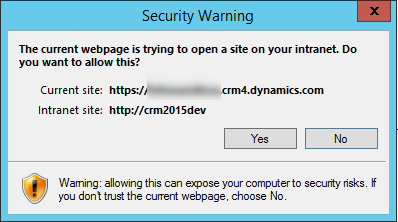
4251.1.png

and the second is:

63623.2.png

If I accept both of these prompts the report is displayed successfully.  What I'm not sure of is exactly which IE settings I need to change to show the reports without any prompts being shown.  I'm no expert in IE and it seems like there are lots of settings.

Can anyone help?

TIA

*This post is locked for comments

I have the same question (0)
  • Verified answer
    a33ik Profile Picture
    84,331 Most Valuable Professional on at

    Hello,

    I believe "Allow Mixed Content" is the setting you're looking for:

    MixedContent.png

  • CU21020959-0 Profile Picture
    2,601 on at

    Thanks for the reply Andrew.

    Setting 'Allow Mixed Content' removes the second prompt but not the first one?

  • Suggested answer
    a33ik Profile Picture
    84,331 Most Valuable Professional on at

    Unfortunately I have no other answer for you.

    I had similar scenarios and how I resolved it - I just moved intranet portal from http to https.

  • CU21020959-0 Profile Picture
    2,601 on at

    Thanks for your help Andrew ;)

  • Verified answer
    ashlega Profile Picture
    34,477 on at

    For the second prompt, google to the rescue:

    www.cisco.com/.../118081-troubleshoot-wsa-00.html

  • Suggested answer
    CU21020959-0 Profile Picture
    2,601 on at

    Thanks Alex - I just found that and was posting a reply :)  

    (in case that link ever stops working:

    1. Click on 'Tools' -> 'Internet Options' -> 'Security' tab -> 'Local Intranet'

    2. Click the 'Custom Level' button

    3. Towards the bottom, find 'Websites in less privileged web content zone can navigate into this zone'.

    4. Set this option to 'Enable'.)

Under review

Thank you for your reply! To ensure a great experience for everyone, your content is awaiting approval by our Community Managers. Please check back later.

Helpful resources

Quick Links

Responsible AI policies

As AI tools become more common, we’re introducing a Responsible AI Use…

Neeraj Kumar – Community Spotlight

We are honored to recognize Neeraj Kumar as our Community Spotlight honoree for…

Leaderboard > 🔒一 Microsoft Dynamics CRM (Archived)

#1
SA-08121319-0 Profile Picture

SA-08121319-0 4

#1
Calum MacFarlane Profile Picture

Calum MacFarlane 4

#3
Alex Fun Wei Jie Profile Picture

Alex Fun Wei Jie 2

Last 30 days Overall leaderboard

Featured topics

Product updates

Dynamics 365 release plans




