web
You’re offline. This is a read only version of the page.
close
Skip to main content

Announcements

No record found.

News and Announcements icon
Community site session details

Community site session details

Session Id :
Customer experience | Sales, Customer Insights,...
Answered

Form Submission

(0) ShareShare
ReportReport
Posted on by 205

Hello, I like to receive submission from form capture only if the Checkbox is checked. 

here is the code I created: 

<script src="">mktdplp102cdn.azureedge.net/.../form-loader.js <div class="d365-mkt-config" style="display:none" data-ignore-prevent-default="true" data-no-submit="true" data-website-id="0op_lGiqvzb8EhCnvxxKF8M5EgXDTTwy2kUINDDRTaw" data-hostname="d83e4f8d78034cc28d062fc3641101bf.svc.dynamics.com"> </div>
<script>
var form = document.querySelector('form');
form.onsubmit = function() {
 
var formInputCheckboxByID = document.getElementById('25254a33-c81d-4fc9-a9d2-5b9aaa6839a4');
var formInputCheckboxByClassName = document.querySelector('.ikvindhetprimawanneervattenfallmijngegevensbewaartommijperemailinteressanteaanbiedingentesturenmbtlaadoplossingenvoorelektrischvervoergeenzorgenwehoudenhetbescheiden input[type=checkbox]'); 
 
if(formInputCheckboxByID.checked || formInputCheckboxByClassName.checked) {
MsCrmMkt.MsCrmFormLoader.sendFormCaptureToCrm(form);
}
 
}
</script>
but now, I am not receiving any submission. 
can you help me, please? 
Thank you , 
Elly
I have the same question (0)
  • Verified answer
    cloflyMao Profile Picture
    25,210 on at

    Hi Elly,

    Here are my suggestions:

    1. Only keep data-no-submit="true" attribute, remove data-ignore-prevent-default="true" attribute, because we only want to perform sendFormCaptureToCrm function by ourselves.

    2. Check whether you have gotten checkbox elements correctly.

    (Because you are using form capture, therefore, you can set a simple id name for the checkbox, e.g: id="email-allowed", in my form, I get all checkboxes with getElementById method)

    3. Due to you are using document.querySelector('form') method, hence you could check whether there is only one form on page.

    Code of my form capture:

    Script:

    (add alert function to monitor whether there is anything incorrect.)

    function submitForm() {
    
      var emailAllowed = document.getElementById("allow-email");
      if (emailAllowed.checked) {
        var form = document.getElementById("contactForm");
        alert("Thank you for submission.");
        MsCrmMkt.MsCrmFormLoader.sendFormCaptureToCrm(form);
      } else {
        alert("We can't send email to your if you don't allow email.");
      }
      
    }

    Form element:

    <form id="contactForm" onsubmit="submitForm()">

    </form>

    Page:
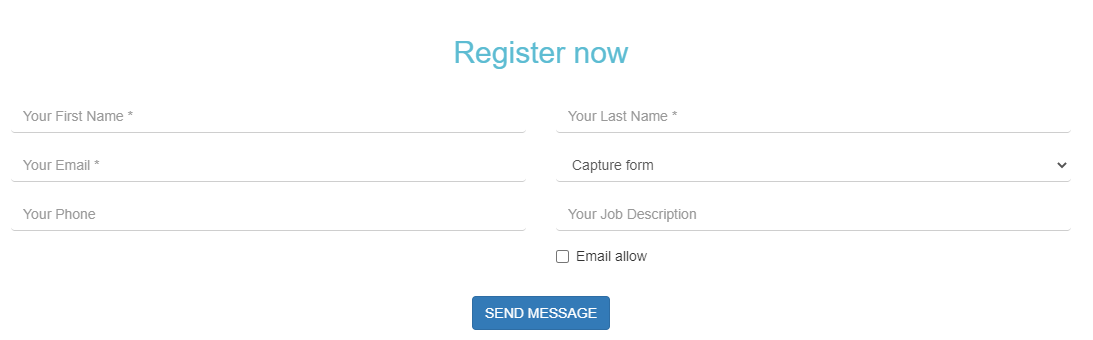
    pastedimage1600760096540v1.png

    Regards,

    Clofly

  • Elly-Farokhi Profile Picture
    205 on at

    Hello Cofy,

    I tried this technique and realized that the website logic is not allowing the submission after form submitted.

    Thats why I linked the field to Send marketing email checklist.

    Do you know if this field act like Do not bulk email as well and exclude people from marketing email automatically if it is not ticked?

    Many Thanks,

    Elly

  • Verified answer
    cloflyMao Profile Picture
    25,210 on at

    Hi Elly,

    If we have a custom checkbox field: Email allow and map it to "Do not email" form field,

    when the field is ticked and form is submitted, Bulk Email field of the new contact will be set to "Do Not Allow".

    That because for the OOB Bulk Email field, it uses true/checked to stand for "Do Not Allow", false/unchecked to stand for "Allow".

    Therefore, contact who ticked the custom field will be excluded from marketing email.

    Regards,

    Clofly

  • Elly-Farokhi Profile Picture
    205 on at

    Thank you for the response cofly. :)

  • Lav Shah Profile Picture
    5 on at

    Hello Clofly Mao ,

    I've the same issue, in my use-case we are not using any conditional submission, but I want to add some validations & want to add redirecitons after form is submitted.

    I'm checking all the events given here: docs.microsoft.com/.../marketing-form-client-side-extensibility

    I added them in my code as below, but. none of them is logging anything in console.

    Code is as below:

    <form>
    <label class="form__label" for="firstName">First Name</label>
    <input
    type="text"
    id="firstName"
    name="firstName"
    placeholder="Enter first name"
    />
    //...more inputs
    </form>
    <div
    class="d365-mkt-config"
    style="display: none"
    data-website-id="<data-website-id>"
    data-hostname="<some-id>.svc.dynamics.com"
    ></div>

    <script src="">mktdplp102cdn.azureedge.net/.../script>
    <script>
    // formLoad
    MsCrmMkt.MsCrmFormLoader.on("formLoad", function () {
    console.log("formLoad")
    });

    //formRender
    MsCrmMkt.MsCrmFormLoader.on("formRender", function () {
    console.log('formRender');
    });

    // afterFormRender
    MsCrmMkt.MsCrmFormLoader
    .on("afterFormRender", function(event) {
    console.log('afterFormRender');
    });


    // afterFormLoad
    MsCrmMkt.MsCrmFormLoader
    .on("afterFormLoad", function(event) {
    console.log('afterFormRender');
    })

    //formSubmit
    MsCrmMkt.MsCrmFormLoader
    .on("formSubmit", function(event) {
    console.log('thanks for submit');
    });

    // afterFormSubmit
    MsCrmMkt.MsCrmFormLoader
    .on("afterFormSubmit", function(event) {
    console.log("afterFormSubmit")
    })
    </script>

    Can you help us to get this resolved?

  • antonella laura sbardella Profile Picture
    72 on at

    Hola, tengo un inconveniente. Tengo capturados varios formularios de una web externa, es decir a través de un script que le solicito al desarrollador web que inserte en su código. Lo que sucede es que cada vez que alguien olvida completar algun campo obligatorio se envía ese formulario igual aunque falten campos. Que debería pedirle al desarrollador web que agregue el script para que solo ingresen los envíos de formulario correctamente completados??

    Gracias! ojala puedas ayudarme!

Under review

Thank you for your reply! To ensure a great experience for everyone, your content is awaiting approval by our Community Managers. Please check back later.

Helpful resources

Quick Links

Introducing the 2026 Season 1 community Super Users

Congratulations to our 2026 Super Stars!

Meet the Microsoft Dynamics 365 Contact Center Champions

We are thrilled to have these Champions in our Community!

Congratulations to the March Top 10 Community Leaders

These are the community rock stars!

Leaderboard > Customer experience | Sales, Customer Insights, CRM

#1
ManoVerse Profile Picture

ManoVerse 184 Super User 2026 Season 1

#2
11manish Profile Picture

11manish 125

#3
CU11031447-0 Profile Picture

CU11031447-0 100

Last 30 days Overall leaderboard

Product updates

Dynamics 365 release plans
