web
You’re offline. This is a read only version of the page.
close
Skip to main content

Notifications

Announcements

No record found.

Community site session details

Community site session details

Session Id :
Microsoft Dynamics CRM (Archived)

Make a Timestamp when single field is modified

(0) ShareShare
ReportReport
Posted on by 91

Im needing an assistance on how to make a timestamp when single field is modified specifically for First Response Sent field when i choose YES.

i was able to configure the timestamp whenever i change the First Response Sent to YES but the problem is the time is ongoing. I want only the exact time when i choose yes in the First Response Sent field.
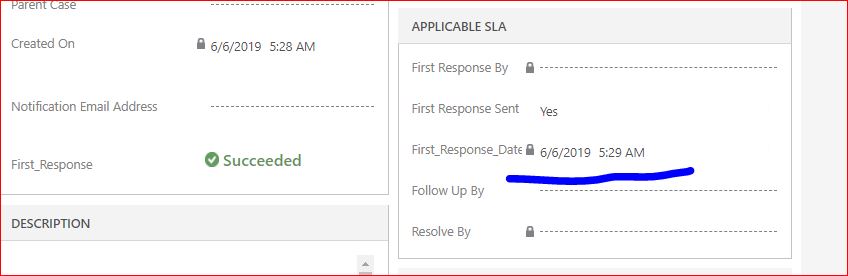
7380.timer2.JPG

Is there a condition that i need to change here?
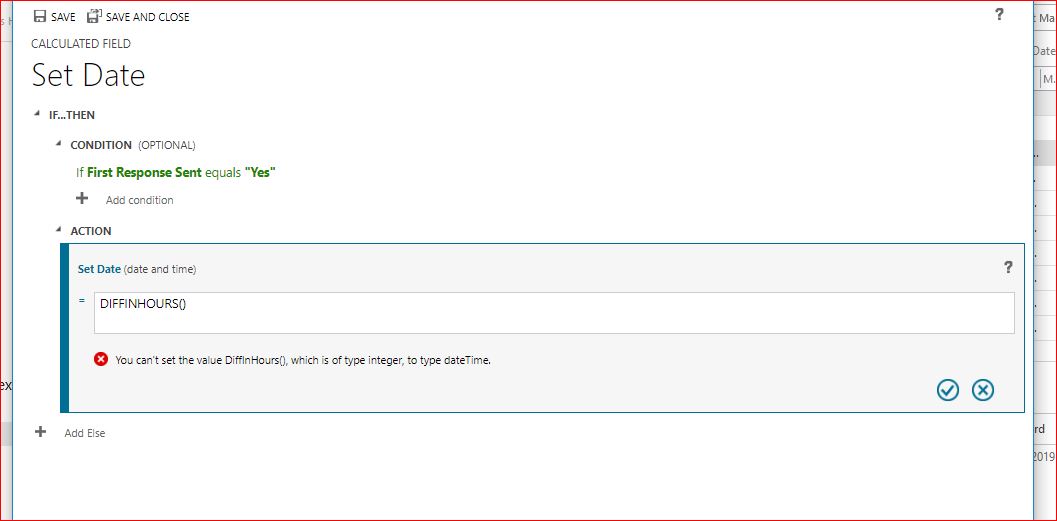
time-stamp.JPG

*This post is locked for comments

I have the same question (0)
  • Suggested answer
    Kokulan Profile Picture
    18,054 on at

    Hi

    You could do this in Javascript or Workflow, calculated field may  not be the best option for this.  I would recommend workflow so that even if the data changed via API or imports, the logic will still work.

    For workflow based approach, you could create a real-time workflow to set the value.  You could just create a timestamp datetime field, and create a real-time workflow to trigger OnCreate and On Field change of the First Response field. And in the workflow you can set the timestamp to process execution time.

    Let me know if you need any screenshots of workflow steps for this.

  • Suggested answer
    Oksana Danyliak Profile Picture
    on at

    Hi again)

    Business rule for that is ok, just make some changes

    Condition: First Response Sent=Yes AND First response Date doesn't contain data

    Set Date = NOW()

  • Cloud92019 Profile Picture
    91 on at

    @Kokulan Eswaranathan

    Thank you for your response. Could you please guide me how to configure it in Workflow that will trigger that changed?

  • Cloud92019 Profile Picture
    91 on at

    @Oksana Danyliak

    yeah I tried that . but the problem is the date and time are changing. I only want to capture the date and time when the first response sent field is modified to YES.

  • Cloud92019 Profile Picture
    91 on at

    Hi all it looks like its working now by using Modified ON instead of NOW()

    But will continue to observe for any changes.

  • oliver.rodrigues Profile Picture
    4,052 on at

    can you please clear the Portals tag.. this is not Portal related

  • Cloud92019 Profile Picture
    91 on at

    @Oliver ... Sorry for that. I already removed it. thanks

  • Verified answer
    Kokulan Profile Picture
    18,054 on at

    Hi

    Please follow the screenshots below to create the workflow

    2570.ScreenClip-_5B00_151_5D00_.png

    2570.ScreenClip-_5B00_151_5D00_.png

  • Cloud92019 Profile Picture
    91 on at

    Thank you so much Kokulan. It worked.

    I created Enhanced SLA. But whenever I change the status reason except for NEW. the enhanced SLA details becomes cancelled. 

    4774.Case1.JPG

    4774.Case1.JPG

    8407.Case2.JPG

    Also. is it possible that the first response sent field will be triggered to YES when I send my initial reply? I'm kinda lost how to do it. I've red that you need to create a workflow for that. I would appreciate if you can provide a screenshot on how to do it. 

  • Suggested answer
    Kokulan Profile Picture
    18,054 on at

    Hi

    Please see below

    I created Enhanced SLA. But whenever I change the status reason except for NEW. the enhanced SLA details becomes cancelled. 

    If the SLA applies for other status reasons as well, you could select all the status reasons in your Applicable When criteria. Once you done that, it should not cancel the SLA.

    Also. is it possible that the first response sent field will be triggered to YES when I send my initial reply? I'm kinda lost how to do it. I've red that you need to create a workflow for that. I would appreciate if you can provide a screenshot on how to do it.

    Assuming your initial reply is an email, you could create a workflow on Email status change, and when the email is in the status of Sent, you can update the First Response Sent to Yes.  You might have to add a Two options field to email entity and set to Yes when you send the email. This way you can restrict your workflow to only set the First Response Sent to Yes when its an Initial Reply.

Under review

Thank you for your reply! To ensure a great experience for everyone, your content is awaiting approval by our Community Managers. Please check back later.

Helpful resources

Quick Links

Responsible AI policies

As AI tools become more common, we’re introducing a Responsible AI Use…

Neeraj Kumar – Community Spotlight

We are honored to recognize Neeraj Kumar as our Community Spotlight honoree for…

Leaderboard > 🔒一 Microsoft Dynamics CRM (Archived)

#1
SA-08121319-0 Profile Picture

SA-08121319-0 4

#1
Calum MacFarlane Profile Picture

Calum MacFarlane 4

#3
Alex Fun Wei Jie Profile Picture

Alex Fun Wei Jie 2

Last 30 days Overall leaderboard

Featured topics

Product updates

Dynamics 365 release plans



