web
You’re offline. This is a read only version of the page.
close
Skip to main content

Notifications

Announcements

No record found.

Community site session details

Community site session details

Session Id :
Microsoft Dynamics GP (Archived)

Update company address on Invoice

(0) ShareShare
ReportReport
Posted on by

Hi folks,

Could you please help me out with the report writer formatting? We are moving so I need to update our company's new address. I changed it in the company's setup but the invoice still shows old address. The invoice is in the Word template format. I go to Report Writer and the company address lines are calculated field. 

So how do I code it to use our new addr?

Thank you in advance for your advise.

Nhi
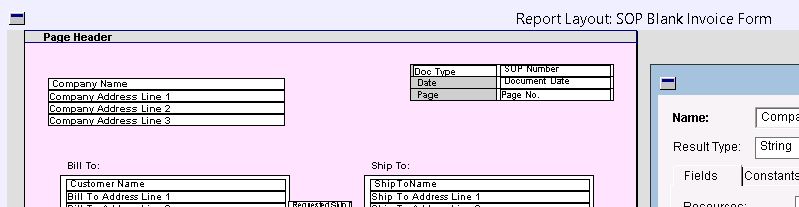
33134.Capture.JPG

5037.Capture1.JPG

*This post is locked for comments

I have the same question (0)
  • Suggested answer
    Bill Campbell Profile Picture
    12 on at

    Maybe I am missing something, but if your document is in Word Template, then you do not need to go to Report Writer to make changes.  You need to follow the steps to edit the Word document template and re-save the format changes.

    However, unless you 'hard coded' the company address on the face of the document, I would think that the change in the GP system would be reflected on the invoice.

    One thing that might change that is if you are trying to re-print a Historical Document - in that case the form and the address may be fixed (I don't remember for sure)

    Have a look at the Word format for this change.

  • Verified answer
    Nhi Nguyen Profile Picture
    on at

    Hi Bill,

    The fields are hard coded on the template and I was able to change it.

    Thanks,

  • Bill Campbell Profile Picture
    12 on at

    Just to be fair to others looking at this case - can you provide a bit of detail on what you had to do to complete the fix.

    Glad to know it is working for you.

  • Community Member Profile Picture
    on at

    Hi Nhi

    I am having some issue as yours. could you please let me know how you did the details in the Word template format to fix the problem -  update the company info.

    Thanks!

    May

Under review

Thank you for your reply! To ensure a great experience for everyone, your content is awaiting approval by our Community Managers. Please check back later.

Helpful resources

Quick Links

Responsible AI policies

As AI tools become more common, we’re introducing a Responsible AI Use…

Neeraj Kumar – Community Spotlight

We are honored to recognize Neeraj Kumar as our Community Spotlight honoree for…

Leaderboard > 🔒一 Microsoft Dynamics GP (Archived)

#1
mtabor Profile Picture

mtabor 1

Last 30 days Overall leaderboard

Featured topics

Product updates

Dynamics 365 release plans
