web
You’re offline. This is a read only version of the page.
close
Skip to main content

Announcements

No record found.

News and Announcements icon
Community site session details

Community site session details

Session Id :
Microsoft Dynamics AX (Archived)

How to add Category Hierarchy into Retail Product Catalog AX2012 R3 ?

(0) ShareShare
ReportReport
Posted on by

Hi

I create new category hierarchy under Product Information Management > Setup > Categories > Category Hierarchies

Let's said new category hierarchy name is Retail Test Category


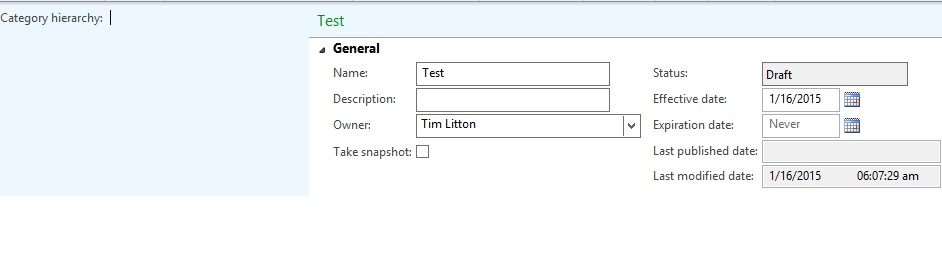
Then I create new product catalog under Retail > Catalogs > Catalogs, but I see Category hierarchy is empty & disable
*This post is locked for comments

I have the same question (0)
  • Bilal Issa Profile Picture
    4,370 on at

    Hi ,

    can you please check the link below.

    technet.microsoft.com/.../jj728712.aspx

  • Verified answer
    Guy Terry Profile Picture
    28,981 Moderator on at

    Hi Pramudita,

    At PIM -> Setup -> Categories -> Category hierarchy types, you have to tell AX what sort of Category hierarchy it is. Choose either Retail Product Hierarchy or Supplemental retail hierarchy.

    Then you need to create an Assortment, to tell AX which Products can be sold to which retail channels. When you add Products to the Assortment, you can choose which Category hierarchy to use.

    Then you create a catalogue, which contains products from the Assortment.

    The Category hierarchy seems to become available on the Catalogue when you add the Retail channel to the Catalogue, but presumably this retail channel needs to be in an Assortment.

  • Community Member Profile Picture
    on at

    Hi

    Thanks for your feedback.

    One missing step, before publish online store, need to define category hierarchy (Online store > Setup > Channel product attributes

  • Ghanshyam Profile Picture
    42 on at

    Hi,

    please help me to create channel navigation hierarchy and catelog because not able to add product in catelog.

    not find the correct way...

    regards

    ghanshyam

Under review

Thank you for your reply! To ensure a great experience for everyone, your content is awaiting approval by our Community Managers. Please check back later.

Helpful resources

Quick Links

Introducing the 2026 Season 1 community Super Users

Congratulations to our 2026 Super Stars!

Meet the Microsoft Dynamics 365 Contact Center Champions

We are thrilled to have these Champions in our Community!

Congratulations to the April Top 10 Community Leaders

These are the community rock stars!

Leaderboard > 🔒一 Microsoft Dynamics AX (Archived)

#1
CP04-islander Profile Picture

CP04-islander 24

#2
Michel ROY Profile Picture

Michel ROY 14

#3
Jagadabi Profile Picture

Jagadabi 6

Last 30 days Overall leaderboard

Featured topics

Product updates

Dynamics 365 release plans
