web
You’re offline. This is a read only version of the page.
close
Skip to main content

Notifications

Announcements

No record found.

Community site session details

Community site session details

Session Id :
Small and medium business | Business Central, N...
Unanswered

Changes to record cannot be saved because some information on the page is not up-to-date

(0) ShareShare
ReportReport
Posted on by 50
Hello,

We have a page containing a list part. One of the actions in the list part is updating data in the line that also modifies parent data. Imagine for example, that the action updates line weight that implies also modifying parent weight (that is the summation of lines weight).

Parent data is correctly modified. However, parent weight data that is shown in the page still contains old data. In this situation, if you try to change any other field in the page, the following error raises:
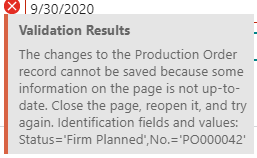
2020_2D00_09_2D00_01_5F00_11h29_5F00_12.png

We would need to set the property UpdatePropagation of the listpart to Both. However, the listpart is part of BC code and this property is NOT allowed to be modified in an extension. We don't consider a good idea clonning the listpart just to change that property value.

Is there any other workaround that will update the page from the subpage? We have tried calling page.Update(false) but have no success (perhaps not in the correct trigger).

Any suggestions will be appreciated. Thanks in advance!
I have the same question (0)
  • Community Member Profile Picture
    on at

    Yeah... maybe the cleanest workaround is a FactBox on the SubPage to display your header value. You may even get a FactBox on the main card if you link it to the SubPage using the Provider property on the FactBox part control. CurrPage.SaveRecord/Update on the SubPage might trigger that to update itself.

    Without being able to change the UpdatePropagation property, this really limits what you can reliably do.

  • Hicham OE Profile Picture
    105 on at

    Hi,

    Using the solution provided here it worked perfectly  :

    www.hougaard.com/.../

    instead of calling the object directly, call it in using "var"

    for exemple

    procedure(foo: record foo)

    use

    procedure (var foo: record foo)

    Many thanks to Hougaard

    Hicham

Under review

Thank you for your reply! To ensure a great experience for everyone, your content is awaiting approval by our Community Managers. Please check back later.

Helpful resources

Quick Links

Responsible AI policies

As AI tools become more common, we’re introducing a Responsible AI Use…

Neeraj Kumar – Community Spotlight

We are honored to recognize Neeraj Kumar as our Community Spotlight honoree for…

Leaderboard > Small and medium business | Business Central, NAV, RMS

#1
OussamaSabbouh Profile Picture

OussamaSabbouh 3,229

#2
Jainam M. Kothari Profile Picture

Jainam M. Kothari 1,867 Super User 2025 Season 2

#3
YUN ZHU Profile Picture

YUN ZHU 1,153 Super User 2025 Season 2

Last 30 days Overall leaderboard

Featured topics

Product updates

Dynamics 365 release plans
