web
You’re offline. This is a read only version of the page.
close
Skip to main content

Announcements

News and Announcements icon
Community site session details

Community site session details

Session Id :
Dynamics 365 Community / Forums / Human Resources forum / Track additional infor...
Human Resources forum

Track additional information about employees, jobs, positions, and benefits

(0) ShareShare
ReportReport
Posted on by

Hi,

Hopefully a really simple question.

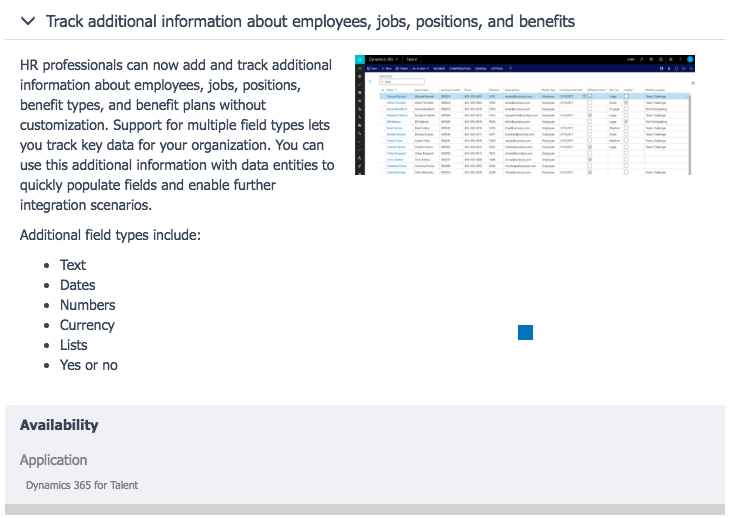
On the "What's New" Roadmap for Dynamics 365 for Talent, there is a new feature listed as "Track additional information about employees, jobs, positions, and benefits".
2766.Screen-Shot-2017_2D00_11_2D00_14-at-3.31.40-PM.png

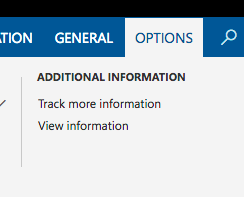
Within the application itself, I am certainly able to add extra information to an entity, and view this on a per entity basis using Options > Additional Information > (Track More / View) Information
3833.Screen-Shot-2017_2D00_11_2D00_14-at-3.47.03-PM.png

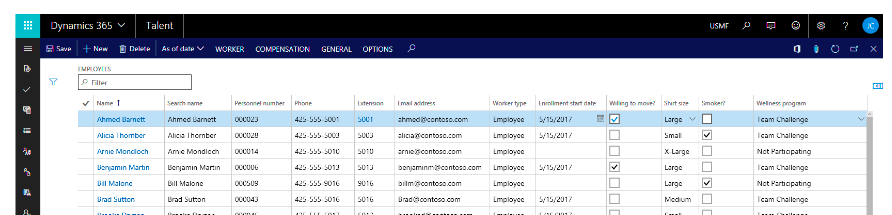
However, I do not seem able to view this extra information in a list as per the screenshot from the Roadmap feature screen.
4721.Screen-Shot-2017_2D00_11_2D00_14-at-3.48.40-PM.png

I also am unsure of whether this information can be included in a form (rather than being hidden away for access within the Ribbon).

Are you able to provide any more insight into this feature, or in general any opportunities to track additional fields and/or entities within Dynamics 365 for Talent?

As a reference (and perhaps a red herring), I've noted that older questions say this is impossible (prior to this roadmap update). I've also noted this question that suggests data can be added to the CDS Entities, but won't necessarily be visible in the CoreHR yet.

Categories:
I have the same question (0)
  • Verified answer
    Jill Carter Profile Picture
    1,846 on at

    Hi Matt,

    When you are creating these fields, be sure to select the "Add to form" option. Selecting that option will add it to the list page. 

    Currently, these new fields aren't added into CDS for the Core HR entities, but that is something that is coming in the next few months. 

  • MattMitchell Profile Picture
    on at

    Hi Jill,

    Thanks for the reply - that seems to have successfully added the field to both the Grid View, and an "Additional Information" tab in the Details View :-)

    4606.Screen-Shot-2017_2D00_11_2D00_15-at-10.47.47-AM.png

    4606.Screen-Shot-2017_2D00_11_2D00_15-at-10.47.47-AM.png

    The one problem I have noticed since doing that is, is that I now no longer seem to be able to Personalise the form to add fields (I get the error below that no fields can be found). I've tried deleting the custom field and the problem persists, so it's possible this is an unrelated issue that has coincidentally emerged since yesterday when this feature worked (perhaps the trial environment received an update overnight?).

    5315.Screen-Shot-2017_2D00_11_2D00_15-at-10.35.10-AM.png

    Have you come across this problem?

  • Gongyi X Profile Picture
    Microsoft Employee on at

    Hi Matt,

    We also noticed this issue, we will work on it.

  • MattMitchell Profile Picture
    on at

    Thanks Gongyi!

  • Gongyi X Profile Picture
    Microsoft Employee on at

    Hi Matt,

    This issue is fixed. It will take some time to roll out to the production environment. But should be pretty soon.

  • MattMitchell Profile Picture
    on at

    Thanks Gongyi - it hasn't fixed in our trial environment just yet, but I'll check back in a couple of days and if still an issue let you know :-)

  • Suggested answer
    Rachel Profitt Profile Picture
    Microsoft Employee on at

    In order to get the new fields to display on the form, you will need to personalize the form and add the field to the grid, FastTab, or Field Group desired. Then in order to apply that change to other users, you will need to export your personalization, and then use the Personalization form that you can find under System Administration > Setup > Personalization to apply the new layout for the page to all the applicable users.

    The feature is not available in every single screen in the system with this release. It is only available in the handful of pages that are mentioned in the roadmap. Workers, Employees, Jobs, Positions, and Benefits. There is also a limitation of 15 fields per page. I have not tested this limit, but that is my understanding. The additional fields are also designed to work with the out of the box data entities so you can easily import and export data into the custom fields.

  • Rachel Profitt Profile Picture
    Microsoft Employee on at

    So to add to what I was saying here as well. The screen shots you have above are from an earlier release. If you have update 13, then you can add a field to any page and it is done directly in the Personalization page by clicking the Insert button and then selecting field. On the insert dialog you will see the Create a field button at the top of the page and that is the new way to add fields to Talent.

Under review

Thank you for your reply! To ensure a great experience for everyone, your content is awaiting approval by our Community Managers. Please check back later.

Helpful resources

Quick Links

November Spotlight Star - Khushbu Rajvi

Congratulations to a top community star!

Forum Structure Changes Coming on 11/8!

In our never-ending quest to help the Dynamics 365 Community members get answers faster …

Dynamics 365 Community Platform update – Oct 28

Welcome to the next edition of the Community Platform Update. This is a status …

Leaderboard > Human Resources

Last 30 days Overall leaderboard

Featured topics

Product updates

Dynamics 365 release plans
