web
You’re offline. This is a read only version of the page.
close
Skip to main content

Notifications

Announcements

No record found.

Community site session details

Community site session details

Session Id :
Microsoft Dynamics AX (Archived)

How to generate new configuration Id through X++ for sales line Item

(0) ShareShare
ReportReport
Posted on by

Hi I am working on 2012 R2.

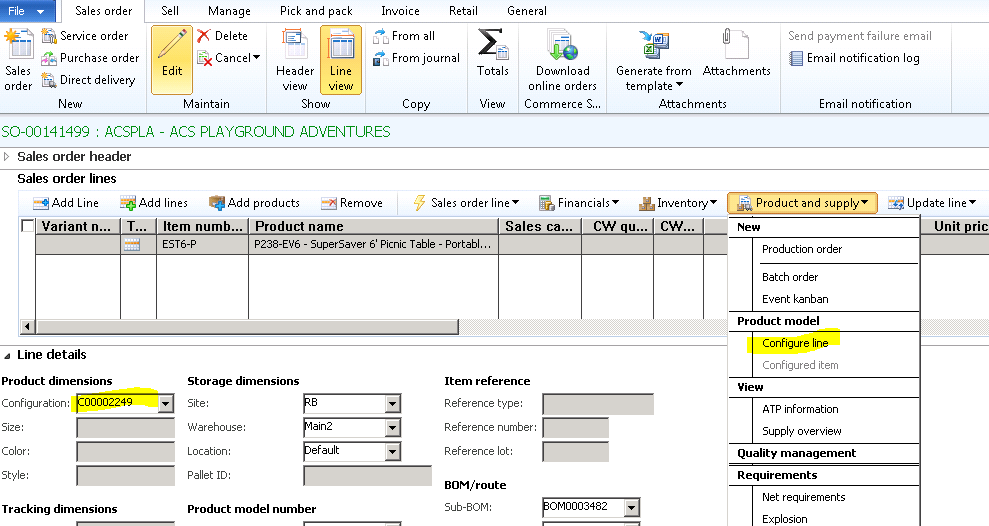
When we configure the sales line(Item) it is generating new configuration Id as below.
1050.Capture.PNG

Now I have requirement to generate the same config Id by X++(Job) can body suggest I don't have  Idea from where to start.

Please suggest

Thanks

Haribabu

*This post is locked for comments

I have the same question (0)
  • Community Member Profile Picture
    on at

    86634.Capture.PNG

    I looked into it but could not understand exactly..

    When We click on configure line button another form will open the form name is  "PCRuntimeConfgurator" as Above.

    In the above user will select some values and new config Id will generate.

    In my case all these values will be available in CSV from those values I need to generate config ID and assign it to Item.

    Please suggest.

  • Community Member Profile Picture
    on at

    Hi Sukruth,

    Thanks for your reply.

    InventDim.configId =  "Your value from file"      this config ID will not be in CSV file..it should be generate.

    And also the Config ID in invent Dim is coming from the Table EcoresConfiguration which means I guess we need to create it in Ecoresconfiguration table.

    And also for the line of Code which  you have suggested "PCExecuteVariantConfiguration::execute(salesLine, salesLine.ItemId, inventDim.ConfigId);"

    To pass the parameters for above method I have values only Item ID and ConfigID(if it generates), how to pass salesline..when I am doing it from Job.

    Kindly suggest

  • Community Member Profile Picture
    on at

    I have checked with functional people .The requirement is I have to create a new BOM and BOM line based on CSV file Data and I need to generate new config Id(As it is doing for sales line) and Assign it to the BOM line as below.

    07447.Capture.PNG

    If you have any idea please suggest

    Thanks

    Hari

Under review

Thank you for your reply! To ensure a great experience for everyone, your content is awaiting approval by our Community Managers. Please check back later.

Helpful resources

Quick Links

Responsible AI policies

As AI tools become more common, we’re introducing a Responsible AI Use…

Neeraj Kumar – Community Spotlight

We are honored to recognize Neeraj Kumar as our Community Spotlight honoree for…

Leaderboard > 🔒一 Microsoft Dynamics AX (Archived)

#1
Martin Dráb Profile Picture

Martin Dráb 4 Most Valuable Professional

#1
Priya_K Profile Picture

Priya_K 4

#3
MyDynamicsNAV Profile Picture

MyDynamicsNAV 2

Last 30 days Overall leaderboard

Featured topics

Product updates

Dynamics 365 release plans
