web
You’re offline. This is a read only version of the page.
close
Skip to main content

Notifications

Announcements

Community site session details

Community site session details

Session Id :
Business Central forum

Can we add custom image to the action?

(0) ShareShare
ReportReport
Posted on by

Hello All,

I have one question regarding the development in D365 Business Central, So the question is Can we add custom image to the action in ribbon?

For example:

  •  I have one custom action called Add Document into customer list. and right now i have added the Microsoft standard image to that action called NewDocument.
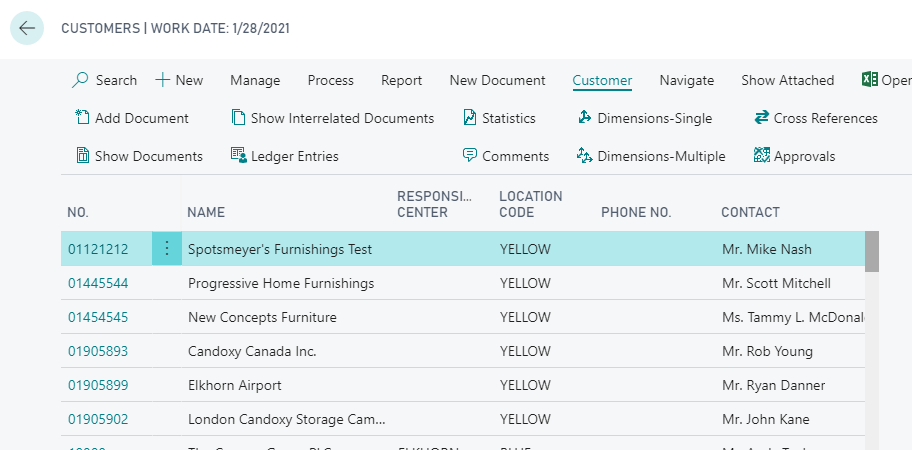
pastedimage1566823234397v1.png

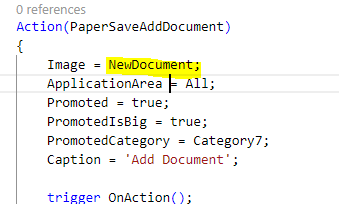
  • But now i want to add one custom image to above action which is called Add Document. As we know we can change image which are available into Microsoft libraries as per below image. But what about custom images?
pastedimage1566823826242v4.png

Please let me know if there are any availability we have for this functionality.

Thanks

Categories:
I have the same question (0)
  • Verified answer
    Suresh Kulla Profile Picture
    50,251 Super User 2025 Season 2 on at

    No, this functionality is not available currently.

  • Verified answer
    Teddy Herryanto (That NAV Guy) Profile Picture
    14,284 Super User 2025 Season 2 on at

    It is not possible to add the images. Not sure if it will change in the future.

  • Community Member Profile Picture
    on at

    Thank you @Oleksandr Shevchuk for your response, and now also we can see the list of images from the visual studio code. but i want to add custom image if it is possible.

  • Verified answer
    Oleksandr Shevchuk Profile Picture
    175 on at

    Hi,

    As far as I know, there is no such possibility to add a custom image on the page action.

    But you can download the Dynamics NAV Image Library tool that allows previewing the list of all images from the Microsoft library (more than 1000 standard images).

    pastedimage1566827974618v1.png

    Hope you will find one that is most suitable for your action.

Under review

Thank you for your reply! To ensure a great experience for everyone, your content is awaiting approval by our Community Managers. Please check back later.

Helpful resources

News and Announcements

Season of Giving Solutions is Here!

Quick Links

November Spotlight Star - Khushbu Rajvi

Congratulations to a top community star!

Forum Structure Changes Coming on 11/8!

In our never-ending quest to help the Dynamics 365 Community members get answers faster …

Dynamics 365 Community Platform update – Oct 28

Welcome to the next edition of the Community Platform Update. This is a status …

Leaderboard > Business Central

Last 30 days Overall leaderboard

Featured topics

Product updates

Dynamics 365 release plans
