web
You’re offline. This is a read only version of the page.
close
Skip to main content

Notifications

Announcements

No record found.

Community site session details

Community site session details

Session Id :
Finance | Project Operations, Human Resources, ...
Answered

One or more projects in the solution were not loaded correctly

(0) ShareShare
ReportReport
Posted on by 678

Hi,

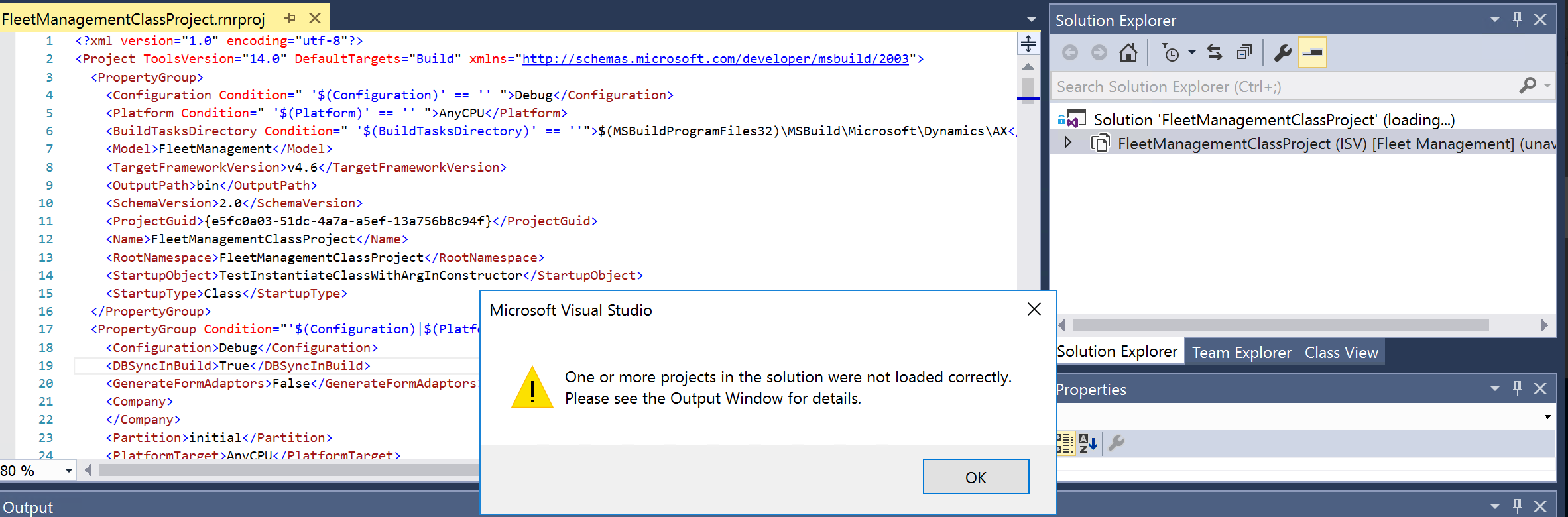
I have got the following error when opening a project after an update was installed by LCS team. 
pastedimage1587372490131v1.png

Output window:  ........  : error  : Project node name 'AxLabelFile\TestLabel_en-US' is invalid.

Error list window:  there are several errors but all of them mention 'namespace' and 'invalid child element' in common. 

The element 'PropertyGroup' in namespace 'schemas.microsoft.com/.../2003' has invalid child element 'BuildTasksDirectory'/ in namespace 'schemas.microsoft.com/.../2003'. List of possible elements expected: ...

The element 'PropertyGroup' in namespace 'schemas.microsoft.com/.../2003' has invalid child element 'DBSyncInBuild' in namespace 'http://schemas.microsoft.com/developer/msbuild/2003' List of possible elements expected: ...

The element 'Content' in namespace 'schemas.microsoft.com/.../2003' has invalid child element 'Name' in namespace 'schemas.microsoft.com/.../2003'. List of possible elements expected: ...

Could you guide me to solve this issue?

Thank you. 

I have the same question (0)
  • WillWU Profile Picture
    22,361 on at

    Hi ShawnDEV,

    It seems that that the fields 'BuildTasksDirectory','DBSyncInBuild' are required fields.

    Please make sure you specify all required values.

    And please do a full build.

    Any progress Please let us know.

  • Sergei Minozhenko Profile Picture
    23,093 on at

    Hi ShawnDEV,

    If you press right-click on the solution and click "Open folder in File explorer". Do you see the folder for project and inside that folder project file?

  • ShawnDEV Profile Picture
    678 on at

    Hi

    Yes.

    See the screenshot below

    pastedimage1587388424354v1.png

  • Sergei Minozhenko Profile Picture
    23,093 on at

    Hi ShawnDev,

    If you open FleetManagementClassProject folder (inside FleetManagementClassProject), do you see *rnrproj file?

    If yes, try to remove it from solution and add project again to the solution - right click on Solution -> Add - Existing project -> rnrproj file.

  • ShawnDEV Profile Picture
    678 on at

    Hi

    Now I get this infolog

    pastedimage1587389442082v1.png

  • Sergei Minozhenko Profile Picture
    23,093 on at

    Hi,

    Do you see label file TestLabel in ApplicationExpoler if you search by name? Do you know anything about this label file? If it's supposed to be a new model you should take from source control have you taken the latest version and refreshed models (Dynamics 365 -> Model management -> Refresh models)?

  • ShawnDEV Profile Picture
    678 on at

    That TestLabel was created by me just for practice.

    and Yesterday there was an upgrade on my demo environment by LCS team.

    I cannot find this label in the explorer anymore also other elements like class, action menu item.

    Then when I try to open the project, this issue occured.

    Do you want me to refresh the model 'Flee Managment' ?

  • Verified answer
    Sergei Minozhenko Profile Picture
    23,093 on at

    Hi ShawnDEV,

    Have you added objects to "Fleet management" model directly? If yes, it was wiped by the update as it's MS model. For education purposes, you need to create a new model. I'm not sure if there is a point to try to open the old project as it only stores references to objects, but do not store objects itself.

  • ShawnDEV Profile Picture
    678 on at

    Hi Sergei,

    Okay. But even if I had a my own model, the changes like form changes, menu item changes are not displayed in the interface after an upgrade. I heard that in order to display those changes in the interface again,  dll objects for the extensions should be created. Do you have any doc which I can learn from?

  • Suggested answer
    Sergei Minozhenko Profile Picture
    23,093 on at

    Hi ShawnDEV,

    If you made own model and changes added to this model, the changes do not disappear after an update.

    Check this one how to create own model and project for new model dynamicsinsights.com/.../

Under review

Thank you for your reply! To ensure a great experience for everyone, your content is awaiting approval by our Community Managers. Please check back later.

Helpful resources

Quick Links

Responsible AI policies

As AI tools become more common, we’re introducing a Responsible AI Use…

Neeraj Kumar – Community Spotlight

We are honored to recognize Neeraj Kumar as our Community Spotlight honoree for…

Leaderboard > Finance | Project Operations, Human Resources, AX, GP, SL

#1
Martin Dráb Profile Picture

Martin Dráb 584 Most Valuable Professional

#2
André Arnaud de Calavon Profile Picture

André Arnaud de Cal... 499 Super User 2025 Season 2

#3
Sohaib Cheema Profile Picture

Sohaib Cheema 254 User Group Leader

Last 30 days Overall leaderboard

Product updates

Dynamics 365 release plans
