web
You’re offline. This is a read only version of the page.
close
Skip to main content

Announcements

No record found.

News and Announcements icon
Community site session details

Community site session details

Session Id :
Finance | Project Operations, Human Resources, ...
Answered

How to arrange column and format to export data in Data Management?

(0) ShareShare
ReportReport
Posted on by 512

Hi,

I have a problem regarding exporting file to arrange column and formatting date. Here are my screenshot below.

This is my staging table that are mapping in data entity and also the staging data below.
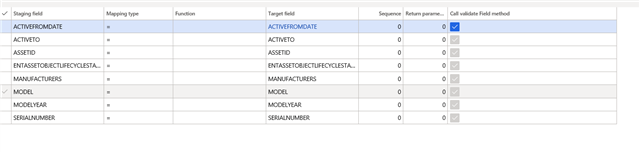
0724.pastedimage1580372531416v1.png

2625.pastedimage1580372531417v2.png

I want to arrange like.  Serial Number, Manufacturer, Model, Model Year, Active From, ActiveTo, Status But it seems the output for export.
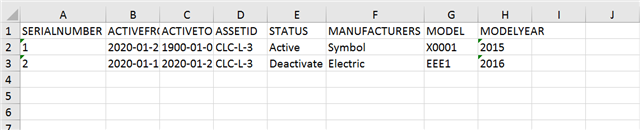
8345.pastedimage1580372531418v3.png

Do you have any idea in how to arrange the column when export and also to format the activeto date attribute? 

Thank you.

CJ

I have the same question (0)
  • Verified answer
    nmaenpaa Profile Picture
    101,172 Moderator on at

    When you create export project in Data management, you can choose "Use sample file". There you can provide such Excel where the columns are in the order that you want them to.

    These dates are always shown as utcDateTime so if you want to show something else you can format it in the Excel after exporting.

  • nmaenpaa Profile Picture
    101,172 Moderator on at

    Moved to D365 Finance forum.

Under review

Thank you for your reply! To ensure a great experience for everyone, your content is awaiting approval by our Community Managers. Please check back later.

Helpful resources

Quick Links

Introducing the 2026 Season 1 community Super Users

Congratulations to our 2026 Super Stars!

Meet the Microsoft Dynamics 365 Contact Center Champions

We are thrilled to have these Champions in our Community!

Congratulations to the April Top 10 Community Leaders

These are the community rock stars!

Leaderboard > Finance | Project Operations, Human Resources, AX, GP, SL

#1
Giorgio Bonacorsi Profile Picture

Giorgio Bonacorsi 622

#2
André Arnaud de Calavon Profile Picture

André Arnaud de Cal... 553 Super User 2026 Season 1

#3
CP04-islander Profile Picture

CP04-islander 430

Last 30 days Overall leaderboard

Product updates

Dynamics 365 release plans

