web
You’re offline. This is a read only version of the page.
close
Skip to main content

Notifications

Announcements

No record found.

Community site session details

Community site session details

Session Id :
Microsoft Dynamics NAV (Archived)

NAV Production Journal Output_Lot Tracking

(0) ShareShare
ReportReport
Posted on by

Can some one please enlighten me on what the below error message means? and how I can resolve this?

This entry attempt is for an output item in which we will be putting a lot number to the metal for the first time. This error pops up on the production journal.
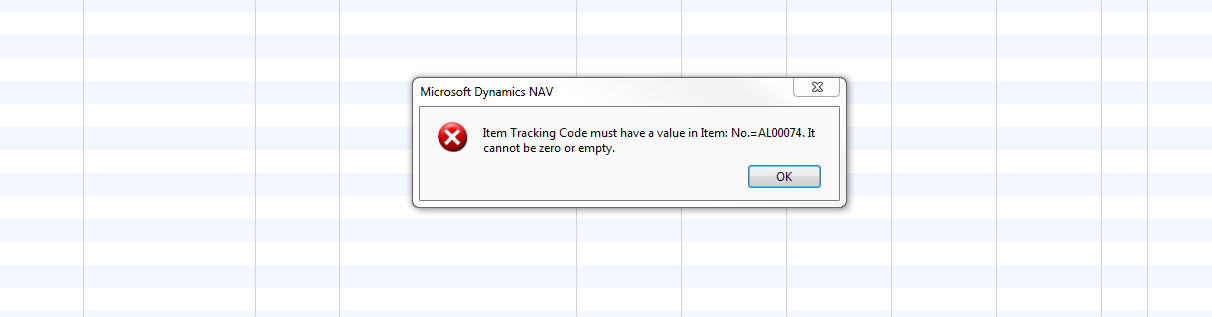
Production-Journal-Error.PNG

*This post is locked for comments

I have the same question (0)
  • Suggested answer
    Alexander Ermakov Profile Picture
    28,096 on at

    Check if you have any entry in Tracking Specification or Reservation Entry Table for this item. Also, check what is the value in the Applies-to Entry field. If this would not guide you to result, try debugging.

  • Suggested answer
    Tharanga Chandrasekara Profile Picture
    23,118 on at

    It means this particular item is tagged with a tracking specification and you are trying to post a output without a tracking (Lot)

    If you click on the line and then click on the "Item Tracking Lines" action button on the Navigate tab and check if there is any tracking lines available, if not you need to assign a Lot No. to it.

  • Community Member Profile Picture
    on at

    The issue ending up being that we did not put "lot" as tracking method on the item card. This is now resolved.

    However, we then tried to close out said RPO and it gave us an error message stating "Production Order RPO-1001164 cannot be finished as the associated subcontract order PO-102096 has not been fully delivered.".

    So, we then went to PO- 102096 and attempted to receive the quantity so that we may finally close out RPO-1001164. However, when trying to receive this quantity, it gave us this error message, "You cannot define item tracking on this line because it is linked to production order RPO- 1001164.".

    There seems to be no right move at this point but hopefully someone can help me out of this one who knows better.

  • Community Member Profile Picture
    on at

    so, anyway out of this error deadend???

    Anyone?

  • Suggested answer
    Tharanga Chandrasekara Profile Picture
    23,118 on at

    Hi,

    Want t clarify few things,

    1. Was the item defined as a tracking item before creating the PO?

    2. Did anyone change the tracking specification in the middle?

    If you have change the tracking specification then you need to revert the change and delete the tracking lines in the Production order. Once the Production order tacking lines are deleted, you can go to subcontract order and complete that. Once that is complete you can come back to Prod order and finish it.

    * I did not check the solution, but I fee that it might help you out. If you could not resolve the error by tomorrow, let us know.

  • Community Member Profile Picture
    on at

    I will try to explain this situation as clear as possible so I can have minimal confusion (referring to myself). 

    The issue started when we did a two tier approach to receiving metal. We wanted to capture the unit cost for bare material from the mill and then the processing unit cost for the second vendor. In order to do this, we created a subcontracting worksheet that created a PO and an RPO. The RPO was supposed to transfer the bare metal into the finished metal, all while capturing total cost.

    We could not successfully consume and output this item on that RPO for about two months. As the issue stood still, we physically produced several different jobs with said metal (Also, in holding pattern). Eventually, I found a way to compete the Metal RPO so that all items were entered and accounted for. I was then able to complete and close out the RPOs affected by this metal. However, I then could not close out the metal RPO.

    Later in the day, I discovered that the PO had been not received during this same time (reason why I couldn't close Metal RPO). And that the PO would not allow me to lot track one of the metal line items (However, It allowed me to lot track the other two metal line items on that same PO). The PO error message said the metal line item in question could not lot track due to already being linked to Metal RPO. Confusing as the other items were acceptable on the PO.

    To answer your earlier question, we did change the item tracking to "LOT" after the PO was created and the metal RPO was completed prior to completing the PO (Incompletion discovered after completing RPO). In hind sight, I realize what the natural progression should have been, but now I need to figure a way to put this issue to bed.

Under review

Thank you for your reply! To ensure a great experience for everyone, your content is awaiting approval by our Community Managers. Please check back later.

Helpful resources

Quick Links

Responsible AI policies

As AI tools become more common, we’re introducing a Responsible AI Use…

Neeraj Kumar – Community Spotlight

We are honored to recognize Neeraj Kumar as our Community Spotlight honoree for…

Leaderboard > 🔒一 Microsoft Dynamics NAV (Archived)

#1
HoangNam Profile Picture

HoangNam 7

Last 30 days Overall leaderboard

Featured topics

Product updates

Dynamics 365 release plans
