web
You’re offline. This is a read only version of the page.
close
Skip to main content

Announcements

No record found.

News and Announcements icon
Community site session details

Community site session details

Session Id :
Microsoft Dynamics 365 | Integration, Dataverse...
Answered

Script Error - Principal user is missing prvReadTerritory privilege for entity 'territory'

(0) ShareShare
ReportReport
Posted on by 1,128

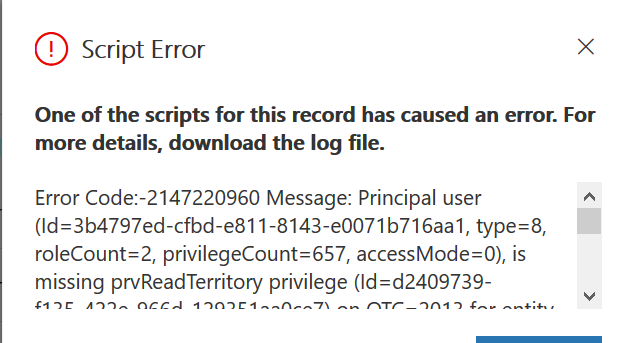
I create a new Unified App and am getting this error when I try to create a new account? Principal user is missing prvReadTerritory privilege for entity 'territory'

System Admins can create the new account but looks like some role is missing for the user that is getting this error. This user has the Read/Write access not sure what I am missing. 
pastedimage1584650052303v1.png

Thanks

I have the same question (0)
  • Verified answer
    RaviKashyap Profile Picture
    55,410 Moderator on at

    Hi,

    Based on the error message, the user does not have read permission on territory entity. Check & fix that to resolve this issue.

    Hope this helps.

  • Ann2015 Profile Picture
    1,128 on at

    The role was missing a "read" permission on territory.

    I thought since it had Delete permission  that includes read, write, create & delete.

    Thank you this fixed my issue.

  • Ann2015 Profile Picture
    1,128 on at

    I see this error where the user have no permission to access certain areas. How can I fix this? what entity is missing? 

    pastedimage1584731536262v1.png

  • Suggested answer
    Henry J. Profile Picture
    5,237 on at

    Try providing read access to Case and Entitlement entities in your security role. However if these are entities you are not using, you could also just remove these sub grids from your forms.

  • Ann2015 Profile Picture
    1,128 on at

    I don't see case or entitlement entities ? where can I find them ? here is what I see under my "Custom Entities" 

    pastedimage1584732240110v1.png

  • Ann2015 Profile Picture
    1,128 on at

    never mind found them in other sections. Thank you for all the help.

Under review

Thank you for your reply! To ensure a great experience for everyone, your content is awaiting approval by our Community Managers. Please check back later.

Helpful resources

Quick Links

Introducing the 2026 Season 1 community Super Users

Congratulations to our 2026 Super Stars!

Congratulations to our 2025 Community Spotlights

Thanks to all of our 2025 Community Spotlight stars!

Leaderboard > Microsoft Dynamics 365 | Integration, Dataverse, and general topics

#1
Pallavi Phade Profile Picture

Pallavi Phade 102 Super User 2026 Season 1

#2
11manish Profile Picture

11manish 55

#2
Abhilash Warrier Profile Picture

Abhilash Warrier 55 Super User 2026 Season 1

Last 30 days Overall leaderboard

Product updates

Dynamics 365 release plans
