web
You’re offline. This is a read only version of the page.
close
Skip to main content

Notifications

Announcements

No record found.

Community site session details

Community site session details

Session Id :
Small and medium business | Business Central, N...
Answered

Budget Not Updating in Account Schedule KPI

(0) ShareShare
ReportReport
Posted on by 213

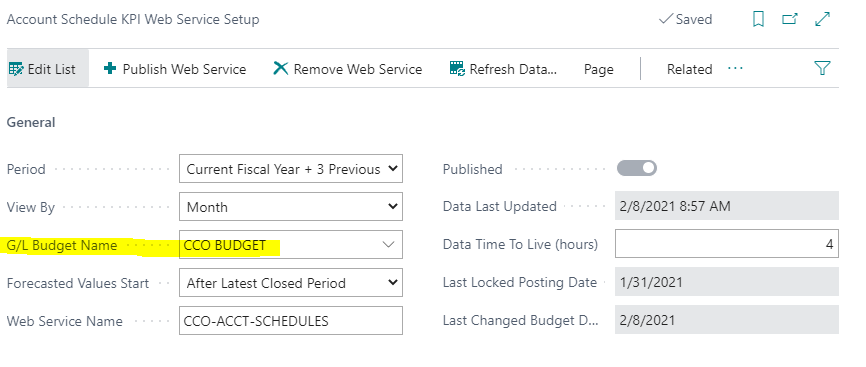
I have linked our G/L Budget with our Account Schedule KPI Web services - seemed to work great at first - budget info is contained right within these KPI Web Services queries.  However, after making a  recent change to the budget, I've noticed that change isn't reflected in the Web Services queries - the numbers aren't updating, even after hitting 'Refresh Data' on the screen shot below - any ideas why the budget numbers wouldn't be updating?  I even tried unlinking the budget, refreshing the data, then linking it back and refreshing again...
pastedimage1612802235865v1.png

I have the same question (0)
  • Verified answer
    Agazziz Profile Picture
    213 on at

    Finally figured this out - I just needed to update the Account Schedule Analysis View BEFORE refreshing the KPI.

  • Andy Sather Profile Picture
    on at

    Thank you for posting the resolution.

Under review

Thank you for your reply! To ensure a great experience for everyone, your content is awaiting approval by our Community Managers. Please check back later.

Helpful resources

Quick Links

Responsible AI policies

As AI tools become more common, we’re introducing a Responsible AI Use…

Neeraj Kumar – Community Spotlight

We are honored to recognize Neeraj Kumar as our Community Spotlight honoree for…

Leaderboard > Small and medium business | Business Central, NAV, RMS

#1
OussamaSabbouh Profile Picture

OussamaSabbouh 2,362

#2
YUN ZHU Profile Picture

YUN ZHU 867 Super User 2025 Season 2

#3
Sumit Singh Profile Picture

Sumit Singh 607

Last 30 days Overall leaderboard

Featured topics

Product updates

Dynamics 365 release plans
