web
You’re offline. This is a read only version of the page.
close
Skip to main content

Announcements

No record found.

News and Announcements icon
Community site session details

Community site session details

Session Id :
Microsoft Dynamics AX (Archived)

regarding Project, Package and Model in D3FO

(0) ShareShare
ReportReport
Posted on by 56

Dear All,

Can you please let me the below assumption is correct regarding Project, Package and Model ?
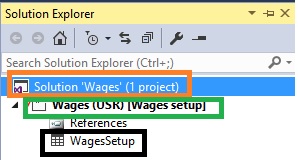
2133.Project.jpg

RED      : Project

GREEN : Package

BLACK : Model

Please give me more shed on this.

Thanks!

*This post is locked for comments

I have the same question (0)
  • Chaitanya Golla Profile Picture
    17,225 on at

    Hi,

    RedColor block is solution and green color block is project.

  • @rp@n Profile Picture
    56 on at

    Thanks Chaitanya,

    What about Package and Model ?

  • Martin Dráb Profile Picture
    239,381 Most Valuable Professional on at

    No, you didn't get any one of them right. Please read Summary: New Microsoft Dynamics AX Packages, models, and projects, for example, before continuing. It should make things much clearer.

    Because you have a plenty of basic questions, I think the best think for you would be watching the whole 81215AE: X++ Programming and Advanced Topics in Microsoft Dynamics 365 for Finance and Operations, Enterprise edition on DLP. You really need learn to basics; you're currently stumbling in the dark.

  • Suggested answer
    Chaitanya Golla Profile Picture
    17,225 on at

    Hi,

    On Application explorer, you can switch classic view to model view to see the list of available models. To get the package details, you can use view package dependencies option on any model.

    Refer below links:

    (Application explorer - Check for model view)

    docs.microsoft.com/.../application-explorer

    (Models - Check for Viewing package dependencies)

    docs.microsoft.com/.../models

  • Verified answer
    Mahmoud Hakim Profile Picture
    17,887 on at

    first Wages is project and wages setup is model

    In green box

  • @rp@n Profile Picture
    56 on at

    Thanks Hakim,

    Package ??

  • Verified answer
    Mahmoud Hakim Profile Picture
    17,887 on at

    Package selected when you run create mode wizard

    [View:http://www.microsoftdynamicsax365.com/modelspackages-projects-ax-365/]

    So you can use view package dependencies

  • @rp@n Profile Picture
    56 on at

    Thanks Hakim

    As above link you suggested, as per that the BLACK colour represent Element right?

    Please give me more shed on this.

    Thanks!

  • Suggested answer
    Chaitanya Golla Profile Picture
    17,225 on at

    Hi,

    Here are the details:

    Redcolor box represents Solution

    In Green color box Wages is project

    In Green color box Wages setup is model

    Black color box is element.

  • Suggested answer
    Mahmoud Hakim Profile Picture
    17,887 on at

    Yes that is right black colour is element

Under review

Thank you for your reply! To ensure a great experience for everyone, your content is awaiting approval by our Community Managers. Please check back later.

Helpful resources

Quick Links

Introducing the 2026 Season 1 community Super Users

Congratulations to our 2026 Super Stars!

Meet the Microsoft Dynamics 365 Contact Center Champions

We are thrilled to have these Champions in our Community!

Congratulations to the March Top 10 Community Leaders

These are the community rock stars!

Leaderboard > 🔒一 Microsoft Dynamics AX (Archived)

#1
CP04-islander Profile Picture

CP04-islander 39

#2
Michel ROY Profile Picture

Michel ROY 14

#3
imran ul haq Profile Picture

imran ul haq 8

Last 30 days Overall leaderboard

Featured topics

Product updates

Dynamics 365 release plans
