web
You’re offline. This is a read only version of the page.
close
Skip to main content

Announcements

No record found.

News and Announcements icon
Community site session details

Community site session details

Session Id :
Microsoft Dynamics AX (Archived)

How to increase width of columns of custom lookup

(0) ShareShare
ReportReport
Posted on by 56

Hi All,

I have done custom lookup in a form. But i wants to increase width lookup.
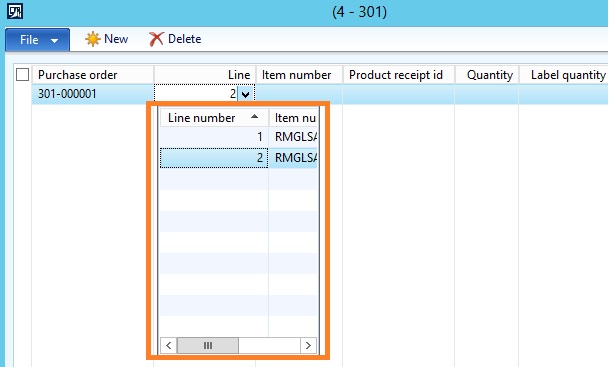
o1.jpg

I wrote below code in Form - DS -Line (field) - Lookup method

public void lookup(FormControl _formControl, str _filterStr)
{
//super(_formControl, _filterStr);
Query query = new Query();
QueryBuildDataSource queryBuildDataSourcePurchTable,queryBuildDataSourcePurchLine;
QueryBuildRange queryBuildRange;
SysTableLookup sysTableLookup;

sysTableLookup = SysTableLookup::newParameters(tableNum(PurchLine),_formControl);

queryBuildDataSourcePurchLine = query.addDataSource(tableNum(PurchLine));

queryBuildRange = queryBuildDataSourcePurchLine.addRange(fieldNum(PurchLine, PurchId));
queryBuildRange.value(Test.PurchId);

sysTableLookup.addLookupField(fieldNum(PurchLine, LineNumber), true);
sysTableLookup.addLookupField(fieldNum(PurchLine, itemid));

sysTableLookup.parmQuery(query);
sysTableLookup.performFormLookup();
}

Please give me more shed on this.

Thanks!

*This post is locked for comments

I have the same question (0)
  • Verified answer
    BrandonSA Profile Picture
    1,673 on at

    Hi

    There is no way to do this without modified actual system code.

    Drill down into the sysTableLookup class and see how lookups are being built. You'll see how the system takes the specified datasource and builds a grid out of it etc.

    If you want to make a more intelligent lookup, you could do it by modifying this system code.

    You'd have to be very careful though, because anything you modify there will affect every lookup in the whole system.

    But, that's the only way you can do it. There is no way to do it without modifying standard code.

  • @rp@n Profile Picture
    56 on at

    Thanks Bradon,

    Do you have any code.  Could you please let me know.

    Thanks!

  • @rp@n Profile Picture
    56 on at

    Any other way could you please suggest me ?

    Please give me more she'd on this

    Thanks!

  • Verified answer
    Blue Wang Profile Picture
    Microsoft Employee on at

    Hi @rp@n,

    You can define the layout of field controls in a custom lookup form.
    In addition, you can extend the lookup in SysTableLookup and SysTableLookupBase classes.
    And pass in the width parameter of the addLookupField method, and then use it in the buildFromGridDesign method to increase the width of that particular column.


    Here' an example: https://community.dynamics.com/365/financeandoperations/b/alirazatechblog/archive/2014/08/27/how-to-use-ax-form-as-lookup-in-dynamics-ax-2012

  • @rp@n Profile Picture
    56 on at

    Thanks Blue

  • Blue Wang Profile Picture
    Microsoft Employee on at

    Hi @rp@n,

    You are welcome.

Under review

Thank you for your reply! To ensure a great experience for everyone, your content is awaiting approval by our Community Managers. Please check back later.

Helpful resources

Quick Links

Introducing the 2026 Season 1 community Super Users

Congratulations to our 2026 Super Stars!

Meet the Microsoft Dynamics 365 Contact Center Champions

We are thrilled to have these Champions in our Community!

Congratulations to the April Top 10 Community Leaders

These are the community rock stars!

Leaderboard > 🔒一 Microsoft Dynamics AX (Archived)

#1
CP04-islander Profile Picture

CP04-islander 39

#2
Michel ROY Profile Picture

Michel ROY 14

#3
imran ul haq Profile Picture

imran ul haq 8

Last 30 days Overall leaderboard

Featured topics

Product updates

Dynamics 365 release plans
