web
You’re offline. This is a read only version of the page.
close
Skip to main content

Notifications

Announcements

No record found.

Community site session details

Community site session details

Session Id :
Small and medium business | Business Central, N...
Suggested Answer

Sync items to CRM- Error when Changing Default Unit Group for items

(0) ShareShare
ReportReport
Posted on by

Hello,

Not sure if this is the proper forum so my apologies for that.

This question is about integrating items and unit groups from BC17 On Prem to 365 Sales.

Has anyone had the case where:

-The CRM is already existing, but BC is new

-In the CRM there is only one active unit group, called "Base Unit" and underneath, there are all the liters, kg, pieces and so on. All active items in the CRM have "Base Unit".

-We created Units of measures in BC and manually made the coupling with the unit groups, even if most of them were not active. None was named with the NAV prefix.

-We imported all items from the CRM, so we could have coupling automatically there. Only the Item No and Description were included, no unit of measure.


-We brought all the other information in BC with configuration packages, including Default Unit of Measure, which of course can vary. Some items have KG, some other have L, and so on.

-Initially we had an error that "NAV L" could not be found in the common data service.

-We went back to BC, removed al coupling for units of measure, and allowed the system to create all 34 Unit Groups in the CRM, prefixed by NAV. So now, in the CRM, there is NAV L, NAV KG, etc. Every unit group has the corresponding Base Unit as L, KG, etc.
-Now, when trying to synchronize an already coupled item (in the CRM it has "Base Unit and in BC it has "KG"), we receive the following error:

"An error occurred when communicating with Common Data Service.

Detailed description: The specified unit is not valid for this product"

Any idea what we are missing? Is there a problem if KG is being used as a base unit in more than one unit group in the CRM?
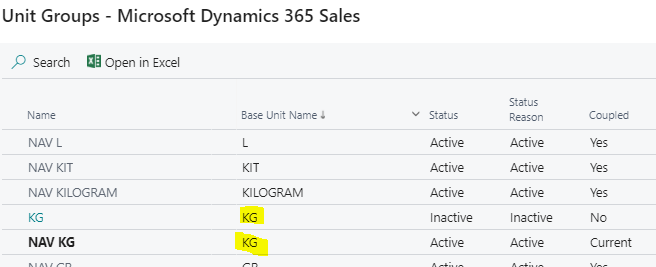
pastedimage1611076846139v1.png

I have the same question (0)
  • Suggested answer
    Marco Mels Profile Picture
    on at

    Hello,

    It is always tricky when there is data in both systems. One of the system must be in charge and act as master data source. Here it seems that both system act as master which may indeed cause some troubles. Defining one data source and continue using that may be key to resolve the issue.

    If you require assistance with that, you are free to raise a support case with Microsoft support.

    Thanks.

  • Community Member Profile Picture
    on at

    Hi Marco,

    Thank you for taking the time to answer this.

    At the time it did not seem feasible to create all items from BC, given the fact the customer has been using those products for years in the CRM.

    We will ask for support, as it would be quite a task to have to recreate all items from BC and probably deactivate the old ones in the CRM.

    Nevertheless, we are wondering what can be done if in the future the client decides he does not want to sell some items as boxes, but as pallets. Would we then need to create new items for this?

    Best regards,

  • Suggested answer
    Marco Mels Profile Picture
    on at

    Hello,

    Yes, we are here to assist. Best is to contact us before starting to recreate items when this may not be needed at all.

    It makes indeed sense to recreate these items as the system already contains sold boxes which are then changed to pallets.

    Thanks.

Under review

Thank you for your reply! To ensure a great experience for everyone, your content is awaiting approval by our Community Managers. Please check back later.

Helpful resources

Quick Links

Responsible AI policies

As AI tools become more common, we’re introducing a Responsible AI Use…

Neeraj Kumar – Community Spotlight

We are honored to recognize Neeraj Kumar as our Community Spotlight honoree for…

Leaderboard > Small and medium business | Business Central, NAV, RMS

#1
OussamaSabbouh Profile Picture

OussamaSabbouh 3,151

#2
Jainam M. Kothari Profile Picture

Jainam M. Kothari 1,443 Super User 2025 Season 2

#3
YUN ZHU Profile Picture

YUN ZHU 1,092 Super User 2025 Season 2

Last 30 days Overall leaderboard

Featured topics

Product updates

Dynamics 365 release plans



