web
You’re offline. This is a read only version of the page.
close
Skip to main content

Notifications

Announcements

No record found.

Community site session details

Community site session details

Session Id :
Small and medium business | Business Central, N...
Answered

Account on Chart of Accounts currency change error

(0) ShareShare
ReportReport
Posted on by 187

Hello BC-Forum,

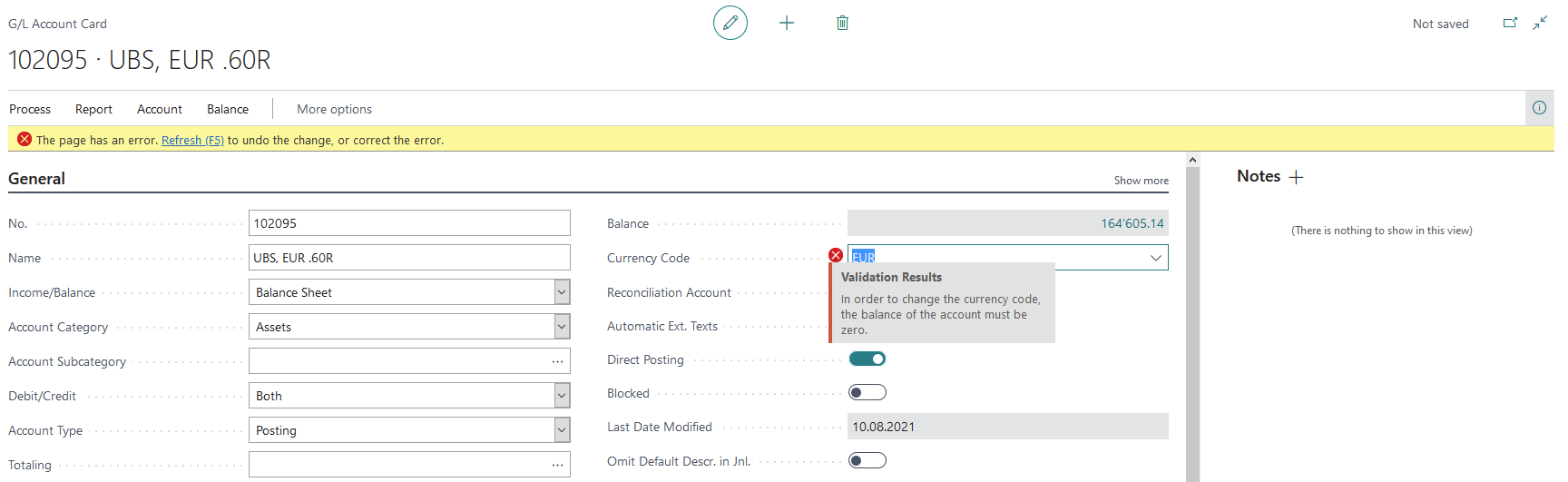
With a data transfer of all the postings of a different system into Business Central I want to change the currency code on a G/L Account Card.

Because of the numerous postings I cannot track down every single change in currency rates for this Account, so for the data transfer I used 1 CHF = 1 EUR.

Now I changed the currency EUR to the current rate. From this day on the currency differences should be calculated and in the Chart of Accounts I want the FCY Column to be filled.

Unfortunately I get the following error on the Account Card, see my print screen. What should I do?

Thanks in advance for your answer.

Greetings,

John
pastedimage1628666236304v1.png

I have the same question (0)
  • Suggested answer
    JAngle Profile Picture
    133 on at

    Is it just one account or have you migrated all balances? If it’s in a different company you could change the LCY for the entire data set in the general ledger setup. If it’s in one company maybe the reporting currency feature.

    In terms of the error I’m not familiar with the field but the order of the data movement seems to matter. Change the account card value and the post the balance

  • Verified answer
    Dirk Profile Picture
    on at

    Hi John,

    I know we have this field in CH local ... to be used for bank accounts and cash accounts only, in order for a better reconciliation of the totals.

    If this is about CH local ...

    As Josh mentioned ... if you enter a transaction to clear the balance, then set the Currency Code on the G/L Account and then revert the previous transaction, then it should be okay.

    But please do not use this field for any other G/L Accounts, like the receivabels or payables account or any other.

    This would create trouble in further processing and can easily end in inconsistentcy error message.

    Please use it only for "Bank G/L Accounts".

  • JohnnyLM Profile Picture
    187 on at

    Hi Dirk, 

    Thanks a lot for your answer. I thought so myself to clear the balance with a temporary posting and then a revert, but I wanted to be sure. 

    Yes it is a Bank G/L Account.

    Greetings, 

    John

Under review

Thank you for your reply! To ensure a great experience for everyone, your content is awaiting approval by our Community Managers. Please check back later.

Helpful resources

Quick Links

Responsible AI policies

As AI tools become more common, we’re introducing a Responsible AI Use…

Neeraj Kumar – Community Spotlight

We are honored to recognize Neeraj Kumar as our Community Spotlight honoree for…

Leaderboard > Small and medium business | Business Central, NAV, RMS

#1
OussamaSabbouh Profile Picture

OussamaSabbouh 3,229

#2
Jainam M. Kothari Profile Picture

Jainam M. Kothari 1,867 Super User 2025 Season 2

#3
YUN ZHU Profile Picture

YUN ZHU 1,153 Super User 2025 Season 2

Last 30 days Overall leaderboard

Featured topics

Product updates

Dynamics 365 release plans



