web
You’re offline. This is a read only version of the page.
close
Skip to main content

Announcements

No record found.

News and Announcements icon
Community site session details

Community site session details

Session Id :
Microsoft Dynamics NAV (Archived)

To create a report for last sold item with posting date for a customer

(0) ShareShare
ReportReport
Posted on by 475

Hi all,
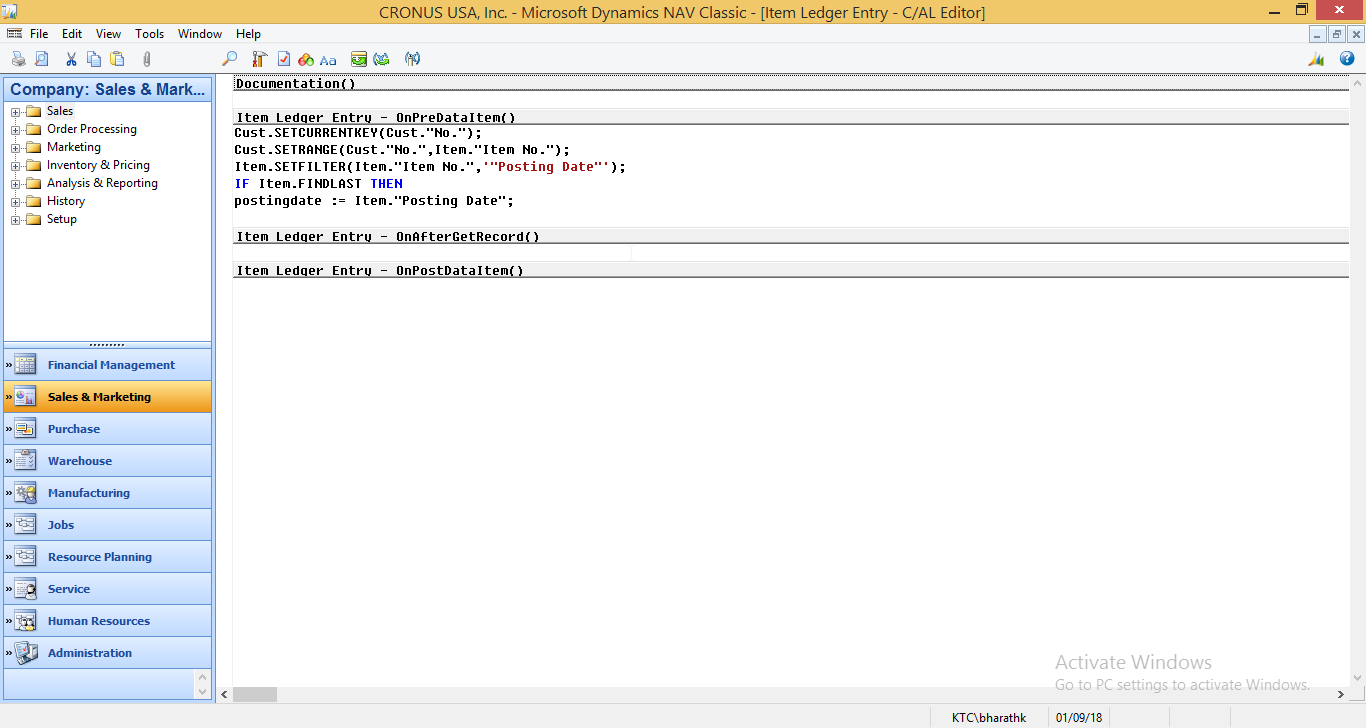
I create a report to print a customer last sold an item with posting date.But I am facing some issues.
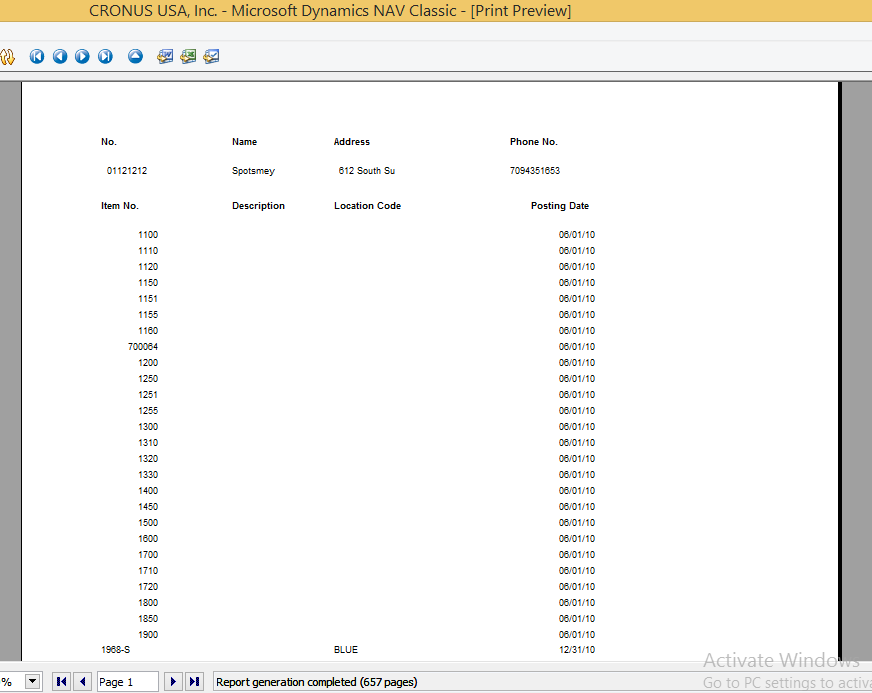
Here I am able to print the items based on posting date but all the items are shown here.Moreover, I want to display only last posting date but it is showing all the posting dates.
Please advice.
Thanks in Advance
Warm Regards,
bharath k2018_2D00_02_2D00_27-00_5F00_24_5F00_13_2D00_CRONUS-USA_2C00_-Inc.-_2D00_-Microsoft-Dynamics-NAV-Classic-_2D00_-_5B00_Item-Ledger-Entry-_2D00_-C_5F00_AL-Ed.png2018_2D00_02_2D00_27-00_5F00_24_5F00_51_2D00_CRONUS-USA_2C00_-Inc.-_2D00_-Microsoft-Dynamics-NAV-Classic-_2D00_-_5B00_Print-Preview_5D00_.png
*This post is locked for comments

I have the same question (0)
  • Suggested answer
    Stefano Demiliani Profile Picture
    37,172 Most Valuable Professional on at

    The output you want is the list of items with its last posting date?

    If so, you need to loop through the Item table and the in OnAfterGetRecord checks the last Posting Date by filtering Item Ledger Entry table (by considering only movements with Entry Type = Sale)

  • Suggested answer
    Andrey Baludin Profile Picture
    3,943 on at

    1. Create data Item "Customer"

    2. Create Data item "Item Ledger Entry"

    Set filter Entry type =Sale

    3. Link Item Ledger entry to Customer by Source No. = Customer.No.

    4. On PreDataItem of Item Ledger Entry print:

    If NOT FINDLAST THEN

     CurrReport.SKIP;

    5. Add customer number, Item ledger entry posting date and Item no to layout.

  • bharathkarunakaran Profile Picture
    475 on at

    2018_2D00_02_2D00_27-22_5F00_51_5F00_56_2D00_CRONUS-USA_2C00_-Inc.-_2D00_-Microsoft-Dynamics-NAV-Classic-_2D00_-_5B00_last-sold-item_5D00_.png2018_2D00_02_2D00_27-22_5F00_51_5F00_56_2D00_CRONUS-USA_2C00_-Inc.-_2D00_-Microsoft-Dynamics-NAV-Classic-_2D00_-_5B00_last-sold-item_5D00_.png2018_2D00_02_2D00_27-22_5F00_52_5F00_31_2D00_CRONUS-USA_2C00_-Inc.-_2D00_-Microsoft-Dynamics-NAV-Classic-_2D00_-_5B00_Print-Preview_5D00_.png

    Hi guys thanks for your reply,

    I have done it through properties but I don't know how to do it with the code since I am a beginner in nav...

    Please help.

    Warm Regards,'

    Bharath K

  • Suggested answer
    Andrey Baludin Profile Picture
    3,943 on at

    Try this way:

    2702.JPG

  • bharathkarunakaran Profile Picture
    475 on at

    2018_2D00_02_2D00_28-06_5F00_38_5F00_49_2D00_CRONUS-USA_2C00_-Inc.-_2D00_-Microsoft-Dynamics-NAV-Classic-_2D00_-_5B00_last-sold-item_5D00_.png2018_2D00_02_2D00_28-06_5F00_38_5F00_49_2D00_CRONUS-USA_2C00_-Inc.-_2D00_-Microsoft-Dynamics-NAV-Classic-_2D00_-_5B00_last-sold-item_5D00_.png

    Hi,

    thanks for your reply,

    Need a little help, I am able to print the report of entry type:= sale but I am unable to filter the posting date.I have attached the screenshots with this.

    Please Help me.

  • Suggested answer
    Stefano Demiliani Profile Picture
    37,172 Most Valuable Professional on at

    What is the Posting Date filter that you want to apply? If it's a range from today to EndDate you can write:

    nan.SETFILTER("Posting Date",'%1..%2',TODAY,EndDate);

  • bharathkarunakaran Profile Picture
    475 on at

    Hi Stefano Demiliani,

     Thanks for your reply ,,

    With your code i am able to the put the posting date filter as today but i need it to be last date for item that when it has been posted .

    For Example. If an item is posted on 20/02/18 for one item and i want it to get that date (20/02/18)   as a filter for that item for the entry type:Sale...Can you tell me how to do that.Currently i am able to print the posting date as a current date..

    Please advice

    Thanks in advance

  • Suggested answer
    Stefano Demiliani Profile Picture
    37,172 Most Valuable Professional on at

    You need to retrieve that date (filtering for example the Item Ledger Entry), than after retrieving the date you can filter the Item for Posting Date (the range you want).

  • bharathkarunakaran Profile Picture
    475 on at

    Yes,Thats the way i want to do it ,

    Can you guide on how to do that,

    Please help

    Bharath

  • Suggested answer
    Stefano Demiliani Profile Picture
    37,172 Most Valuable Professional on at

    I dont know what you want to to, so consider the following code only as a starting point.

    You can retrieve the last date in Item Ledger Entry:

    ItemLedgerEntry.SETCURRENTKEY("Item No.","Posting Date","Entry Type");

    ItemLedgerEntry.SETRANGE("Item No.",YourItem);

    //If you want to consider only Sales, apply also this filter:

    ItemLedgerEntry.SETRANGE("Entry Type",ItemLedgerEntry."Entry Type"::s);

    if itemleItemLedgerEntry.FINDLAST then

     PostingDate := ItemLedgerEntry."Posting Date";

    //Now the PostingDate variable contains the last posting date for the item

    //Here you can filter your nan table:

    nan.SETFILTER("Posting Date",'%1..%2',PostingDate,EndDate);

Under review

Thank you for your reply! To ensure a great experience for everyone, your content is awaiting approval by our Community Managers. Please check back later.

Helpful resources

Quick Links

Introducing the 2026 Season 1 community Super Users

Congratulations to our 2026 Super Stars!

Meet the Microsoft Dynamics 365 Contact Center Champions

We are thrilled to have these Champions in our Community!

Congratulations to the April Top 10 Community Leaders

These are the community rock stars!

Leaderboard > 🔒一 Microsoft Dynamics NAV (Archived)

Last 30 days Overall leaderboard

Featured topics

Product updates

Dynamics 365 release plans