web
You’re offline. This is a read only version of the page.
close
Skip to main content

Notifications

Announcements

No record found.

Community site session details

Community site session details

Session Id :
Microsoft Dynamics AX (Archived)

Sales Order Confirmation Button is Disabled in selected accounts only

(0) ShareShare
ReportReport
Posted on by

Hi All please help me with this I want to print sales contract of my one accounts here but the confIrmation button is disabled or unclickable. I'd check all the accounts it was enables only on the selected account is disabled. My User id  also is responsible for the creation of the account and I create that sales order like the others but in this account only I experience this problem. Our Microsoft dynamics ax version is 2009

Please see image below for the problem.
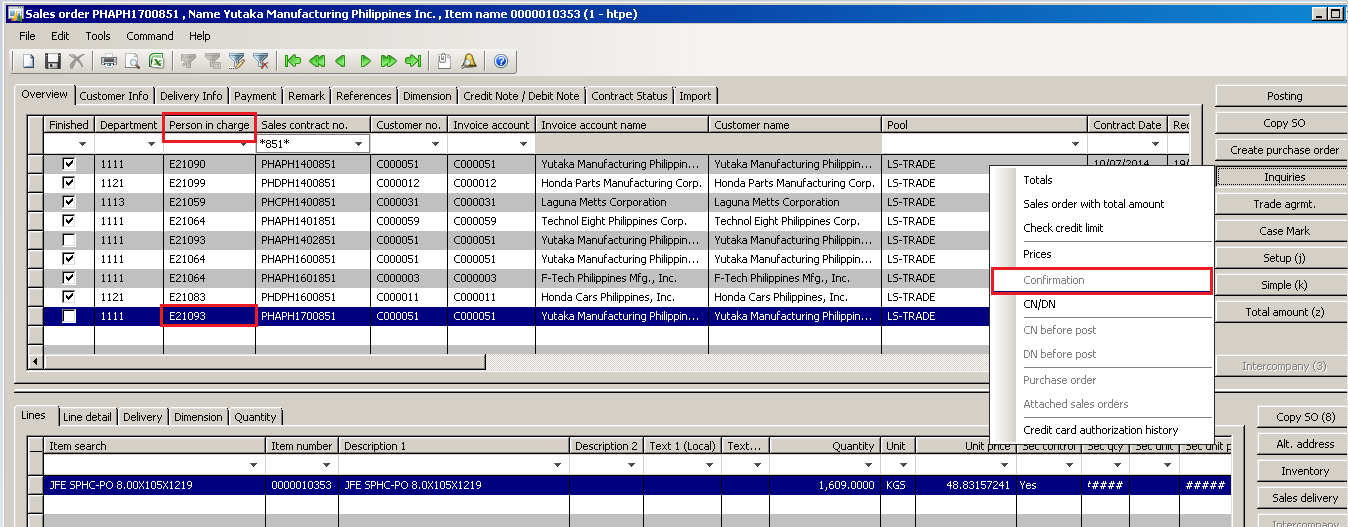
2678.pic.PNG

*This post is locked for comments

I have the same question (0)
  • Suggested answer
    Erik HB Profile Picture
    205 on at

    In standard AX2009, this would normally mean a confirmation has not been posted for the current sales order.

    You can check this in the sales order confirmation header table, to see if you have a confirmation for sales ID PHAPH1700851.

  • Community Member Profile Picture
    on at

    Hi Sir Erik,

    In the sales order confirmation header tables consist only the following

    Overview

    Customer Info

    Delivery info

    Payment

    Remarks

    Reference

    Dimension

    Credit Not/Debit note

    Contract Status

    Import

    Where should I go to check if I have Confirmation for the Sales ID

    Thanks,

  • Community Member Profile Picture
    on at

    Did you checked in the master data of your customer account if it is Blocked for delivery and invoicing?

  • Community Member Profile Picture
    on at

    Hi Sir Jaykay,

    May I know how to check? Where in the system did I go? And after checking what's the next step?

    Appreciated your help.

    Thanks

  • Community Member Profile Picture
    on at

    It has been quite some while that I used AX2009. But I found some directions:

    1- go to Accounts receivable tap in AX 2009

    2- go to common forms

    3- select customer details

    4- filter the form by your customer account

    5-select the general tap

    6-go to administration section in the general tap

    7- and in Stopped label check the value.

    If the value is 'All' the customer is blocked and you should change this value. But before doing that check your financial department, because maybe they blocked this customer on purpose.

  • Community Member Profile Picture
    on at

    Hi Sir Jaykay,

    I follow your instructions but in no. 3 (go to customer details) I can't see that tab/button, these are the list of tab contained in the customer forms

    Customer Master

    Sales Contract

    Sales Quotation Details

    Sales Delivery

    Return Order Details

    Free text Invoice

    Global Address book Details

    Appreciated your help

    Thanks

  • Community Member Profile Picture
    on at

    Before I mentioned the master data of your customers. So your next step will be your Customer Master.

    But to be honest. If you don't know or do not have the knowledge how to get to your Customer data, I am not sure if I only make things worser by explaining you functionality are not familair with. There must be someone within your company who is. Navigation is really the basics. Or contact your AX partner.

  • Community Member Profile Picture
    on at

    Hi Sir Jaykay,

    Apologize that i'm not technicality familiar in dynamics ax platform but our adminitsrator/AX partner also our dynamics server is in the other country and we experiencing here hardly to contact the administrator in email only. This was really urgent because of the month end closing of our company for the month of april and I need to finish this so I've search for help that maybe guide to solve the problem. Please help

    Thanks

  • Community Member Profile Picture
    on at

    Hi Sir Jaykay,

    I'd Already see the administration section in the account receivable and i'd already change value of the stopped label to "NO" but still no effect/changes the confirmation button is still disabled/unclickable. Please help

    Thanks

Under review

Thank you for your reply! To ensure a great experience for everyone, your content is awaiting approval by our Community Managers. Please check back later.

Helpful resources

Quick Links

Responsible AI policies

As AI tools become more common, we’re introducing a Responsible AI Use…

Neeraj Kumar – Community Spotlight

We are honored to recognize Neeraj Kumar as our Community Spotlight honoree for…

Leaderboard > 🔒一 Microsoft Dynamics AX (Archived)

#1
Martin Dráb Profile Picture

Martin Dráb 4 Most Valuable Professional

#1
Priya_K Profile Picture

Priya_K 4

#3
MyDynamicsNAV Profile Picture

MyDynamicsNAV 2

Last 30 days Overall leaderboard

Featured topics

Product updates

Dynamics 365 release plans
