web
You’re offline. This is a read only version of the page.
close
Skip to main content

Notifications

Announcements

No record found.

Community site session details

Community site session details

Session Id :
Microsoft Dynamics 365 | Integration, Dataverse...
Suggested Answer

Use SQL to query data, TDS error but TDS is enabled in the organisation

(0) ShareShare
ReportReport
Posted on by 295

Hi

I would like to use SQL to query our Dynamics online environment but I have problems connecting. I have checked the configuration and I cannot find what I am doing wrong. 

I am using SQL 2018
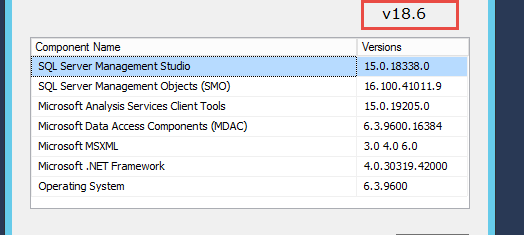
pastedimage1601003729373v1.png

Our organisation is in a version above the recommended one

pastedimage1601003829341v2.png

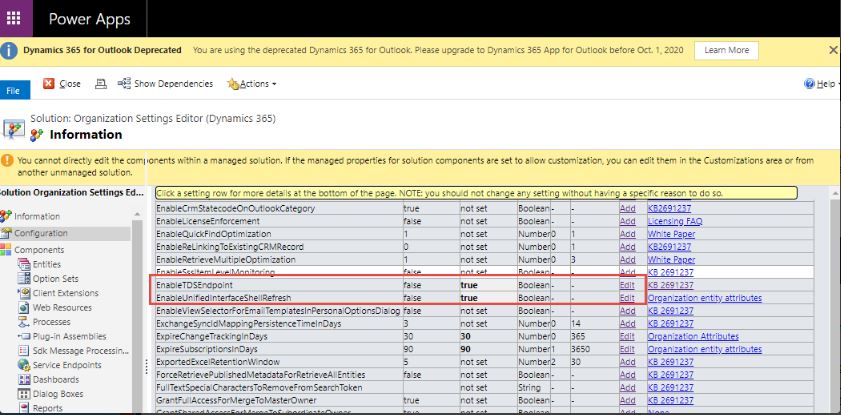
TDS is enabled under features

I also checked it using the managed solution Organisation Settings
1111.JPG

When connecting from SQL Management I use Azure authentication

pastedimage1601005259658v9.png

We do have MFA enabled in our organisation, I am prompt to login and I get the MFA notification on my mobile which I can approve. However, after that I get this error. 
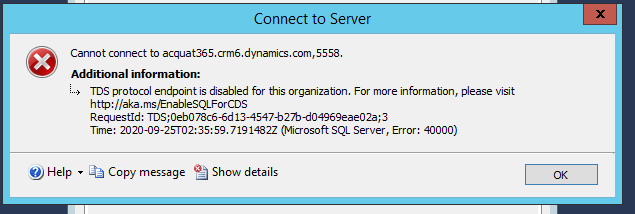
pastedimage1601005329344v10.png

Every pots on the internet says it is related to not having TDS enabled, however, as you could see it it. Any ideas of what could be the issue?

Thanks in advance

Teresa

I have the same question (0)
  • Suggested answer
    LeoAlt Profile Picture
    16,331 Moderator on at

    Hi Partner,

    It is a preview feature and is not available in all regions now.

    pastedimage1601016814773v1.png

    https://docs.microsoft.com/en-us/powerapps/developer/common-data-service/cds-sql-query

    And you should also check if you've enabled TDS in PPAC.

    pastedimage1601016911889v2.png

    Best Regards,

    Leo

  • Suggested answer
    Bipin D365 Profile Picture
    28,983 Moderator on at

    Hi,

    To verify if your target environment has the Common Data Service SQL connection feature enabled, do the following:

    Sign into Power Apps, on the left navigation pane expand Data, and then select Entities.

    On the command bar, you should see a button Analyze in Power BI. If you do not see this button, your environment does not yet have the feature.

    docs.microsoft.com/.../cds-sql-query4722.JPG

  • Tessacq Profile Picture
    295 on at

    HI Leo

    You can see on my post that I mentioned that TDS is enabled under features, I am including an image of it now
    pastedimage1601018320543v2.png

    I also checked the same using Organisation Setting Managed Solution, the previous method to check that. I already put an image on it. In both places it is enabled. 


    The Microsoft version where they enabled it is 9.1.0.17154, as you can see on my image, our is 9.1.0.22845, which means is higher?

    So I think we meet all requirements for it to work. 

    Please let me know if you have any other idea.

    Thanks

    Teresa

  • Tessacq Profile Picture
    295 on at

    Hi Bipin Kumar

    Thanks for your answer. Please know that my issue is with a Dynamics 365 Environments, not with a Power app. However I checked in our default environment (the one that I think Power Apps would use) and the option is available.

    pastedimage1601021133317v1.png

    Thanks

    Teresa

  • Suggested answer
    Pankaj Gogoi Profile Picture
    3,177 on at

    Hi Teresa,

    Please refer this blog, it talks about modifying the config file.

    https://nishantrana.me/2020/05/21/setting-up-using-sql-to-query-data-in-dynamics-365-preview/

    Good Luck

    Best Regards,

    PG

  • Community Member Profile Picture
    on at

    Super helpful.

  • LeoAlt Profile Picture
    16,331 Moderator on at

    Hi Partner,

    Thanks for your details.

    As I mentioned, this feature is not supported in all regions, may be we need to wait for some time until this feature applied to all regions.

    You could also contact with Microsoft Team for more information.

    Regards,

    Leo

Under review

Thank you for your reply! To ensure a great experience for everyone, your content is awaiting approval by our Community Managers. Please check back later.

Helpful resources

Quick Links

Responsible AI policies

As AI tools become more common, we’re introducing a Responsible AI Use…

Neeraj Kumar – Community Spotlight

We are honored to recognize Neeraj Kumar as our Community Spotlight honoree for…

Leaderboard > Microsoft Dynamics 365 | Integration, Dataverse, and general topics

#1
Siv Sagar Profile Picture

Siv Sagar 93 Super User 2025 Season 2

#2
#ManoVerse Profile Picture

#ManoVerse 76

#3
Martin Dráb Profile Picture

Martin Dráb 64 Most Valuable Professional

Last 30 days Overall leaderboard

Product updates

Dynamics 365 release plans



