web
You’re offline. This is a read only version of the page.
close
Skip to main content

Notifications

Announcements

No record found.

Community site session details

Community site session details

Session Id :
Microsoft Dynamics AX (Archived)

Production Planning: Cost calculation of BOM

(0) ShareShare
ReportReport
Posted on by 145

Dears

I have a problem in cost calculation of BOM

Item number Configuration Size Color Style Acutal stitches Quantity Per series Unit
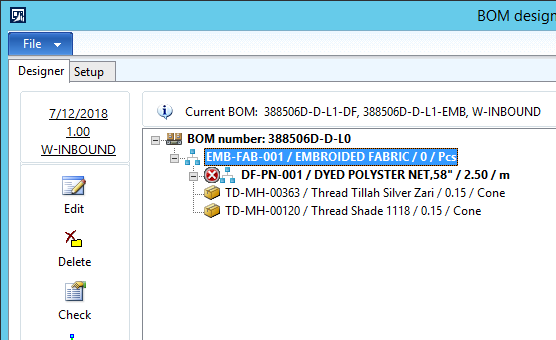
EMB-FAB-001 MULTI HEAD 1MT MULTI 388506D 0 0.50 1.00 Pcs

When I entered above-highlighted quantity less than 0.5 it's not Calculate production cost

Item number Configuration Size Color Style Quantity Per series Unit
EMB-FAB-001 MULTI HEAD 1MT MULTI 388506D 0.40 1.00 Pcs

0167.1.png

When I run this BOM Calculation, Its show zero cost.

Price type Version Name Site Price Price unit Price charges Price quantity Incl. in unit price Unit From date
Cost PLAND COST PLANNED COST W-INBOUND 0.00 1.00 0.00 1.00 No m 8/28/2017

How can I get this price calculation cost? Is that any option that BOM calculation check with exact quantity figure. 

*This post is locked for comments

I have the same question (0)
  • Weaveriski Profile Picture
    23,620 Moderator on at

    What are the costs per 1 of the component parts?

    Are you really going to make 0.4 of the costed unit? I would suggest Pcs is not really your correct UOM if this is the case.

  • Muhammad Burhan Zahoor Profile Picture
    145 on at

    5228.2.png

    As mentioned in a pic, when bulk produced F.G. item 388305F through production order it gives exact costing of EMB-FAB-001 as we expected in production order but when we run BOM calculation then costing of EMB-FAB-001 shows zero.

  • Weaveriski Profile Picture
    23,620 Moderator on at

    Can you please show the cost calculation screen?

  • Muhammad Burhan Zahoor Profile Picture
    145 on at

    5277.4.png

    After that get following calculation

    5277.4.png

  • Suggested answer
    Galyna Fedorova Profile Picture
    3,566 on at

    Try to run Inventory management/Periodic/Bill of materials/Recalculate BOM levels

  • Weaveriski Profile Picture
    23,620 Moderator on at

    Press the complete button so we can see the calculation and post that picture please. 

  • guk1964 Profile Picture
    10,888 on at

    Your screen shot shows  planned cost version with an active cost fallback.

    Do you have an active cost version?

    Are you using standard cost?

  • Muhammad Burhan Zahoor Profile Picture
    145 on at
    Thanks all for the reply
    Galyna Fedorova,
    I have tried recalculated BOM level solution but it's not working in my case.
    Steven Weaver,
    As you said, Please find an attached Screenshot.
    1207.5.png
    Magic1949
    I am using weighted average group, Yes I have used an active cost version.
  • Weaveriski Profile Picture
    23,620 Moderator on at

    Everything is 0.00 costed and 0 quantity, which will be why the cost is 0.00 at that level. 

    If you use the active cost version, what is the current weighted average cost of the items?

    I would guess that the rounding is too small for the cost to work at the quantity of 1 the way you have configured it. 

Under review

Thank you for your reply! To ensure a great experience for everyone, your content is awaiting approval by our Community Managers. Please check back later.

Helpful resources

Quick Links

Responsible AI policies

As AI tools become more common, we’re introducing a Responsible AI Use…

Neeraj Kumar – Community Spotlight

We are honored to recognize Neeraj Kumar as our Community Spotlight honoree for…

Leaderboard > 🔒一 Microsoft Dynamics AX (Archived)

#1
Priya_K Profile Picture

Priya_K 4

#1
Martin Dráb Profile Picture

Martin Dráb 4 Most Valuable Professional

#3
MyDynamicsNAV Profile Picture

MyDynamicsNAV 2

Last 30 days Overall leaderboard

Featured topics

Product updates

Dynamics 365 release plans