web
You’re offline. This is a read only version of the page.
close
Skip to main content

Notifications

Announcements

No record found.

Community site session details

Community site session details

Session Id :
Small and medium business | Business Central, N...
Suggested Answer

Expense and Purchase order approval - Approver designation

(0) ShareShare
ReportReport
Posted on by 75

Hi Folks,

Following is our workflow for expense and purchase approval: 

- All expenses and invoice payments will be input by Accounting.
- less than $300 needs to be approved by level 2 only.
- Over $300 needs to be approved by both level 2 and level 3.

As you can see below image, Finance and Operations have equal approval permission in Business Central. When I request approval for expenses, then the approval request will be sent to both Finance and Operations. I wonder if I can designate one person or two to approve the journals. Can anyone provide some advice on this issue?

7384.Capture.JPG

Thank you,

Mike

I have the same question (0)
  • Suggested answer
    Vanessa Garcia Profile Picture
    on at

    Hello Mike,

    yes, this can be done.

    Test this one, this will work:

    pastedimage1608289085670v1.png

    TIP: Remember to set the "Next to response" for all the new "Send approval request for the record and create a notification" that you add.

    pastedimage1608289302511v2.png

    This should point to the initial one:

    pastedimage1608289356727v3.png

    TIP 2: When only Sep 2 users need to approve, use "Approve the approval request for the record", so the one for Seq 3 approver is auto-approved as it's not needed when Amount <301

    TIP 3: I use "Number of Approver Request": 3, to make sure that you don't send the approval request to Approver with Seq No. 3 until both approvers under Seq No. 2 have both approved.

    I hope it helps :-),

  • Mike0hp Profile Picture
    75 on at

    Hi Vanessa,

    Thank you for replying for my question. I appreciate it. Our biggest issue is that we have two people who have equal approval permission in Business Central. When I process an expense, the approval request will be sent to both people, but I only need one of them to approve. Therefore, I wonder if I can set up only one person to receive the approval request, or if there could be a drop-down/pop-up window to ask me to choose one of the two approvers. Because an expense could be related to Finance or Operations, so I need to designate one person to approve it.

  • Suggested answer
    Vanessa Garcia Profile Picture
    on at

    Hi Mike :)

    Ahhhh, sorry, I thought you wanted both Approvers with Seq. No. 2 to receive and approve their respective request to approve, so I suggested that previous workflow.

    In case you only need one of them (Finance or Operations) there are several alternatives:

    a) If you have any field/anything in the documents that you could use as filter to know if that one depends on Finance OR Operations, then it could be easier.

    You could create 2 Workflows and filter out by that field in the OnConditions. Then you could create 2 Workflow User Groups, each one containing just 1 of the Seq. 2 approvers.

    b) If all the documents applies for both without any difference, but you want to get the document released just when just one of them approves 1 of the approval request, then you could do the following:

     b.1) If you want to keep all in 1 workflow, you could use the previous workflow I suggested but with a couple of changes.

     "Number of Approved Request" = 2 in the 2 "On Conditions" for Seq 2 approvers:

    pastedimage1608386088389v1.png

    So just ACCOUNTING and FINANCE|OPERATIONS approved it (but just 1), then the workflow goes on.

    In case the Amount <301, only the Seq. No 2 approvers should approve this. So as soon as you have "Number of approved request" = 2, then you use "Approve the approval request for the record" and the other one gets auto-approved, and the document released. Then just ACCOUNTING + 1 of FINANCE or OPERATIONS was needed to get the document released (even if both got the Request to approve).

    In case the Amount >300, when just 1 Seq. No. 2 approved the entry, we will open the Request to Approve for CEO, and he/she can approve it as well.

    Here you need to add the "Approve the approval request for the record" as well, in case there is a remaining Request to approve for the 2nd Seq. No approver:
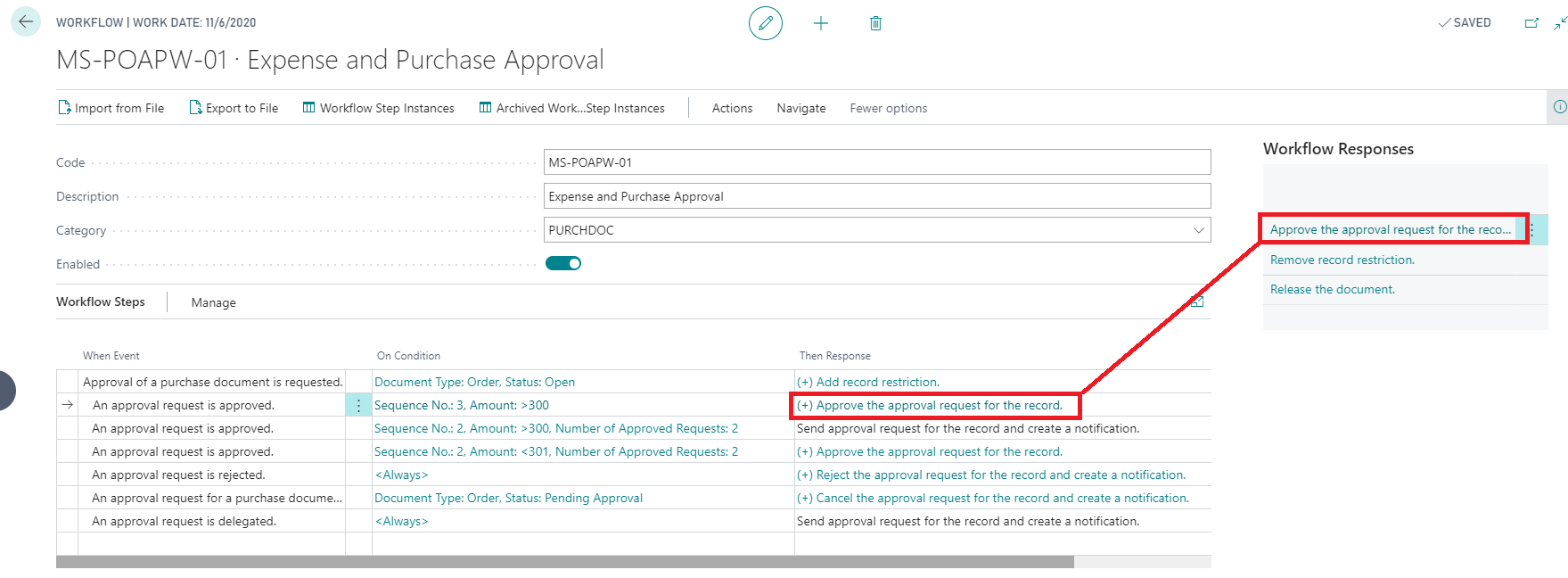
    pastedimage1608387149734v2.png


    The problem here is that we cannot Auto-Approve the other Seq. No. 2 approval request in the previous stage, but only when the CEO approves it. Then all remaining will be auto-approved.

    We cannot filter the auto-approval by Seq: Number... so if we do it at this stage...we will auto-approve not only the remaining Request to Approve for the second Seq. no 2, but also the one for the CEO, and we don't want that.

     b.2) Create 2 Workflows and 2 Workflow User Groups.

    First Workflow User Group for: ACCOUNTING, FINANCE and OPERATIONS

    Second Workflow User Group for: ACCOUNTING, FINANCE, OPERATIONS and CEO

    In the first Workflow, filter in the first response, OnCondition by the Amount <301....and use Workflow User Group 1 (ACCOUNTING, FINANCE and OPERATIONS).

    In the second Workflow, filter in the second response, OnCondition by the Amount>300....and use Workflow User Group 2 (ACCOUNTING, FINANCE, OPERATIONS and CEO)

    In this way in the first one, you can use Auto-Approve (Approve the approval request of the record) once the first approver approves it.

    In any case, the best alternative would be a), if you have something that differentiates the documents that FINANCE should approve VS the documents that OPERATIONS should approve and have Workflow Users Groups of only 1 approver in each level:

    ACCOUNTING (1), FINANCE (2), CEO (3)

    ACCOUNTING (1), OPERATIONS (2), CEO (3)

    Cheers,

  • Mike0hp Profile Picture
    75 on at

    Hi Vanessa,

    Thank you so much for your detailed explanation. I agree with your thoughts that we need to make something different from the documents. Let me give you an example. There are 10 purchase invoices(all less than $300) from our vendors; 5 of them are invoiced to Finance and another 5 are invoiced to Operations. Accounting will input all these invoices. In this situation, could you provide some examples of the identifiers that could help me/the system to filter out which department to send to (Finance or Operation) when I request an approval?

  • Vanessa Garcia Profile Picture
    on at

    Hi Mike :-),

    happy new year! didn't see this before as I went of Xmas Holidays.

    I guess this is something you should identify in your company.

    For example, if you work with Dimensions...and you have a Department one, you can use this one to identify to which team the approval should go.

    If the invoices has any difference so that's why you sent X to Finance and X to Operations, use that differentiation...

    I hope you can get it done as soon as possible .

    Happy new year,

    Vanessa.

Under review

Thank you for your reply! To ensure a great experience for everyone, your content is awaiting approval by our Community Managers. Please check back later.

Helpful resources

Quick Links

Responsible AI policies

As AI tools become more common, we’re introducing a Responsible AI Use…

Neeraj Kumar – Community Spotlight

We are honored to recognize Neeraj Kumar as our Community Spotlight honoree for…

Leaderboard > Small and medium business | Business Central, NAV, RMS

#1
OussamaSabbouh Profile Picture

OussamaSabbouh 2,066

#2
YUN ZHU Profile Picture

YUN ZHU 658 Super User 2025 Season 2

#3
Sumit Singh Profile Picture

Sumit Singh 595

Last 30 days Overall leaderboard

Featured topics

Product updates

Dynamics 365 release plans
