web
You’re offline. This is a read only version of the page.
close
Skip to main content

Announcements

News and Announcements icon
Community site session details

Community site session details

Session Id :
Small and medium business | Business Central, N...
Suggested Answer

How to Connect Dynamics 365 Business Central 16 to Sales (CRM), both (on-premise)

(0) ShareShare
ReportReport
Posted on by 15

To start with, this is about on-premise for both Dynamics 365 Sales (CRM) and Dynamics 365 Business Central. 

After BC 16 release (2020 Wave 1) we are no more able to use Dynamics 265 Sales setup screen, cause as soon as we open it, it asks for Common Date Server (CDS) setup as shown below.
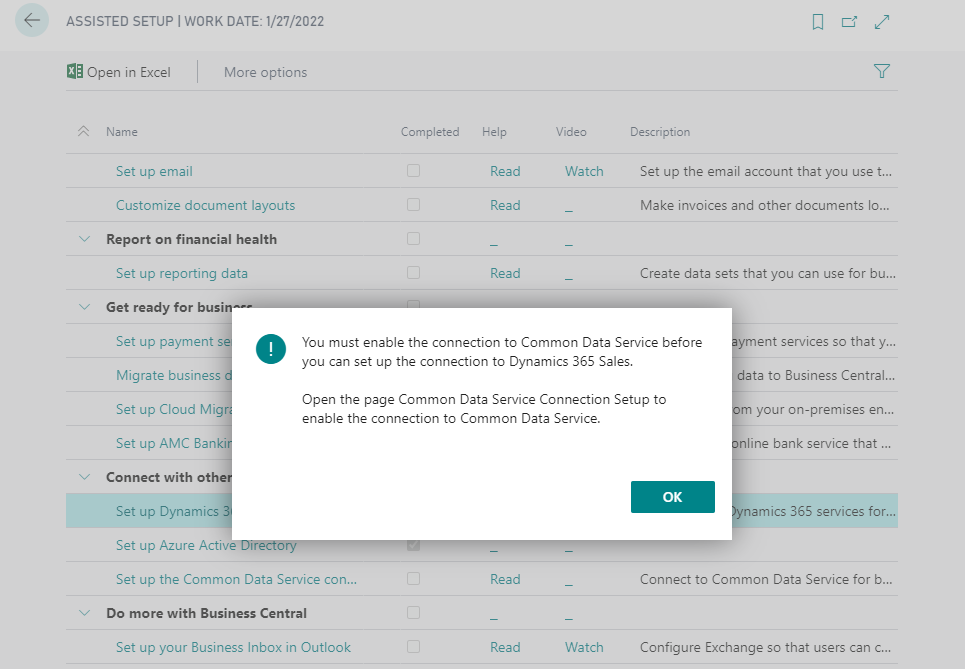
pastedimage1594992389662v1.png

Is Microsoft not going to support the connectivity of on-premise BC to on-premise CE (Dynamics 365 Sales), or is there away to disable CDS setup message so we can get Dynamics 365 Sales Setup page like the previous versions.

I have the same question (0)
  • Suggested answer
    Binesh Profile Picture
    7,887 on at

    Hello, You have to setup your CRM(Dynamics 365 Sales) URL and other required.

    in the Search box type CDS and then select the related link as shown below

    pastedimage1595001396159v1.png

    pastedimage1595001503007v3.png

    Test your connection, and then map the entity/records

    for reference see the below URL

    https://docs.microsoft.com/en-us/dynamics365/business-central/admin-common-data-service

  • Shlemon Zaia Profile Picture
    15 on at

    Thanks for your reply Binesh, as I stated in the beginning this is about connecting on premise both BC and CE, CDS does not help here.

    CDS only works for online Dynamics 365 Sales (CE), and I'm fully aware of that link and others but they all address connecting BC to Online Dynamics 365 which is not the case I have here.

  • Shlemon Zaia Profile Picture
    15 on at

    Updates,  Microsoft replied to a support ticket on-premise BC to CE is supported as per below link

    docs.microsoft.com/.../system-requirement-business-central-v16

  • Shlemon Zaia Profile Picture
    15 on at

    Page 5330 (CRM Connection Setup) shows how CDS connection is forced.

    pastedimage1595265374027v1.png

  • Suggested answer
    Shlemon Zaia Profile Picture
    15 on at

    Found it, up until BC16.4 (BC 2020 Wave 1 CU4) you won't be able to connect On-premise (BC to CE) without modifying the Base Application code, and the reason is Dynamics 365 Connection setup page will tries to get connection details from CDS setup (dataflex pro) which does not work.

  • AliHH Profile Picture
    40 on at

    Hello Shlemon,

    I'm on Business Central 2021 RW2, and I'm facing the same issue, but I can't modify the Base Application because it is read-only, What was your approach ?

    Thanks

Under review

Thank you for your reply! To ensure a great experience for everyone, your content is awaiting approval by our Community Managers. Please check back later.

Helpful resources

Quick Links

Season of Sharing Community Challenge Winners!

Congratulations to our community stars!

Women in Power Builds Momentum

Expanding mentorship, skilling, and AI innovation

Congratulations to the June Top 10 Community Leaders

These are the community rock stars!

Leaderboard > Small and medium business | Business Central, NAV, RMS

#1
OussamaSabbouh Profile Picture

OussamaSabbouh 647 Super User 2026 Season 1

#2
Gerardo Rentería García Profile Picture

Gerardo Rentería Ga... 447 Most Valuable Professional

#3
YUN ZHU Profile Picture

YUN ZHU 366 Super User 2026 Season 1

Last 30 days Overall leaderboard

Featured topics

Microsoft Training Manuals

Product updates

Dynamics 365 release plans
