web
You’re offline. This is a read only version of the page.
close
Skip to main content

Notifications

Announcements

No record found.

Community site session details

Community site session details

Session Id :
Service | Customer Service, Contact Center, Fie...
Answered

Activity feeds not available on UAT and Production instance. How to move activity feeds configurations and rules to another instance?

(0) ShareShare
ReportReport
Posted on by 327

Hi All,

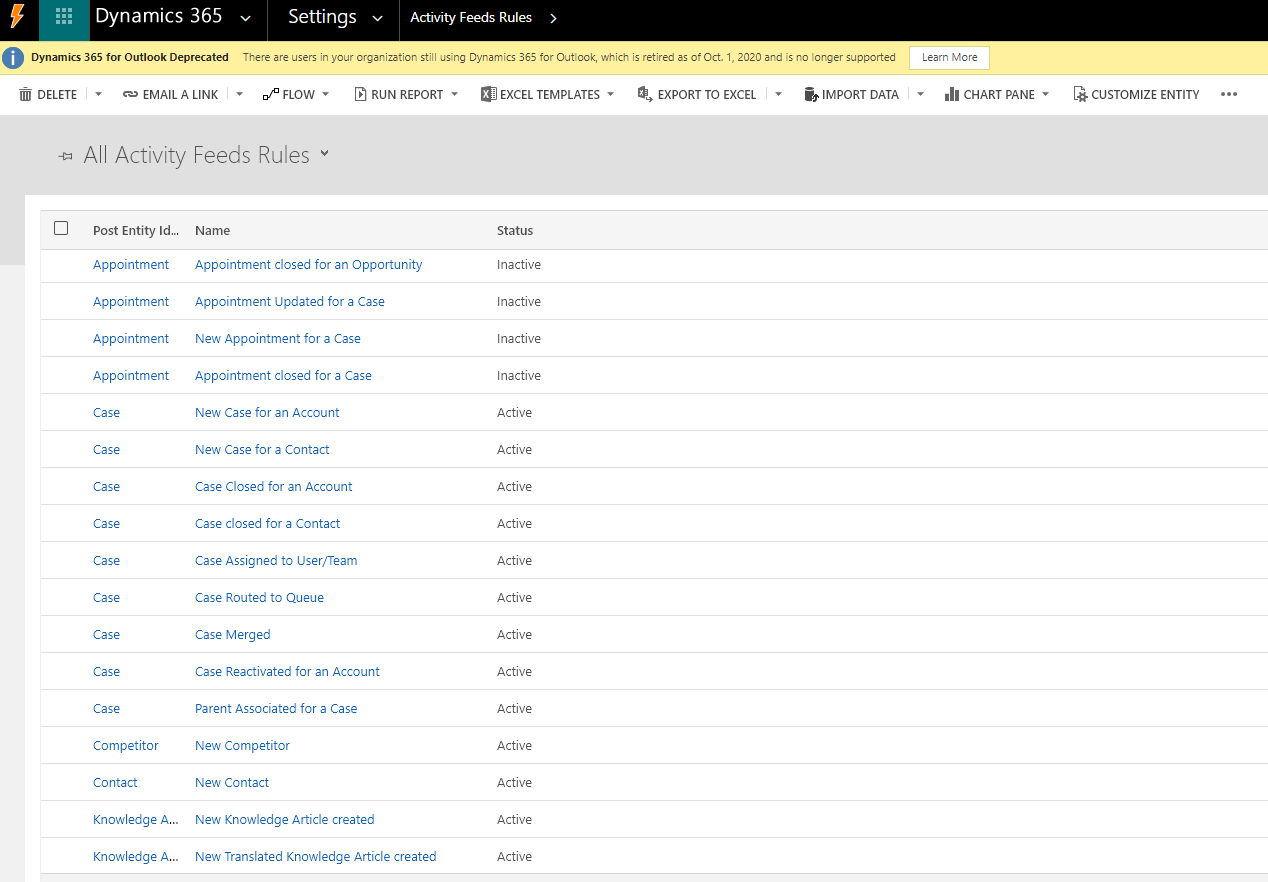
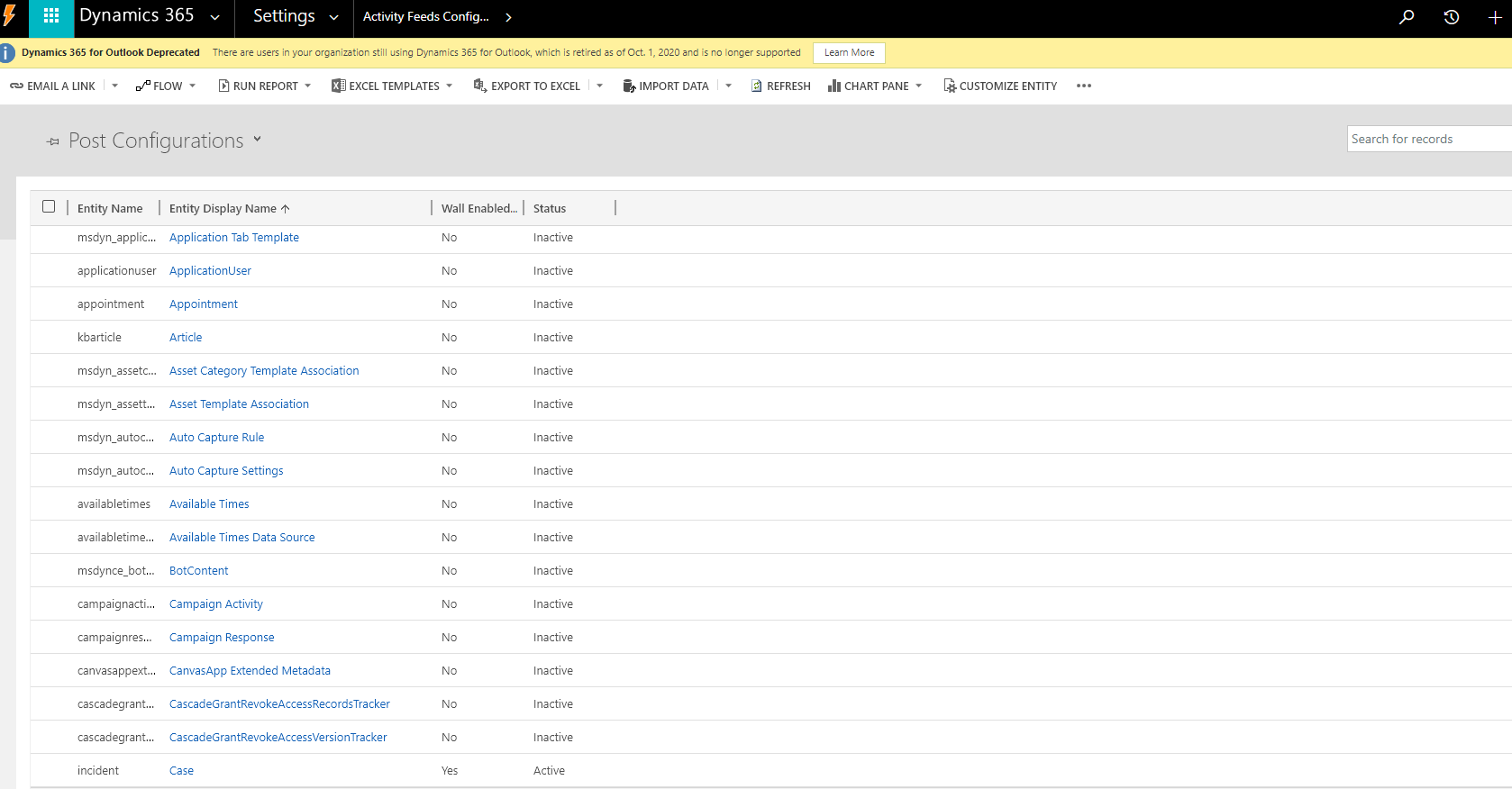
I am facing some issues with Activity Feeds. I have dev instance on which we have activity feeds configuration and rules so that I am able to see auto post on case records when new case is created or case route to queue. 
pastedimage1609307709413v1.png

pastedimage1609307743897v2.png

I have deployed my changes to UAT instance then I found that I am not able to see auto post on case records. So I found that there are no activity feeds configuration and rules in UAT. Now I want to move activity feeds configuration and rules from Dev instance to UAT instance.

In Production, I can't use copy everything option to move changes to production instance so in that case how I can move activity feeds configuration and rules to production. I have tried to import records from exported excel to UAT but it's not copying data.

How can I copy records to another environment? Is there any other way or if you think I am doing something wrong then please let me know.

Thank you,

Pradip

I have the same question (0)
  • Verified answer
    Community Member Profile Picture
    on at

    Hi Pradip,

    As you mentioned above, “So I found that there are no activity feeds configuration and rules in UAT.”

    It means that ‘Activity Feed Configuration’ and ‘Activity Feeds Rules’ functions part are not exist in the UAT instance?

    If so, you can’t use them in UAT instance though you import records.

     pastedimage1609322049268v1.png

    And you can refer following link to know more about how to copy data to another environment.

    https://carldesouza.com/how-to-copy-records-from-one-dynamics-365-org-to-another-using-export-and-import/

    https://docs.microsoft.com/en-us/previous-versions/dynamicscrm-2016/administering-dynamics-365/dn647421(v=crm.8)?redirectedfrom=MSDN

    Regards,

    Leah Ju

    Please mark as verified if the answer is helpful. Welcome to join hot discussions in Dynamics 365 Forums.

  • Pradip Raj Profile Picture
    327 on at

    Hi Leah Ju,

    Thank you very much for your response.

    I had tried excel import but it didn't work for me. Then I tried configuration migration tool and it worked for me.:)

    But it is not importing all the post configuration data and also we need to do some clean up on the imported data like remove duplicate from post configuration rules and activate post configuration records for case, contact, account and so on.

    We need to migrate two entities data 1) Post configuration and 2 Post rule configuration using configuration migration tool.

    Thanks

    Pradip

  • Suggested answer
    Pradip Raj Profile Picture
    327 on at

    Hi All,

    Finally I am able to resolve issue related to Auto Posts in production instance. I found that there are plugins related to Activity Feeds for each related entities in dynamics and some are missing in production so it is not showing auto posts on timeline control on case entity in production.

    We have added Activity Feeds plugins in the solution and export it to UAT & Production and it fixed the issue. 

    pastedimage1611889489366v1.png

Under review

Thank you for your reply! To ensure a great experience for everyone, your content is awaiting approval by our Community Managers. Please check back later.

Helpful resources

Quick Links

Responsible AI policies

As AI tools become more common, we’re introducing a Responsible AI Use…

Neeraj Kumar – Community Spotlight

We are honored to recognize Neeraj Kumar as our Community Spotlight honoree for…

Leaderboard > Service | Customer Service, Contact Center, Field Service, Guides

#1
Tom_Gioielli Profile Picture

Tom_Gioielli 57 Super User 2025 Season 2

#2
Daniyal Khaleel Profile Picture

Daniyal Khaleel 34 Most Valuable Professional

#3
Scott Jackson UK Profile Picture

Scott Jackson UK 22

Last 30 days Overall leaderboard

Featured topics

Product updates

Dynamics 365 release plans