web
You’re offline. This is a read only version of the page.
close
Skip to main content

Announcements

News and Announcements icon
Community site session details

Community site session details

Session Id :
Small and medium business | Business Central, N...
Answered

Net Change and Balances - 2

(0) ShareShare
ReportReport
Posted on by 5

Our company migrated to Dynamics 365 this year. Opening balances were input to Jan 1st 2021. For reporting purposes I need to run a report that shows Net Change -> so only movements for 2021.

Luckily Dynamics 365 Business Central enables me to run account schedule for balance sheet rows with "Net Change" chosen for "Row Type".

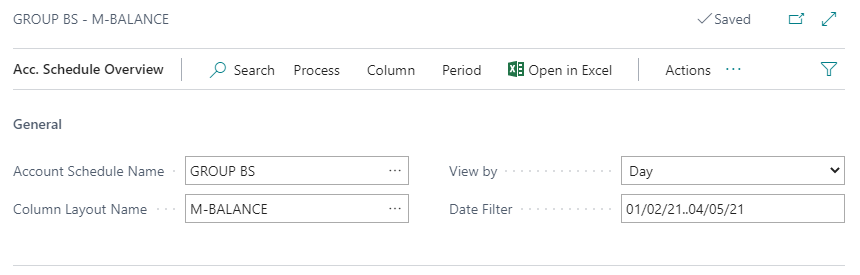
Unluckily I can't find a way to run account schedule for Q1 Net Changes that would leave out postings with date Jan 1st - these are inputs that created Opening Balances. When I choose Day and type in 02/01/21..04/05/21 it does nothing.

Is there any way to run account schedule for period Jan 2nd - March 31st?

I appreciate all answers, including longer workarounds.
pastedimage1617622338173v1.png

I have the same question (0)
  • JAngle Profile Picture
    159 on at

    What about using the trial balance report? Available as a report you output or as an excel report you refresh

  • Verified answer
    Community Member Profile Picture
    on at

    Teet,

    A few questions or places you should check:

    1. On the Account Schedule, the Row Type = Net Change

    pastedimage1617628950065v1.png

    2. Column Layout is defined:

    pastedimage1617628983462v2.png

    I have entries on 1/1/21 and if I enter a Date filter = 1/2/21..T my 1/1 entries are excluded.

    Check your setup.

    Hope this helps.

    Thanks,

    Steve

  • Teet R. Profile Picture
    5 on at

    Thanks for proposing trial balance report.

    However, we need the Balance Sheet report with different account definitions (group report accounts) that can be achieved by using the functionality available in account schedules. I am almost happy - I only miss the Net Change function that could truly extract the movements for 2021.

    At present it looks I have to run the report separately for Jan 1st and March 31st and do the deduction in Excel.

  • Suggested answer
    Teet R. Profile Picture
    5 on at

    Thanks!

    The problem was wrong layout chosen for the account schedule in question.

    After substituting the existing layout with M-NETCHANG magic started to happen!

    Thanks again!

Under review

Thank you for your reply! To ensure a great experience for everyone, your content is awaiting approval by our Community Managers. Please check back later.

Helpful resources

Quick Links

Season of Sharing Community Challenge Winners!

Congratulations to our community stars!

Women in Power Builds Momentum

Expanding mentorship, skilling, and AI innovation

Congratulations to the July Top 10 Community Leaders

These are the community rock stars!

Leaderboard > Small and medium business | Business Central, NAV, RMS

#1
OussamaSabbouh Profile Picture

OussamaSabbouh 572 Super User 2026 Season 2

#2
YUN ZHU Profile Picture

YUN ZHU 331 Super User 2026 Season 2

#3
Grigorios Mavrogeorgis Profile Picture

Grigorios Mavrogeorgis 330 Super User 2026 Season 2

Last 30 days Overall leaderboard

Featured topics

Microsoft Training Manuals

Product updates

Dynamics 365 release plans
