web
You’re offline. This is a read only version of the page.
close
Skip to main content

Notifications

Announcements

No record found.

Community site session details

Community site session details

Session Id :
Microsoft Dynamics CRM (Archived)

Actual Revenue value in Opportunity Closing Dialog

(0) ShareShare
ReportReport
Posted on by

Hi

Here we got a situation as below,

When we try to close an Opportunity as Won a Dialog appears as below Screen
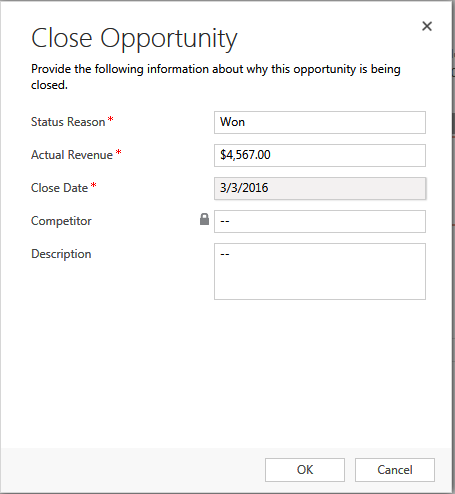
2086.Close-Opportunity.PNG

Here the 'Actual Revenue' field value is auto populating with the Est.Revenue field value from the Opportunity (as this is the OOB functionality). But here we require is in the Actual Revenue, the value should populate from a custom field (ex. Quoted Amount field in the Opportunity) value.

How we can achieve this? 

*This post is locked for comments

I have the same question (0)
  • Suggested answer
    a33ik Profile Picture
    84,331 Most Valuable Professional on at

    Hello,

    Unfortunately the only way I see is replacing of standard "Close Opportunity Dialog" with your custom. Something similar to butenko.pro/.../ms-crm-2011-how-to-override-standard-dialogs

  • Suggested answer
    razdynamics Profile Picture
    17,308 User Group Leader on at

    Hi Bnsp

    On the opportunity there is a Field called Revenue(IsRevenueSystemCalculated) , it provides 2 options, you need to change it from 'System calculated'  to 'User Provided' . Otherwise it will use the estimated revenue field from the values of products to calculate it.

    Hope this helps, Kindly tick 'Yes' to verify :)

    vest Wishes, raz

  • Verified answer
    Community Member Profile Picture
    on at

    Maybe I am off base and I was about to ask that question myself, but why not run a system workflow that updates the est revenue when you update the custom field, then essentially you have that value in two places and then just use the default "Close as" behavior?   Is that field restricted re workflows?

  • Community Member Profile Picture
    on at

    I would suggest Ray's way, and you can choose to use either a workflow or business rule - it's possible to achieve what you want with both.

Under review

Thank you for your reply! To ensure a great experience for everyone, your content is awaiting approval by our Community Managers. Please check back later.

Helpful resources

Quick Links

Responsible AI policies

As AI tools become more common, we’re introducing a Responsible AI Use…

Neeraj Kumar – Community Spotlight

We are honored to recognize Neeraj Kumar as our Community Spotlight honoree for…

Leaderboard > 🔒一 Microsoft Dynamics CRM (Archived)

#1
SA-08121319-0 Profile Picture

SA-08121319-0 4

#1
Calum MacFarlane Profile Picture

Calum MacFarlane 4

#3
Alex Fun Wei Jie Profile Picture

Alex Fun Wei Jie 2

Last 30 days Overall leaderboard

Featured topics

Product updates

Dynamics 365 release plans



