web
You’re offline. This is a read only version of the page.
close
Skip to main content

Notifications

Announcements

No record found.

Community site session details

Community site session details

Session Id :
Small and medium business | Business Central, N...
Answered

Auto update of Description field in Sales line

(0) ShareShare
ReportReport
Posted on by

Description filed in Sales line

The 'Description' filed is auto filled when choosing an item in 'No.' field. in sales line.

The issue is when choosing the 'Variant code' in same line , the 'Description' filed value is getting updated(Replaced) with Variant code description. Below explained with pic

Before Choosing the 'Variant code' in Lines. (Note - The variant code is assigned to Item in Sales price book)
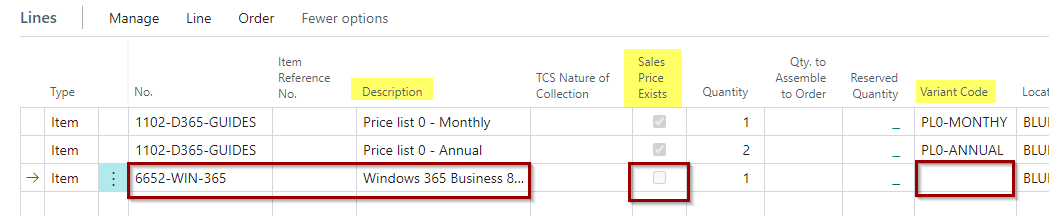
pastedimage1661483192794v2.png

After choosing the 'Variant code ' in Lines.
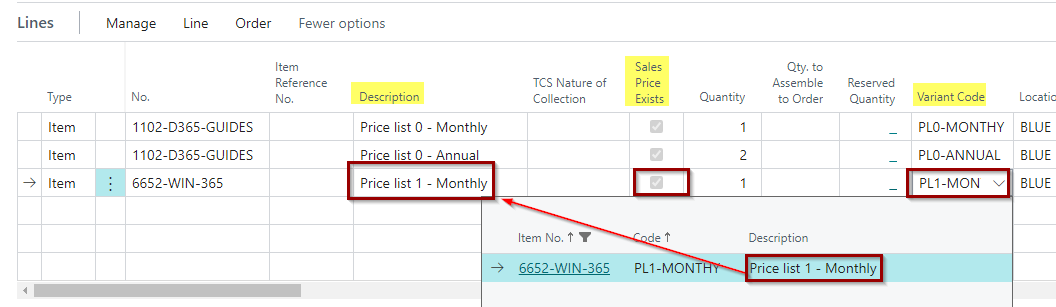
pastedimage1661483362314v3.png

So this reflects in Sales invoice printout too. Need Solution why the description filed is getting updated and how to avoid this and capture(retain) the item description itself in line.

I have the same question (0)
  • Suggested answer
    Nitin Verma Profile Picture
    21,698 Moderator on at

    Hi,

    you need to take help from your developer to replace the description back from Item description even if there is a item variant available.

    Thanks.

  • Suggested answer
    JAngle Profile Picture
    133 on at

    On going you may want to use the main description on the variant. Failing that you could use item references to hold a differing description for the item and variant combination. To resolve the previous entries either have a developer update values or create a report extension for the sales invoice report and have it get the item description if the sales invoice line has a variant code

  • Chandra Moulee Profile Picture
    on at

    Thanks for the response, in sales line the item description field is replaced by field 'Description (3, Text)' from table = Item Variant (5401), but luckily we got 2 Description field in Item variant table 5401. So I Used both , as below In Description 1 given Item description and in Description 2 given Variant description.

    pastedimage1661498558907v1.png

    below is the output for Same Item before and after using  2 Description fields,

     pastedimage1661498756122v2.png

  • Suggested answer
    Amit Baru Profile Picture
    3,037 on at

    Hi

    Make extension of Sales Line table and write code "Onvalidate" trigger of Variant field. for retaining the Items description in Sales Line.

    Regards

    Amit Sharma

    www.erpconsultors.com

    linkedin.com/in/amit-sharma-94542440/

    Pls press Yes if info is useful.

  • Suggested answer
    Dallefeld Profile Picture
    211 User Group Leader on at

    If you want the description of the item to print on the sales line, make the description of the variant the item description. No coding necessary

  • Chandra Moulee Profile Picture
    on at

    Thanks for the solution, I utilized the 2 Description field available in Item variant. Now able to get Item Description in Sales invoice.

    pastedimage1661737877554v1.png

Under review

Thank you for your reply! To ensure a great experience for everyone, your content is awaiting approval by our Community Managers. Please check back later.

Helpful resources

Quick Links

Responsible AI policies

As AI tools become more common, we’re introducing a Responsible AI Use…

Neeraj Kumar – Community Spotlight

We are honored to recognize Neeraj Kumar as our Community Spotlight honoree for…

Leaderboard > Small and medium business | Business Central, NAV, RMS

#1
OussamaSabbouh Profile Picture

OussamaSabbouh 3,226

#2
Jainam M. Kothari Profile Picture

Jainam M. Kothari 2,047 Super User 2025 Season 2

#3
YUN ZHU Profile Picture

YUN ZHU 1,257 Super User 2025 Season 2

Last 30 days Overall leaderboard

Featured topics

Product updates

Dynamics 365 release plans
