web
You’re offline. This is a read only version of the page.
close
Skip to main content

Announcements

No record found.

News and Announcements icon
Community site session details

Community site session details

Session Id :
Microsoft Dynamics AX (Archived)

Query Range Additon to SSRS report not showing Query Range Data

(0) ShareShare
ReportReport
Posted on by 507

DEar ALl,

I have added Dynamics Query range of parameters to SSRS reports using TmpSysQuery Logic. 

Below is the code :

public void processReport()
{
Query q;
QueryRun qRun;
QueryBuildDataSource qbds;
InventDim inventDim;
ProdTable prodTable;

xxxProdOverviewReportDataTmp.setTmp();
q = this.parmQuery();
tmpSysQuery = xxxUtil::rangesToTable(q);
qRun = new QueryRun(q);
while(qRun.next())
{
xxxProdOverviewReportDataTmp.clear();

prodTable = qrun.get(tablenum(ProdTable));
inventDim = qrun.get(tablenum(InventDim));

xxxProdOverviewReportDataTmp.ItemId = prodTable.ItemId;

.....

xxxProdOverviewReportDataTmp.insert();

}

[SRSReportDataSetAttribute(tablestr(xxxTmpSysQuery))]
public xxTmpSysQuery getTmpSysQuery()
{


select tmpSysQuery;
return tmpSysQuery;
}

public static xxxTmpSysQuery rangesToTable(Query _query)
{
QueryBuildDataSource qbds;
QueryBuildRange queryBuildRange;
xxTmpSysQuery tmpSysQuery;
LabelType tableLabel;
int occurrence;
int dataSourceNo;
int i;

if (!_query)
{
return tmpSysQuery;
}

for (dataSourceNo = 1; dataSourceNo <= _query.dataSourceCount(); dataSourceNo++)
{
qbds = _query.dataSourceNo(dataSourceNo);
if (qbds.enabled())
{
occurrence = SysQuery::tableOccurrence(_query, qbds.table(), dataSourceNo);
tableLabel = tableId2pname(qbds.table()) + SysQuery::tableOccurrenceText(occurrence);

for (i = 1; i <= qbds.rangeCount(); i++)
{
queryBuildRange = qbds.range(i);

if (queryBuildRange.value() && queryBuildRange.status() != RangeStatus::Hidden)
{
tmpSysQuery.clear();
tmpSysQuery.DataSourceNo = qbds.uniqueId();
tmpSysQuery.TableLabel = tableLabel;
tmpSysQuery.FieldLabel = fieldId2pname(qbds.table(), queryBuildRange.field());
tmpSysQuery.RangeValue = queryBuildRange.value();
tmpSysQuery.insert();
}
}
}
}

return tmpSysQuery;
}

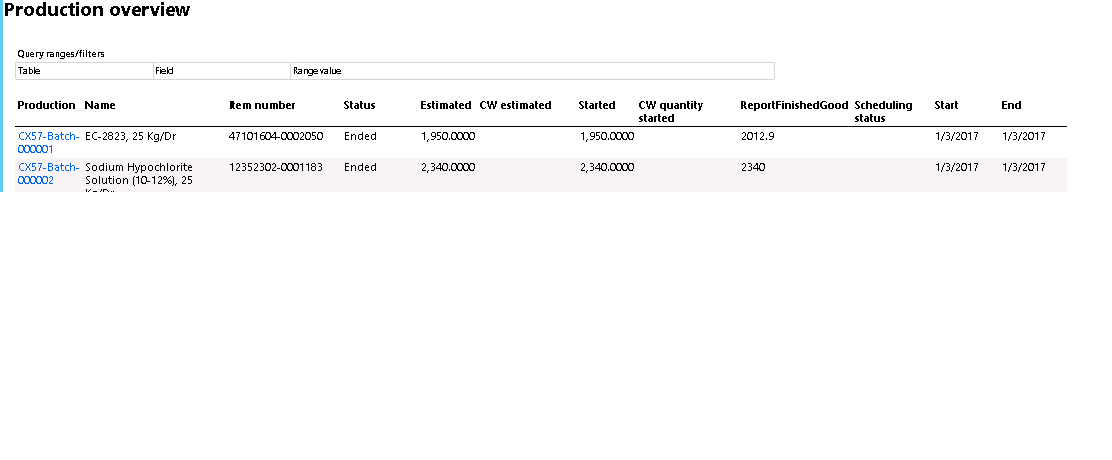
Now the Report output show data but not the query Range . ANy Idea?/

Pls see atatched sceenshot.
1715.1.png

*This post is locked for comments

I have the same question (0)
  • Pravasti AK Profile Picture
    2,985 on at

    Hi,

    Please refer the below link:

    https://community.dynamics.com/ax/f/33/t/154981

  • Safeer PS Profile Picture
    507 on at

    I think the Query range is not fetching the QUERY it seems.

  • Pravasti AK Profile Picture
    2,985 on at
  • Safeer PS Profile Picture
    507 on at

    I created this by referring this doc.

  • Suggested answer
    Patryk Zmijewski Profile Picture
    21 on at

    I know the topic is from long ago, but since nobody has given any suggested answer I'll share my observations with you.

    The query ranges that are visible in processReport (and further in rangesToTable method) must be declared in AOT query object.

    You can see it if you throw an error with qbds.rangeCount().

    I'm trying to find a workaround for that, but up to now it's the only thing I noticed.

    Best regards,

    Patryk

Under review

Thank you for your reply! To ensure a great experience for everyone, your content is awaiting approval by our Community Managers. Please check back later.

Helpful resources

Quick Links

Introducing the 2026 Season 1 community Super Users

Congratulations to our 2026 Super Stars!

Meet the Microsoft Dynamics 365 Contact Center Champions

We are thrilled to have these Champions in our Community!

Congratulations to the March Top 10 Community Leaders

These are the community rock stars!

Leaderboard > 🔒一 Microsoft Dynamics AX (Archived)

#1
Joris dG Profile Picture

Joris dG 5

#2
Andrew Jones a1x Profile Picture

Andrew Jones a1x 2

#3
GL-01081504-0 Profile Picture

GL-01081504-0 1

Last 30 days Overall leaderboard

Featured topics

Product updates

Dynamics 365 release plans
