web
You’re offline. This is a read only version of the page.
close
Skip to main content

Notifications

Announcements

Community site session details

Community site session details

Session Id :
Small and medium business | Business Central, N...
Unanswered

Power Automate for document attachments not working for Purchase Order attachments

(0) ShareShare
ReportReport
Posted on by 15

https://learn.microsoft.com/en-us/dynamics365-release-plan/2022wave2/smb/dynamics365-business-central/power-apps-power-automate-support-document-attachments

"The new capability of the connector allows for easy access to document attachments (for instance, an original order request linked as a PDF to a sales order), related record media (for instance, images linked to items) and other data linked to business records. "

I've tried doing this with document attachments on Purchase Orders, but it doesn't seem to work as I expected. Even getting the system IDs manually and plugging them into the PA action doesn't seem to work.

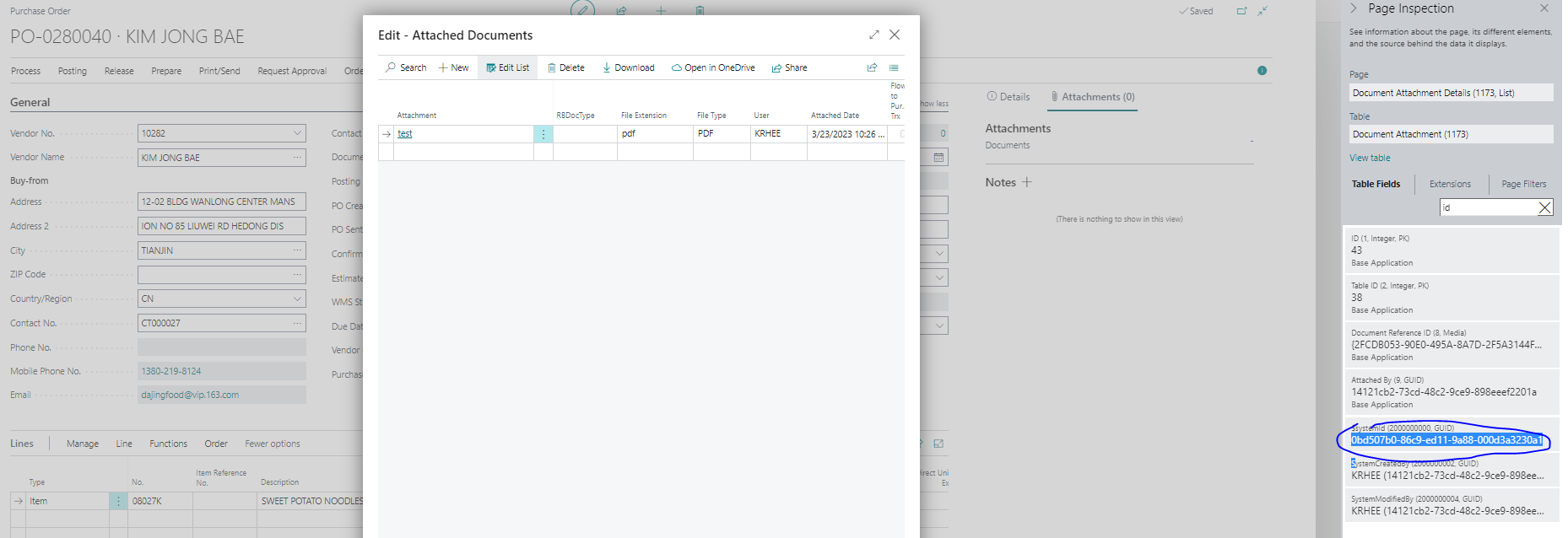
Here's the system ID of the attachment
pastedimage1679581632275v1.png

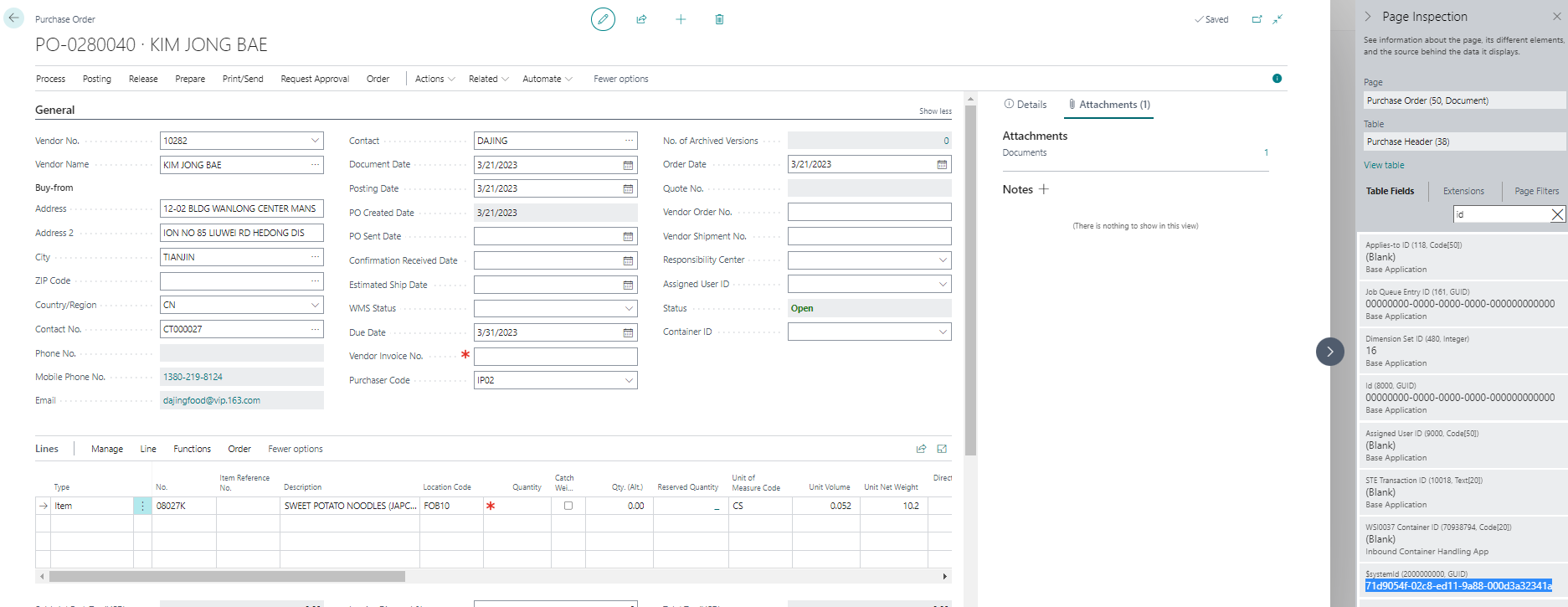
Here's the system ID of the Purchase Order
pastedimage1679581786936v2.png

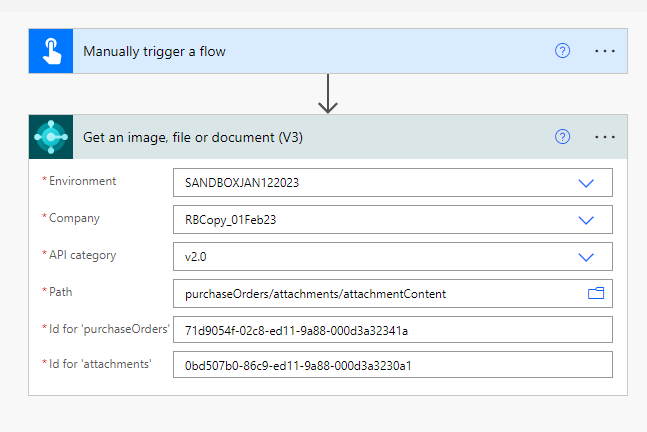
I set up the simplest test that I could in Power Automate:
pastedimage1679581839246v3.png

But I get an error "Resource Not found"

{
    "statusCode"404,
    "headers": {
        "Pragma""no-cache",
        "Cache-Control""no-cache",
        "Set-Cookie""ARRAffinity=06c56b8471ef26f13c61783eeb00d8e15bf74407238d9c8d8936521d5d5d2dd0;Path=/;HttpOnly;Secure;Domain=dynamicssmbsaas-wus.azconn-wus-001.p.azurewebsites.net,ARRAffinitySameSite=06c56b8471ef26f13c61783eeb00d8e15bf74407238d9c8d8936521d5d5d2dd0;Path=/;HttpOnly;SameSite=None;Secure;Domain=dynamicssmbsaas-wus.azconn-wus-001.p.azurewebsites.net",
        "x-ms-request-id""20d8de25-4f81-455b-af7d-98b8f456f783",
        "X-AspNet-Version""4.0.30319",
        "X-Powered-By""ASP.NET",
        "Strict-Transport-Security""max-age=31536000",
        "X-Content-Type-Options""nosniff",
        "X-Frame-Options""DENY",
        "Timing-Allow-Origin""*",
        "x-ms-apihub-cached-response""false",
        "x-ms-apihub-obo""false",
        "Date""Thu, 23 Mar 2023 14:31:07 GMT",
        "Content-Length""487",
        "Content-Type""application/json",
        "Expires""-1"
    },
    "body": {
        "status"404,
        "message""ErrorCode: BadRequest_ResourceNotFound  Resource not found for the segment 'attachment'.  CorrelationId:  02bdaba8-263a-49ba-ae2d-5737add7ada9.\r\nclientRequestId: 20d8de25-4f81-455b-af7d-98b8f456f783",
        "error": {
            "message""ErrorCode: BadRequest_ResourceNotFound  Resource not found for the segment 'attachment'.  CorrelationId:  02bdaba8-263a-49ba-ae2d-5737add7ada9."
        },
        "source""api.businesscentral.dynamics.com",
        "errors": []
    }
}
Does anyone have any ideas on what I'm doing wrong? Have I just misunderstood what this update is capable of?
I have the same question (1)
  • kevinrhee Profile Picture
    15 on at

    Yes, the examples that you have (item picture, PI PDF) both work for me as well.  It's this particular path with the Purchase Order document attachments (table 1173) that I can't get to work correctly.  The ODATA Path I'm looking at is  "purchaseOrders/attachment/attachmentContent"

  • Nitin Verma Profile Picture
    21,710 Moderator on at

    Hi,

    Can you go through below link?

    demiliani.com/.../

  • kevinrhee Profile Picture
    15 on at

    Thanks.  I don't have any issue with the item picture.  That one works exactly as expected.  The issue just comes down to attachments on things like Purchase Orders.

  • Nitin Verma Profile Picture
    21,710 Moderator on at

    Hi,

    You can try below link, might be it helps you understand the basic.

    www.navwithnav.com/.../

Under review

Thank you for your reply! To ensure a great experience for everyone, your content is awaiting approval by our Community Managers. Please check back later.

Helpful resources

News and Announcements

Season of Giving Solutions is Here!

Quick Links

Responsible AI policies

As AI tools become more common, we’re introducing a Responsible AI Use…

Neeraj Kumar – Community Spotlight

We are honored to recognize Neeraj Kumar as our Community Spotlight honoree for…

Leaderboard > Small and medium business | Business Central, NAV, RMS

#1
OussamaSabbouh Profile Picture

OussamaSabbouh 1,472

#2
Khushbu Rajvi. Profile Picture

Khushbu Rajvi. 742 Super User 2025 Season 2

#3
YUN ZHU Profile Picture

YUN ZHU 684 Super User 2025 Season 2

Last 30 days Overall leaderboard

Featured topics

Product updates

Dynamics 365 release plans
