web
You’re offline. This is a read only version of the page.
close
Skip to main content

Notifications

Announcements

No record found.

Community site session details

Community site session details

Session Id :
Microsoft Dynamics CRM (Archived)

Unable to update lookup field ( navigation attribute) using Xrm.WebApi dynamic 365 CRM

(0) ShareShare
ReportReport
Posted on by 235

Hi Friends,

I am struggling to update lookup fields using XRM.WEBAPI for custom entity.

I have web resource and i used JQgrid to show and update related records, Lookup is one of the field inside grid.

The lookup field "Topics" on entity "Query"(web resource has topics grid) , my requirement is to update this field using WEBAPI.

I got the below error:

An error occurred while validating input parameters: Microsoft.OData.ODataException: An undeclared property 'kv_TopicAsk' which only has property annotations in the payload but no property value was found in the payload. In OData, only declared navigation properties and declared named streams can be represented as properties without values.
at Microsoft.OData.JsonLight.ODataJsonLightResourceDeserializer.ReadUndeclaredProperty(IODataJsonLightReaderResourceState resourceState, String propertyName, Boolean propertyWithValue)
at Microsoft.OData.JsonLight.ODataJsonLightResourceDeserializer.ReadPropertyWithoutValue(IODataJsonLightReaderResourceState resourceState, String propertyName)
at Microsoft.OData.JsonLight.ODataJsonLightResourceDeserializer.<>c__DisplayClass4_0.<ReadResourceContent>b__0(PropertyParsingResult propertyParsingResult, String propertyName)
at Microsoft.OData.JsonLight.ODataJsonLightDeserializer.ProcessProperty(PropertyAndAnnotationCollector propertyAndAnnotationCollector, Func`2 readPropertyAnnotationValue, Action`2 handleProperty)
at Microsoft.OData.JsonLight.ODataJsonLightResourceDeserializer.ReadResourceContent(IODataJsonLightReaderResourceState resourceState)
at Microsoft.OData.JsonLight.ODataJsonLightReader.ReadResourceStart(PropertyAndAnnotationCollector propertyAndAnnotationCollector, SelectedPropertiesNode selectedProperties)
at Microsoft.OData.JsonLight.ODataJsonLightReader.ReadAtStartImplementationSynchronously(PropertyAndAnnotationCollector propertyAndAnnotationCollector)
at Microsoft.OData.ODataReaderCore.ReadImplementation()
at Microsoft.OData.ODataReaderCore.InterceptException[T](Func`1 action)
at System.Web.OData.Formatter.Deserialization.ODataReaderExtensions.ReadResourceOrResourceSet(ODataReader reader)
at System.Web.OData.Formatter.Deserialization.ODataResourceDeserializer.Read(ODataMessageReader messageReader, Type type, ODataDeserializerContext readContext)
at System.Web.OData.Formatter.ODataMediaTypeFormatter.ReadFromStream(Type type, Stream readStream, HttpContent content, IFormatterLogger formatterLogger)

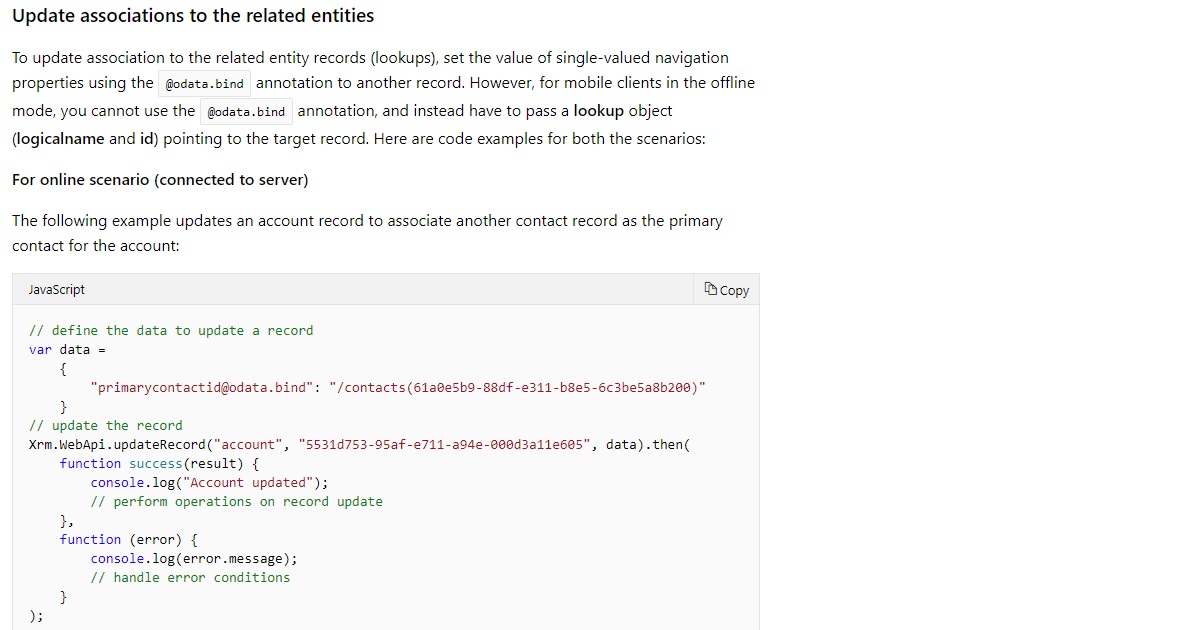
As per documentation given my Microsoft i tried the same but it is not working.
msddocs.jpg

I tried both, Schema name , logical name, post-fix with underscore related entity schema name but no luck.....

var data = { schemaName@odata.bind": "/relatedentity plural(31a0r5b9-88df-e511-b8e5-6c3be5a8b200)" }

var data = { logicalName@odata.bind": "/relatedentity plural(31a0r5b9-88df-e511-b8e5-6c3be5a8b200)" }

var data = { logicalName_relatedenity@odata.bind": "/relatedentity plural(31a0rb9-88df-e511-b8e5-6c3be5a8b200)" }

Please let me now if you have faced the same and got any solution.

Rregards,

Santosh

*This post is locked for comments

I have the same question (0)
  • Suggested answer
    crm development Profile Picture
    870 on at

    Hi, Have you tried below way. Make sure you give lookup schema name not logical name. Thanks.

    var entity = {};

    entity["schemaName@odata.bind"] = "/relatedentity plural(31a0rb9-88df-e511-b8e5-6c3be5a8b200)";

  • Verified answer
    unizap Profile Picture
    on at

    Hi,

    You can download ODATA metadata from Customizations->Developer Resources. In the downloaded ODATA XML look for your entity "Query". Under the entity node you will have "Property" nodes & "Navigation Property" nodes. Under the Navigation Properties look for your field "Topic Ask"; Check the "Name" attribute of that property- this is the name you need to use in your code. Please note that it is case sensitive.

    var data = {NavigationPropertyName@odata.bind": "/relatedentity plural(31a0rb9-88df-e511-b8e5-6c3be5a8b200)" }.

    Hope this works for you. Please mark as answered or let me know if any query.

    Thanks.

  • Santosh Kulkarni Profile Picture
    235 on at

    Anand Thanks for reply,....

    I have tried this , see my below code let me know if missing anything....

    var queryTopicId = "/kv_topics(" + topic.id.toString().replace("{", "").replace("}", "") + ")";

    var updatedQueryPoint = { };

    //schema name

               updatedQueryPoint ["kv_TopicAsk@odata.bind"] = queryTopicId

    //logical name

               // updatedQueryPoint ["kv_topicask@odata.bind"] = queryTopicId  

               // updatedQueryPoint ["kv_TopicAsk_kv_topic@odata.bind"] = queryTopicId

               // updatedQueryPoint ["kv_topicask_kv_topic@odata.bind"] = queryTopicId

               try {

                   WebApi.updateRecord("kv_query", queryGuid, updatedQueryPoint ).then(

                       function success(result) {

                           console.error("record updated...");

                       },

                       function (error) {

                           console.error(error.message);

                           debugger;

                       });

               }

               catch (e) {

                   formContext.Utility.alertDialog(e.message);

               }

  • Suggested answer
    crm development Profile Picture
    870 on at

    Hi, try below code. Hope queryGuid is without {} if not then make proper GUID using slice.

    Hope this helps. 

    -----------------------------------------------------------------------------

    var queryTopicId = null;
        var updatedQueryPoint = null;
        try {
            updatedQueryPoint = new Object();
            var queryTopicId = topic.id.slice(1,-1);
            updatedQueryPoint ["kv_TopicAsk@odata.bind"] = "/kv_topics(" + queryTopicId + ")";
         
            Xrm.WebApi.updateRecord("kv_query", queryGuid, updatedQueryPoint).then(
                       function success(result) {
                           console.error("record updated...");
                       },
    function (error) {
               console.error(error.message);
            });

        } catch (e) {
            formContext.Utility.alertDialog(e.message);
        }

  • Verified answer
    Santosh Kulkarni Profile Picture
    235 on at

    Thanks Mayank...... It works.!!

    It is "NavigationPropertyName" what is requried.

Under review

Thank you for your reply! To ensure a great experience for everyone, your content is awaiting approval by our Community Managers. Please check back later.

Helpful resources

Quick Links

Responsible AI policies

As AI tools become more common, we’re introducing a Responsible AI Use…

Neeraj Kumar – Community Spotlight

We are honored to recognize Neeraj Kumar as our Community Spotlight honoree for…

Leaderboard > 🔒一 Microsoft Dynamics CRM (Archived)

#1
SA-08121319-0 Profile Picture

SA-08121319-0 4

#1
Calum MacFarlane Profile Picture

Calum MacFarlane 4

#3
Alex Fun Wei Jie Profile Picture

Alex Fun Wei Jie 2

Last 30 days Overall leaderboard

Featured topics

Product updates

Dynamics 365 release plans



