web
You’re offline. This is a read only version of the page.
close
Skip to main content

Announcements

No record found.

News and Announcements icon
Community site session details

Community site session details

Session Id :
Business Central forum

Get values from one page to add them in another one

(0) ShareShare
ReportReport
Posted on by

Hey guys,

I have the following problem:
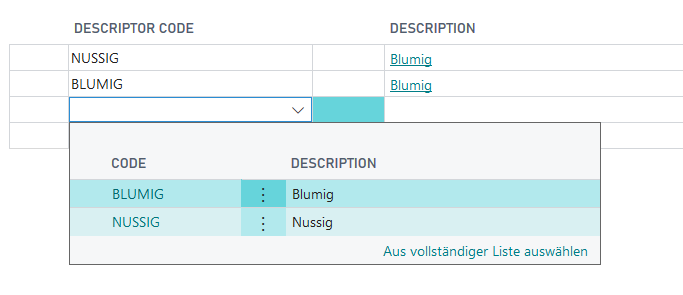
pastedimage1565253294620v1.png

When I try to add the values from the page below, I always get the Description of the first line.

Also when I add "Nussig" I get "Blumig" and not "Nussig"...

In the OnValidate of the field Descriptor Code I make a Get to get the Descriptor Code and I assign the Description to the Description to the above page...

Where is my mistake?

And the other thing I would like to ask, why is there no possibility to add new data?!

Why is there no "New" or so?

Thank you :)

Categories:
I have the same question (0)
  • Verified answer
    Avinash B Profile Picture
    1,455 on at

    Hi,

    The Description field looks like a FlowField. What is the CalcFormula you have defined?

    If its a flowfield, by making it Normal it will work.

  • Community Member Profile Picture
    on at

    Now it is working ;) but still without the possibility "New" or "+"

  • Suggested answer
    Avinash B Profile Picture
    1,455 on at

    You must provide the "LookupPageId" on the table to enable the New or +.

  • Community Member Profile Picture
    on at

    I even use "LookupPageId"  in the general properties of the table...strange...

  • Community Member Profile Picture
    on at

    Still it is not possible for me to add new data to my page...

    pastedimage1565939434864v1.png

    That is the view I get...why is there no "New" or +...

    Here is the code I have written:

    pastedimage1565939877982v3.png

    I am also using LookupPageID I am also using.

  • Verified answer
    I Gusti Made Ari Profile Picture
    3,608 on at

    Check following to allow you add new data :

    If you don't have any card page linked to the list page , make sure "Editable" set to Yes for the list Page.

    If you have card page linked to the list page, you can set the list page to Non Editable but make sure the card page is editable.

  • Community Member Profile Picture
    on at

    OK, I did not understand...sorry.

    I have created a page from type List and as properties is has only PageType, SourceTabel and Caption. Nothing more.

    And then I have another page from type Card with properties PageType, SourceTable and Caption.

    The Listpage I have integrated in my Card page as a part. The part has no special properties. Where is my fault?

Under review

Thank you for your reply! To ensure a great experience for everyone, your content is awaiting approval by our Community Managers. Please check back later.

Helpful resources

Quick Links

November Spotlight Star - Khushbu Rajvi

Congratulations to a top community star!

Forum Structure Changes Coming on 11/8!

In our never-ending quest to help the Dynamics 365 Community members get answers faster …

Dynamics 365 Community Platform update – Oct 28

Welcome to the next edition of the Community Platform Update. This is a status …

Leaderboard > Business Central

Last 30 days Overall leaderboard

Featured topics

Product updates

Dynamics 365 release plans
