web
You’re offline. This is a read only version of the page.
close
Skip to main content

Notifications

Announcements

No record found.

Community site session details

Community site session details

Session Id :
Small and medium business | Business Central, N...
Answered

You do not have any environments. Please create one and try again. - Accessing Customer's Business Central Tenant from Power BI

(0) ShareShare
ReportReport
Posted on by 216

Hi guys,

I have delegated admin rights to a client's business central tenant and i am trying to connect to the Business central from power BI desktop. However i get the error "You do not have any environments. Please create one and try again." and it looks like Power BI cannot access the customer's tenants.

My question is:

As a partner, how do i create power bi reports for the client on their tenant?

Kind regards,

Kuda

I have the same question (0)
  • Suggested answer
    Inge M. Bruvik Profile Picture
    1,105 Moderator on at

    Unless you have a user belonging in the customers Azure AD the correct way would be the create a Power BI app that the customer can deploy in their Power BI environment. The same way that it is done with the standard Power BI apps for BC.

    Maybe you find some hints here:

    docs.microsoft.com/.../deployment-pipelines-process

    The easy work around is to have your customer create a user for you in their AD. But then they will have to pay for your licenses.

  • Suggested answer
    YUN ZHU Profile Picture
    95,432 Super User 2025 Season 2 on at

    Hi,  I'm not sure if this has anything to do with the info below, hope it gives you some hints.

    https://docs.microsoft.com/en-us/partner-center/gdap-supported-workloads#power-bi

    pastedimage1663288982028v1.png

    Thanks.
    ZHU

  • Rebe.Gwaindepy Profile Picture
    216 on at
    [quote user="Inge M. Bruvik"]

    Unless you have a user belonging in the customers Azure AD the correct way would be the create a Power BI app that the customer can deploy in their Power BI environment. The same way that it is done with the standard Power BI apps for BC.

    Maybe you find some hints here:

    docs.microsoft.com/.../deployment-pipelines-process

    The easy work around is to have your customer create a user for you in their AD. But then they will have to pay for your licenses.

    [/quote]

    Hi NorthW and yzhums ,

    Thanks for taking sometime to assist. here is a little background to the problem:

    The client created me as a guest on the Azure Tenant and my guest email looks like kudakwashe.gwaindepi_mydomain@CustomerDomain.OnMicrosoft.com, assigned me a Power BI free license (though i already have a Pro license), gave me access to business central (i can log in fine), i can even sign in on power BI desktop using the sign into an organisation option, though it is not showing my email address like it normally does when i sign into my tenant:
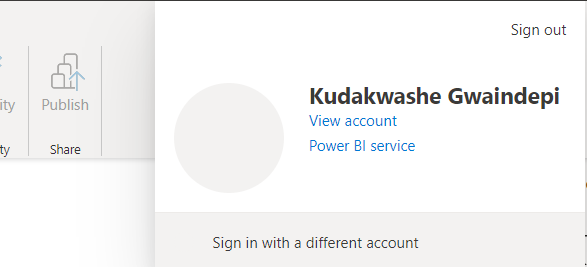
    pastedimage1663620006486v1.png

    When i get data, and select Dynamics 365 Business central is get the below error:
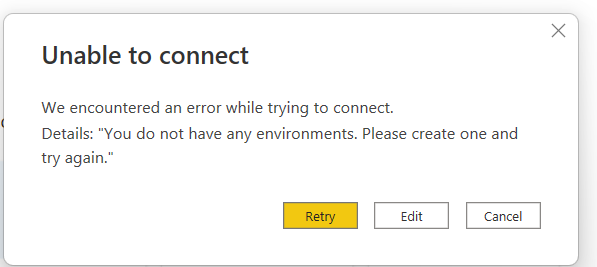
    pastedimage1663620169395v2.png

    I am sure i am connected to the client tenant because if i change my Last name on their side it changes on my power bi. I am just confused as to why Power BI desktop would say i dont have business central environments.

    Kind regards,

    Kuda

  • Rebe.Gwaindepy Profile Picture
    216 on at
    [quote user="Rebe.Gwaindepy"]
    Inge M. Bruvik said:

    Unless you have a user belonging in the customers Azure AD the correct way would be the create a Power BI app that the customer can deploy in their Power BI environment. The same way that it is done with the standard Power BI apps for BC.

    Maybe you find some hints here:

    docs.microsoft.com/.../deployment-pipelines-process

    The easy work around is to have your customer create a user for you in their AD. But then they will have to pay for your licenses.

    Hi Inge M. Bruvik and ZHU YUN ,

    Thanks for taking sometime to assist. here is a little background to the problem:

    The client created me as a guest on the Azure Tenant and my guest email looks like kudakwashe.gwaindepi_mydomain@CustomerDomain.OnMicrosoft.com, assigned me a Power BI free license (though i already have a Pro license), gave me access to business central (i can log in fine), i can even sign in on power BI desktop using the sign into an organisation option, though it is not showing my email address like it normally does when i sign into my tenant:

    pastedimage1663620006486v1.png

    When i get data, and select Dynamics 365 Business central is get the below error:

    pastedimage1663620169395v2.png

    I am sure i am connected to the client tenant because if i change my Last name on their side it changes on my power bi. I am just confused as to why Power BI desktop would say i dont have business central environments.

    Kind regards,

    Kuda

    [/quote]

    in addition i have been following  this whitepaper Distribute Power BI content to external guest users using Azure Active Directory B2B - Power BI | Microsoft Learn as a guide

  • Suggested answer
    Inge M. Bruvik Profile Picture
    1,105 Moderator on at

    Unfortunately you can not be a guest user in your customers AD when you try to connect to their Power BI environment. You will have to make them create you as a regular user.

  • Suggested answer
    YUN ZHU Profile Picture
    95,432 Super User 2025 Season 2 on at

    Hi, hope the following helps as well.

    https://learn.microsoft.com/en-us/power-bi/enterprise/service-admin-azure-ad-b2b#considerations-and-limitations

    Thanks.

    ZHU

  • Suggested answer
    Rebe.Gwaindepy Profile Picture
    216 on at

    Hi guys,

    After hours of trying, i  managed to get it done from a different computer. the problem was actually coming from the BC connector which had cached my Tenant details and was using them on the other tenant. 

    I tried clearing cache, data and even uninstalling and it not working. So for now i am using a different PC to connect to the client environment.

    Kind regards,

  • Verified answer
    Rebe.Gwaindepy Profile Picture
    216 on at

    This is how  i managed to get it to work:

    1) added as a guest user on client tenant

    2) guest user assigned BC license

    3) allow external users to access Power BI content on Power BI admin portal - tenant settings

    4) On power BI desktop sign in to an organisation (client tenant)

    5) open the BC connector

    6) signed into BC in to an organisation (client tenant)

    7) All good

  • _prashant_ Profile Picture
    5 on at

    Hi.

    In Power BI Desktop, the connector (Business Central online via Get Data) reports 'We couldn't authenticate with the credentials provided'.  It shows the environment but does not load any tables, etc. and is stuck loading.  The B2B (Guest) user is confirmed to be able to access the Business Central environment through the web client and the user is successfully able to access reports in the Power BI tenant.  The user is logged in to the organization in the application.  A fresh install on another device was also factored out (produced the same results).

    Any ideas?

    Perhaps it needs an explicit /tenant/environment/company, etc., in the URL it fetches?  Can this be modified on this particular connector?

    Thank you.

    Edit: Using ODataV4 to connect (rather then the pre-built BC online connector), appears to be working.

Under review

Thank you for your reply! To ensure a great experience for everyone, your content is awaiting approval by our Community Managers. Please check back later.

Helpful resources

Quick Links

Responsible AI policies

As AI tools become more common, we’re introducing a Responsible AI Use…

Neeraj Kumar – Community Spotlight

We are honored to recognize Neeraj Kumar as our Community Spotlight honoree for…

Leaderboard > Small and medium business | Business Central, NAV, RMS

#1
OussamaSabbouh Profile Picture

OussamaSabbouh 2,990

#2
Jainam M. Kothari Profile Picture

Jainam M. Kothari 1,576 Super User 2025 Season 2

#3
YUN ZHU Profile Picture

YUN ZHU 1,028 Super User 2025 Season 2

Last 30 days Overall leaderboard

Featured topics

Product updates

Dynamics 365 release plans
