web
You’re offline. This is a read only version of the page.
close
Skip to main content

Announcements

No record found.

News and Announcements icon
Community site session details

Community site session details

Session Id :
Microsoft Dynamics AX (Archived)

Adding a new Table to the Select Query 1:n list of a report

(0) ShareShare
ReportReport
Posted on by

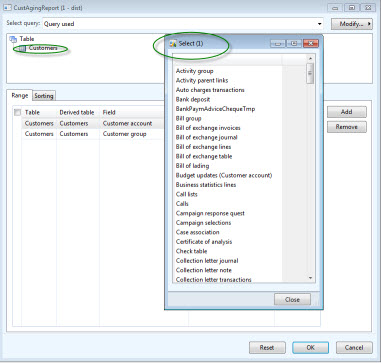
I have created a new table.  I need to be able to add this table to the "Select Query" of the Customer Aging report.  The new table is linked to the CustTable via the CustAccount with 1:n.  How can I get the new table to appear in the list of 1:n tables within the Query Select?  Within the "Query Select" form, I right click on Table  "Customers" -> 1:n  but I do not see this new table listed.   I have already added this new table to the CustTable Relations via a Normal relationship.  Why does the Table not appear in the list within the "Select Query"?  What do I need to do to make the new table name appear in the list?
 

*This post is locked for comments

I have the same question (0)
  • Suggested answer
    Community Member Profile Picture
    on at

    Hi,

    Since your table has the foreign key, the relation should be created on your table, referencing the CustTable. Also, note that it's the table's label that will appear, and not it's AOT name.

    Regards,

  • Community Member Profile Picture
    on at

    Leandro,

    I have the foreign key relation set on my new table to reference the CustTable and still do not see my new table (label name) appearing in the list.  Is there something else I need to do?

    Thank you

  • Verified answer
    Community Member Profile Picture
    on at

    Hi, Bertil

    Sorry, I forgot you need to update de data model. Access Tools > Development Tools > Cross-reference > Periodic > Update. Check only Update Data Model and run.

    Regards,

  • Community Member Profile Picture
    on at

    Leandro,

    Thank you for your assistance with this. 

    Yes after executing the Update I can now see the table.

    Thanks again,


  • Verified answer
    Community Member Profile Picture
    on at

    Hi, Bertil. I'm glad I could help.

    Could you please mark the answer as verified?

    Thank you so much.

    Regards,

Under review

Thank you for your reply! To ensure a great experience for everyone, your content is awaiting approval by our Community Managers. Please check back later.

Helpful resources

Quick Links

Introducing the 2026 Season 1 community Super Users

Congratulations to our 2026 Super Stars!

Meet the Microsoft Dynamics 365 Contact Center Champions

We are thrilled to have these Champions in our Community!

Congratulations to the April Top 10 Community Leaders

These are the community rock stars!

Leaderboard > 🔒一 Microsoft Dynamics AX (Archived)

#1
CP04-islander Profile Picture

CP04-islander 39

#2
Michel ROY Profile Picture

Michel ROY 14

#3
imran ul haq Profile Picture

imran ul haq 8

Last 30 days Overall leaderboard

Featured topics

Product updates

Dynamics 365 release plans
