web
You’re offline. This is a read only version of the page.
close
Skip to main content

Announcements

No record found.

News and Announcements icon
Community site session details

Community site session details

Session Id :
Microsoft Dynamics AX (Archived)

Workflow is not able to retrieve reviewers in case 2 expenditure reviewers groups are assigned

(0) ShareShare
ReportReport
Posted on by 50

We have created a purchase approval workflow where we would like to have two approval steps. In the first step we want the project manager to approve the purchase order and after this approval we would like to have the business unit manager to approve the PO as well. For the Purchase order expenditure reviewers I've created 2 groups:

  • PM APPROVER - Project distributions - set project manager to YES
  • BU APPROVER - Organization distributions - set BusinessUnit to YES
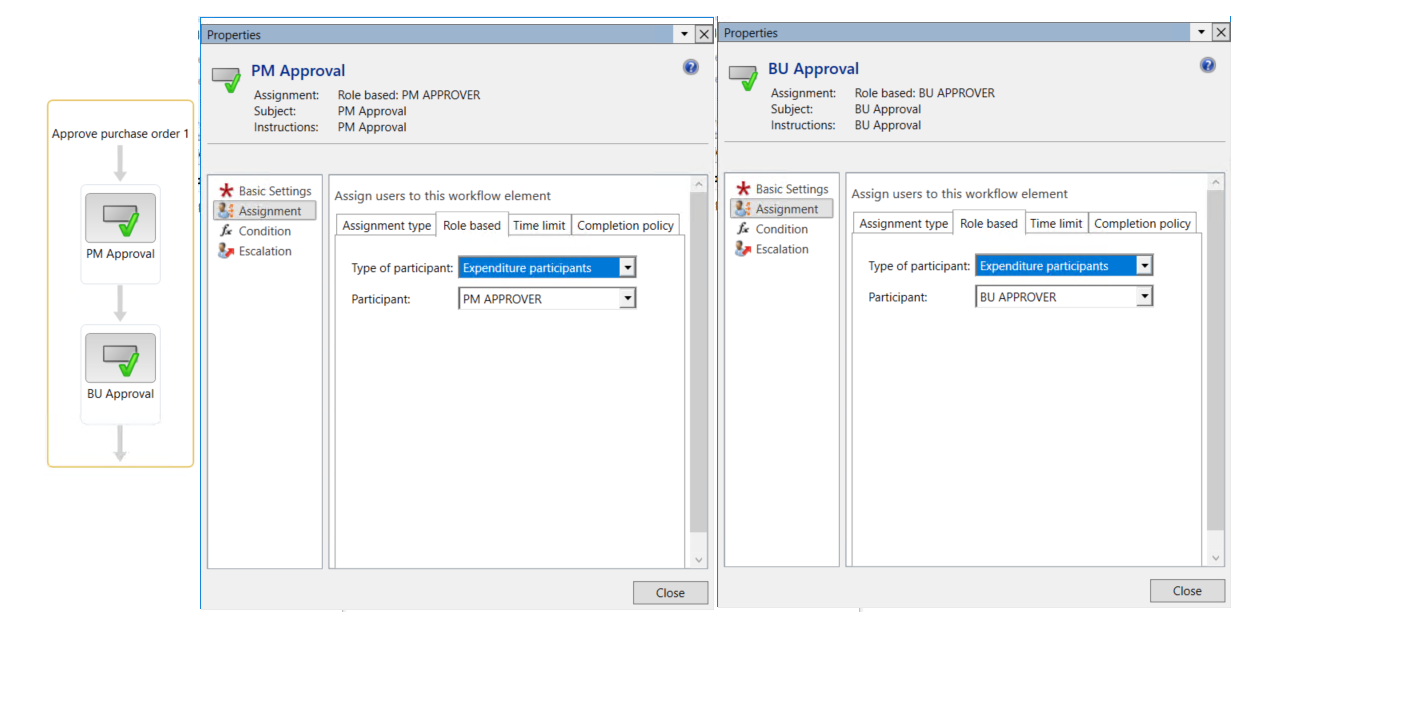
WF-APP-STEPS.png

The owner on the financial dimension 001 - Home I set Jodi Christiansen.

The project manager on the project is set to Charlie Carson.

From the project I've created a new purchase order. The PO is linked to the project and the financial dimension for BusinessUnit is set to 001 - Home.
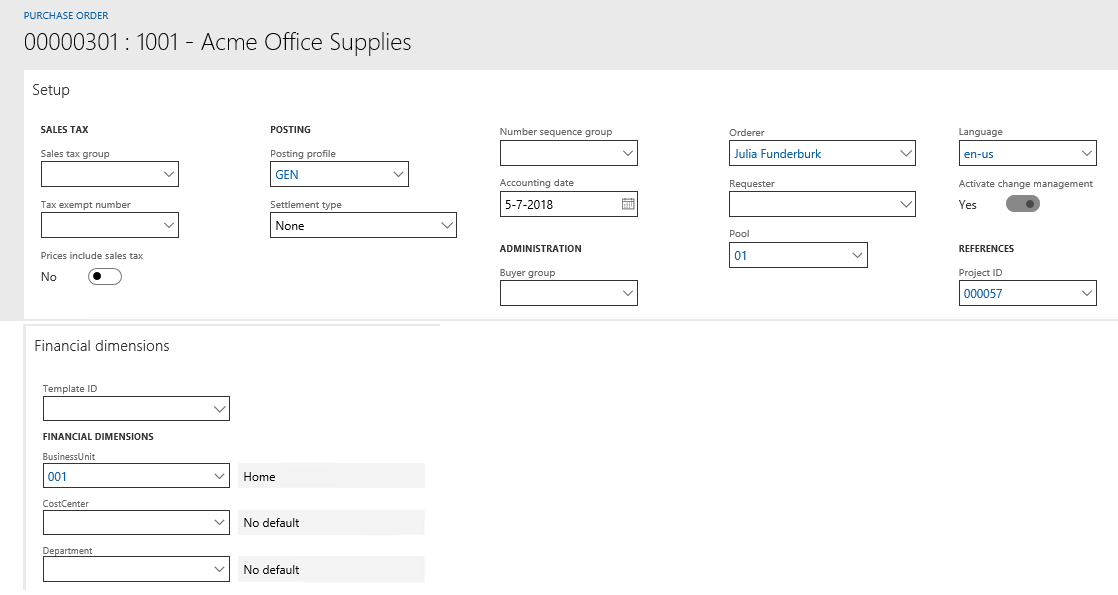
FIN-DIM.png

The PO is submitted to the workflow and the PM approval is assigning the approval as expected to Charlie Carson.
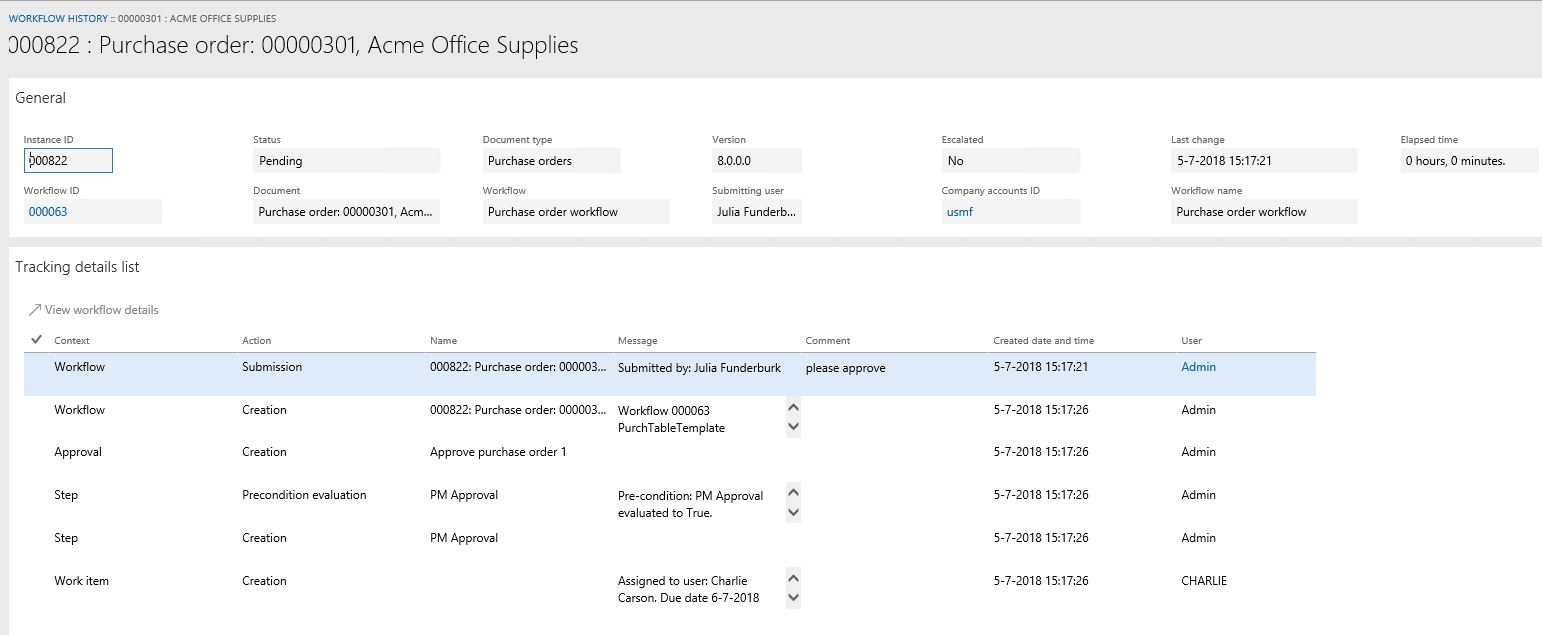
PM-APPR.JPG

The approval is reassigned and approved by Julia Funcderburk. The next approval will need to be done by the BusinessUnit owner, but the workflow is stopped: 

Stopped (error): SysWorkflowQueue-resume X++ Exception: Participant token 'BU APPROVER' does not resolve to any user
at SysWorkflowParticipantProvider-resolve
SysWorkflowParticipantProvider-resolveParticipants
SysWorkflowServiceProvider-resolveParticipant
SysWorkflowQueue

The strange thing is that when I only have 1 approval step in place for BU APPROVAL or PM APPROVAL, the workflow is able to retrieve the correct user. In case there are 2 expenditure reviewer groups, the system is not able to retrieve participants for the second expenditure reviewer group. 

Did someone encounter similar issues? How where you able to solve them? Or is this a Microsoft bug?

*This post is locked for comments

I have the same question (0)
  • Ludwig Reinhard Profile Picture
    Microsoft Employee on at

    Hello Evert,

    Can you share details of how you setup the expenditure reviewers?

    That is, what financial dimension elements have you selected for the BU approver and PM approver group setup?

    Many thanks and best regards,

    Ludwig

  • Evert van Heeringen Profile Picture
    50 on at

    BU-APPROVAL.JPGBU-APPROVAL.JPG

  • Suggested answer
    Ludwig Reinhard Profile Picture
    Microsoft Employee on at

    Hi,

    This setup looks perfectly fine.

    The only thing that might be missing is the linkage of the owner of the business unit with the user Jodi/Charlie.

    Does Jodi/Charlie have an employee linked in the user form under SystemAdministration?

    Can you also do a test and assign a manager for the business unit under Organisation Administration / operating units for BU001 just to double check?

    Best regards,

    Ludwig

  • Evert van Heeringen Profile Picture
    50 on at

    Hi Ludwig,

    Both users are linked to an employee and a manager is also assigned to the business unit! I resumed the workflow, but the system gives the same error.

    Kind regards,

    Evert

  • Suggested answer
    Ludwig Reinhard Profile Picture
    Microsoft Employee on at

    Hello Evert,

    I cannot identify an issue from the setups that you made.

    Can you either check LCS for an available hotfix and/or have a developer taking a look at this?

    Best regards,

    Ludwig

  • Evert van Heeringen Profile Picture
    50 on at

    Hi Ludwig,

    Thanks for your help! I'll take a look with a developer.

    KR Evert

  • Ludwig Reinhard Profile Picture
    Microsoft Employee on at

    Hello KR Evert,

    I am wondering whether you had some time to look into this with a developer and already got it fixed?

    Best regards,

    Ludwig

  • Evert van Heeringen Profile Picture
    50 on at

    We didn't have the opportunity yet to debug the error with a developer. When I've more information, I'll share the results.

  • Verified answer
    Evert van Heeringen Profile Picture
    50 on at

    We received the following answer from Microsoft: It is a design constrain in the workflow framework that you cannot have 2 approval elements after each other in a flow. (You can pull it into the designer, but it won't work). You have to make one of the steps a task that the participant COMPLETE, and then the second "approval" step is the approval element.

Under review

Thank you for your reply! To ensure a great experience for everyone, your content is awaiting approval by our Community Managers. Please check back later.

Helpful resources

Quick Links

Introducing the 2026 Season 1 community Super Users

Congratulations to our 2026 Super Stars!

Meet the Microsoft Dynamics 365 Contact Center Champions

We are thrilled to have these Champions in our Community!

Congratulations to the April Top 10 Community Leaders

These are the community rock stars!

Leaderboard > 🔒一 Microsoft Dynamics AX (Archived)

#1
CP04-islander Profile Picture

CP04-islander 24

#2
Michel ROY Profile Picture

Michel ROY 14

#3
Jagadabi Profile Picture

Jagadabi 6

Last 30 days Overall leaderboard

Featured topics

Product updates

Dynamics 365 release plans
