web
You’re offline. This is a read only version of the page.
close
Skip to main content

Announcements

No record found.

News and Announcements icon
Community site session details

Community site session details

Session Id :
Microsoft Dynamics AX (Archived)

[SSRS REPORT]: Total based on due date

(1) ShareShare
ReportReport
Posted on by 1,264

Hello community, 

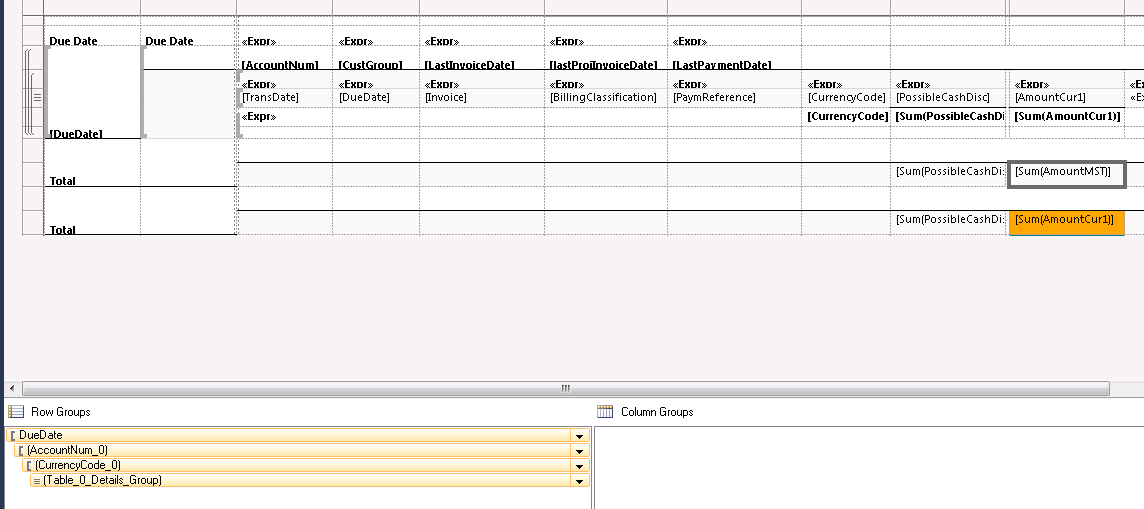
i want to customize the "Detailed due day List" report (SSRS REPORT 2012) and be able to display a total of amount cur. 

when user first opens this report, he enters a date in a dialog. i am asked to display a sum( Amount cur) for all due dates that are greater than the entered date and a second line containing the sum( Amount cur) for all due dates that are less than that date. i tried grouping by due date, but i don't know how to implement the expression in order to say in case date greater ( or less than)
1145.DD.png

Might you please helping me solving this?*

kind regards 

jihane

*This post is locked for comments

I have the same question (0)
  • Suggested answer
    syed baber Profile Picture
    11,633 on at

    Hi Jihane,

    Why don't you do this in your DP class and stores the totals in two different fields and then display those fields on the report wherever you want?

    Thanks,

    Baber.

  • jihane Profile Picture
    1,264 on at

    Thank you for you answer.

    How shall i proceed?

    i don't know how to restrict the values rendered on only an interval

    Kind regards

    Jihane

  • syed baber Profile Picture
    11,633 on at

    Hi Jihane,

    What do you mean by restrict the values rendered on ? From which table, you want to retrieve the sum of amountcur? If you know the table, use select sum(amountcur) and apply the condition of due date in where clause. Where exactly, are you getting problem?

    Thanks,

    Baber.

  • Suggested answer
    Faisal Fareed Profile Picture
    10,796 User Group Leader on at

    You can take idea about how to write expression at group level from here daxture.blogspot.co.nz/.../conditional-iif-sum-in-ssrs-report.html

    1. Right click on Textbox (Sum[AmountMST]) and choose expressions

    2. write expression there something like this;

    =Sum(VAL(IIF(Parameters!EnteredDate.value > Fields!Date.value, Fields!Amount.value, 0)))

    3. You can reverse this expression on your next textbox condition.

  • jihane Profile Picture
    1,264 on at

    Hello Faisal, i tried using this expression in my report, unfortunately no amount was returned. just to explain little bit more my requirement, its like, beside the Total that will be displayed in the end of the report, i want to divide the report into two parts, the first one will display the total for all the transactions having the due date less than the entered date, and the second one will display the total Amount of transactions with the  due date greater than the entered date, like this:

    amount.png

    Might you please helping me solving this.

    P.S: I am new to SSRS

    Kind Regards,

    Jihane

  • syed baber Profile Picture
    11,633 on at

    Hi Jihane,

    What expression you used to print the totals? Can you please share here, so that I can have a look and see what might have gone wrong?

    Thanks,

    Baber.

  • jihane Profile Picture
    1,264 on at

    Hi Baber, here is what i used, i am customizing the CustDueReportDetails Report

    =Sum(VAL(IIF(Parameters!EnteredDate.value > Fields!Date.value, Fields!Amount.value, 0)))

    Maybe i am confusing between what i should put in the tablix expression and what i should use for the text Box expression.

    Kind regards

    Jihane

  • Suggested answer
    syed baber Profile Picture
    11,633 on at

    Hi Jihane,

    Is your tablix control bound to the report dataset correctly? For testing, just try to print the value of Fields!Amount.Value and see if any value is showing and then Sum it using the expression you mentioned above.

    Thanks,

    Baber.

Under review

Thank you for your reply! To ensure a great experience for everyone, your content is awaiting approval by our Community Managers. Please check back later.

Helpful resources

Quick Links

Introducing the 2026 Season 1 community Super Users

Congratulations to our 2026 Super Stars!

Congratulations to our 2025 Community Spotlights

Thanks to all of our 2025 Community Spotlight stars!

Leaderboard > 🔒一 Microsoft Dynamics AX (Archived)

#1
Joris dG Profile Picture

Joris dG 5

#2
Alexey Lekanov Profile Picture

Alexey Lekanov 2

#2
Henrik Nordlöf Profile Picture

Henrik Nordlöf 2 User Group Leader

Last 30 days Overall leaderboard

Featured topics

Product updates

Dynamics 365 release plans
