web
You’re offline. This is a read only version of the page.
close
Skip to main content

Announcements

No record found.

News and Announcements icon
Community site session details

Community site session details

Session Id :
Finance | Project Operations, Human Resources, ...
Suggested Answer

How to duplicate Customer Free Text Invoice Data Entity ?

(0) ShareShare
ReportReport
Posted on by


Hi I am using Customer free text invoice data entity to import free text invoice,

The entity has Customer invoice table and Customer invoice line as the data source,

Client ask New custom Customer Free Text Invoice entity with additional field and the property ispublic enabled.

So, I Duplicate the standard entity , staging table, privilege's, And changed the name, Properties and Logics as per my duplicate objects,

And did the full build and sync , Build completed without error.

when i try to export it works as expect, But while import It throw the error and did not hit the debugger also.
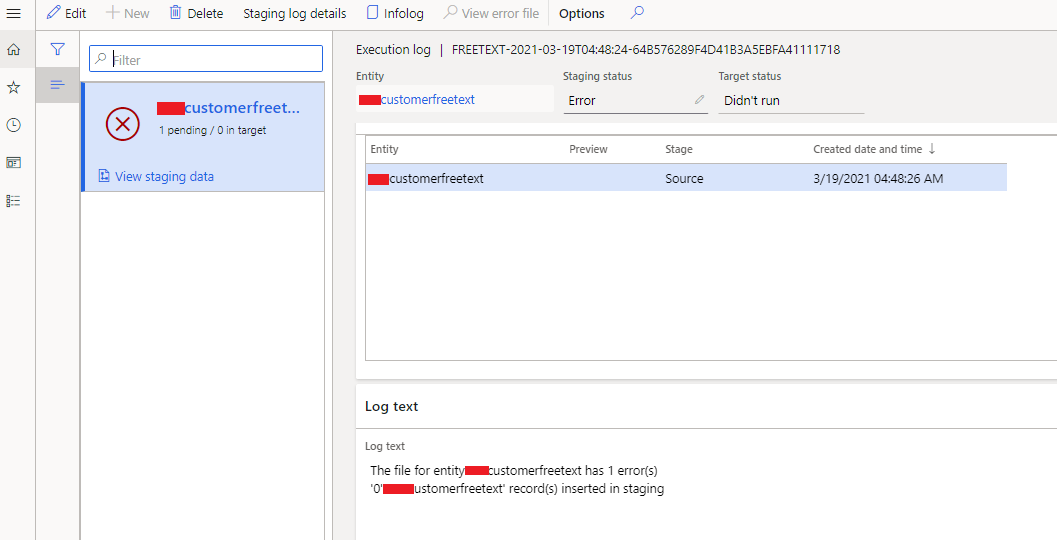

1538.pastedimage1616131745189v3.png

8446.pastedimage1616131771483v4.png

Please guide me what I missed.

Thanks.

I have the same question (0)
  • Ludwig Reinhard Profile Picture
    Microsoft Employee on at

    moved to the d365 forum

  • nmaenpaa Profile Picture
    101,172 Moderator on at

    Did you check Staging log details?

  • WillWU Profile Picture
    22,363 on at

    Hi Sudhakar Venkatesan,

    Is the import file Excel? please check if it contains any empty rows.

  • Community Member Profile Picture
    on at

    Hi Nikolaos Mäenpää

    yes, I checked data in staging, when export staging hold the data but while import I am getting error before data move to staging.

    Thanks.

  • Community Member Profile Picture
    on at

    Hi Will Wu

    No, file don't have issues, I Tried that file with standard Customer Free Text Invoice entity, It's working fine.

    Thanks.

  • nmaenpaa Profile Picture
    101,172 Moderator on at

    You didn't yet answer if you checked Staging log details. That's the button that you see in your first screenshot. 

  • Community Member Profile Picture
    on at

    Hi Nikolaos Mäenpää,

     I checked the log description it shows the following Log Description " The data value violates integrity constraints. "

    pastedimage1616486250990v1.png

    Thanks.

  • Suggested answer
    nmaenpaa Profile Picture
    101,172 Moderator on at

    Hi Sudhakar,

    great, this tells us that your data has some issue vs your entity definition.

    Usually this error message means that you have duplicate rows in your file. Duplicate means : many records that have same values in the entity key field(s).

    Please double check your entity key, and compare your data against it.

Under review

Thank you for your reply! To ensure a great experience for everyone, your content is awaiting approval by our Community Managers. Please check back later.

Helpful resources

Quick Links

Introducing the 2026 Season 1 community Super Users

Congratulations to our 2026 Super Stars!

Meet the Microsoft Dynamics 365 Contact Center Champions

We are thrilled to have these Champions in our Community!

Congratulations to the April Top 10 Community Leaders

These are the community rock stars!

Leaderboard > Finance | Project Operations, Human Resources, AX, GP, SL

#1
Giorgio Bonacorsi Profile Picture

Giorgio Bonacorsi 608

#2
André Arnaud de Calavon Profile Picture

André Arnaud de Cal... 591 Super User 2026 Season 1

#3
CP04-islander Profile Picture

CP04-islander 430

Last 30 days Overall leaderboard

Product updates

Dynamics 365 release plans
