web
You’re offline. This is a read only version of the page.
close
Skip to main content

Announcements

No record found.

News and Announcements icon
Community site session details

Community site session details

Session Id :
Customer experience | Sales, Customer Insights,...
Answered

How to change default language of survey

(0) ShareShare
ReportReport
Posted on by 90

Good day!


In Voice of the customer we simple changed default languege of survey (picture 1, 1).

But I cannot change default language to another (Russian) in Customer Voice (picture 1, 2) (when Russian is additional language of survey).

And when I make other language to default, I cannot open and change labels of this language (picture 2).


Does anybody knows how to change default language of survey to another (and how change labels for it)?
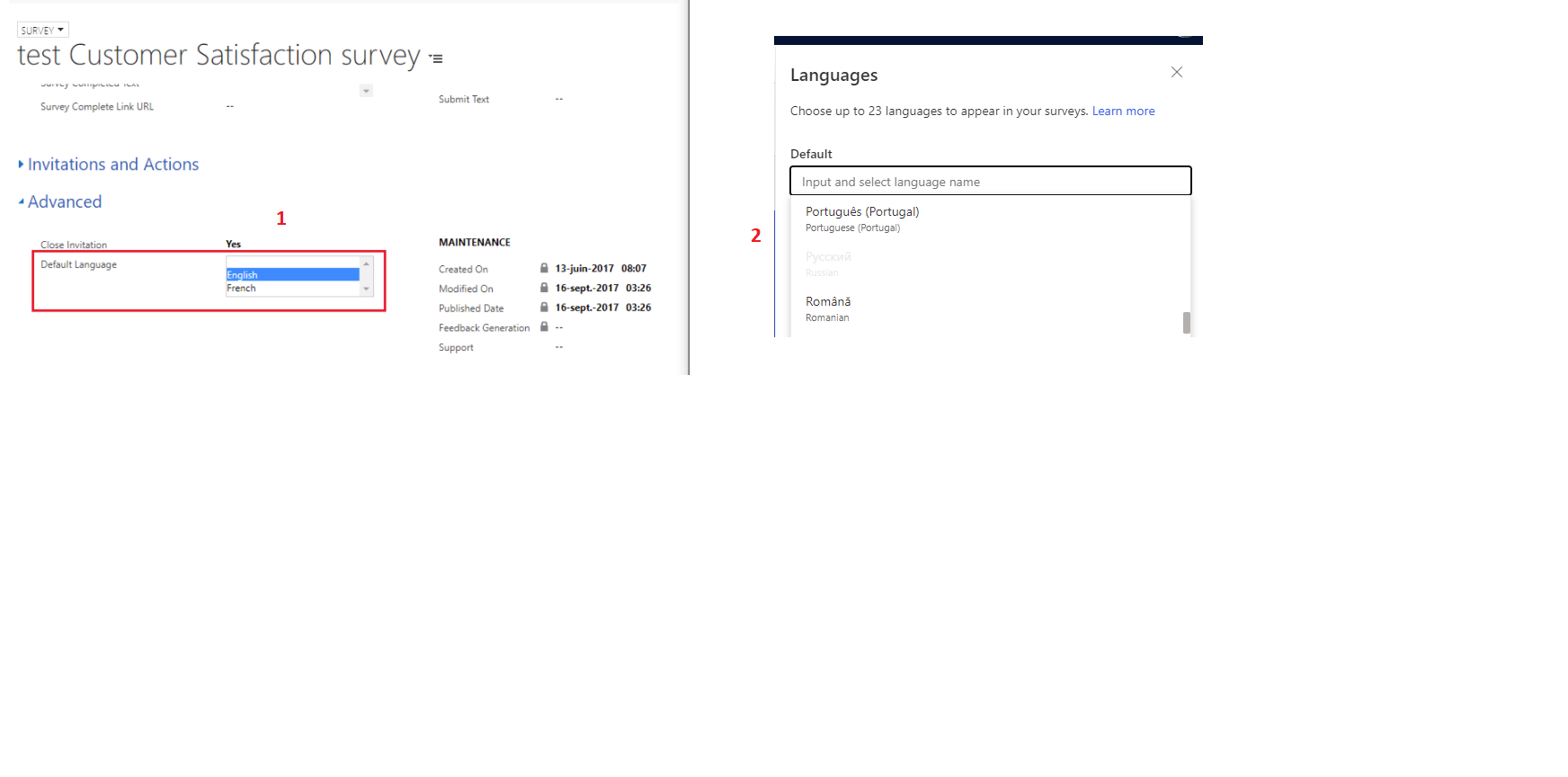
 

Customer-voice.png

_110435043704_-_56043C0435043D045604_.png

Thanks for your reply.

I have the same question (0)
  • Suggested answer
    Usha Rathnavel Profile Picture
    Microsoft Employee on at

    Hi Spiker,

    Thanks for your query - The default language setting indicates what would be the default language shown to the survey respondent (the person you send the survey to) in case if the person's web browser is in a different language than what you have your survey in.

    Let's say you create your survey in English, add Russian and French. You set the default language to Russian and send the survey out to person X.

    Now, person X's mother tongue is Spanish, and person X uses Spanish to browse the internet - so his browser language is set to Spanish.

    When person X clicks on the link to the survey and it opens up as a new web page. Given that the browser language is Spanish, and your survey is NOT available in spanish (you have set-it up for English, Russian & French remember?) the survey will be loaded in the default language i.e. Russian for person X.

    Coming back to your original query - if you are looking to edit your Russian version of the survey, you can edit it by clicking on the edit button in the Additional languages

    pastedimage1612201053080v1.pngpastedimage1612201090907v2.png

    This will open up the edit mode and you can add the "Russian" strings to the survey you created in English. Is this what you are looking for?


  • Spiker Profile Picture
    90 on at

    Thank you very much, Usha, for your comment with explanation.

    But actually I'd like to know, how to change default language of Survey. Or I need to rebuild Survey.

    Best regards.

  • Verified answer
    Usha Rathnavel Profile Picture
    Microsoft Employee on at

    Hey Spiker,

    I would like to understand more - can you drop a note to usrathna@microsoft.com with your email id?

    If you are looking to change the language which is shown in the main window when you login to Customer Voice, you can do the following:

    1) set the browser language to say Russian,

    2) reload Customer Voice application

    3) The entire application now loads in Russian

    4) when you create a new survey or project, you can see the Russian language strings.

    For existing surveys, you will need to rebuild the survey after performing steps 1- 3. Hope this helps. Looking forward to hear from you.

  • Suggested answer
    Spiker Profile Picture
    90 on at

    Thank you very much, Usha, for your explanation.

    You have answered my question: "need to rebuild the survey".

    Best regards.

Under review

Thank you for your reply! To ensure a great experience for everyone, your content is awaiting approval by our Community Managers. Please check back later.

Helpful resources

Quick Links

Introducing the 2026 Season 1 community Super Users

Congratulations to our 2026 Super Stars!

Congratulations to our 2025 Community Spotlights

Thanks to all of our 2025 Community Spotlight stars!

Leaderboard > Customer experience | Sales, Customer Insights, CRM

#1
ManoVerse Profile Picture

ManoVerse 180 Super User 2026 Season 1

#2
11manish Profile Picture

11manish 123

#3
CU11031447-0 Profile Picture

CU11031447-0 100

Last 30 days Overall leaderboard

Product updates

Dynamics 365 release plans
