web
You’re offline. This is a read only version of the page.
close
Skip to main content

Notifications

Announcements

No record found.

Community site session details

Community site session details

Session Id :
Microsoft Dynamics GP (Archived)

Voided Cash Receipt Showing Open*

(0) ShareShare
ReportReport
Posted on by 4

Hi,
A user voided a RM cash receipt and has attempted to re-enter using the same check number.  Upon getting an error that it's already been used, I did an inquiry on the customer and see that the transaction is voided, but it's has an open status (see screen shot).  I'm thinking this is why the check # cannot be re-used.  Shouldn't a void go to history?  How can I make it go there?  Thanks in advance!

Jim

*This post is locked for comments

I have the same question (0)
  • Verified answer
    Mahmoud Saadi Profile Picture
    32,738 on at

    Hello Jim

    Unlike payable management, the posted and applied transactions in receivable transactions are not moved to history automatically, they remain in the open tables until you run what's called the "Paid Transaction Removal Routine", which can be found on (Microsoft Dynamics GP > Tools > Routines> Sales > Paid Transaction Removal)

    When you run this utility, you can specify the criteria by which you want to move the transactions from the open to the history tables. You may refer to Do You Run Paid Transaction Removal in Dynamics GP Receivables Management article by Etelligent Solutions for further details.


    Your feedback is highly appreciated,

  • Thomas Newcomb Profile Picture
    1,810 on at

    Hi Jim!

    Thank you for the post on this, as Mahmoud mentioned in Receivables Management you have to run the Paid Transaction Removal Routine. Once this has been ran any documents that meet the criteria that you select prior to running PTR ( Paid Transaction Removal ) will be moved into the History tables including any voided documents.

    Please let us know if you have any further questions on this!

    ~Thomas Newcomb

    -----------------------------------

    Dynamics GP Support Engineer

    -----------------------------------

    This posting is provided "AS IS" with no warranties, and confers no rights

  • Suggested answer
    soma Profile Picture
    24,410 on at

    The Paid Transaction Removal in Sales Routines will remove the paid transactions (fully applied documents) and completed (Void) transactions from open status to history.

    Don't forget to mark the Void Check box while you process the Paid Transaction Removal.

  • Jim Lines Profile Picture
    4 on at

    Mahmoud,

    Thank you.  I had forgotten about that routine as it's been so long since I've last used it.  It took care of the problem and moved the void into a HIST status.  

    Thanks!

    Jim

  • Jim Lines Profile Picture
    4 on at

    Update - the user is stating that they still cannot use the check number even after the void is moved to history.  Is this by design?  I would think not.  

  • Mahmoud Saadi Profile Picture
    32,738 on at

    Jim

    On the checkbook maintenance, there is an option to allow duplicate check numbers .. have you checked that ?

    Is this your case ?

  • Jim Lines Profile Picture
    4 on at

    Mahmoud,

    I thought that only related to AP checks that our company would cut.  Does it also apply to AR checks received?

    Jim

  • Mahmoud Saadi Profile Picture
    32,738 on at

    Sorry !! It seems I have forgotten that this case is about receivable. Definitely, this option is related to the payable module only as other modules should allow duplicate check numbers !

    What is the error message that they receive when using the same check number ?

  • Jim Lines Profile Picture
    4 on at

    The message is "This check has been entered for this customer already."  This happens when the Cash Receipts Entry screen when typing into the "Check/Card Number" field.  It would be easier to enter a variation of the check number but accounting wants to make it right and I'm also curious.  Thanks.

    Jim

  • Verified answer
    Mahmoud Saadi Profile Picture
    32,738 on at

    Okay Jim

    I have always taken this for granted, that check numbers are allowed in modules other than Payables. I have read this once in the help file as I am definitely sure about. 
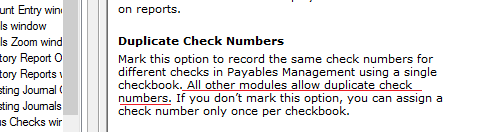
    Following up with your case, I can assure you 100% that the system will not allow a duplicate check number per customer. After you enter the check number on the cash receipt, when you leave the field the system will immediately run the following check to ensure that no duplicate check numbers exist for this specific customer

    exec TWO.dbo.zDP_RM00401SS_2 'customer number','check number'

    --- This means, the system will check the RM Key file for any duplicate numbers.

    -- The stored procedure above is defined as shown below, a simple select statement on the RM00401 which contains all document numbers for all customers. In case one record is retrieved, the error message will pop up

    SELECT TOP 1
                DOCNUMBR ,
                RMDTYPAL ,
                DCSTATUS ,
                BCHSOURC ,
                TRXSORCE ,
                CUSTNMBR ,
                CHEKNMBR ,
                DOCDATE ,
                NEGQTYSOPINV ,
                DEX_ROW_ID
        FROM    .RM00401
        WHERE   CUSTNMBR = @CUSTNMBR
                AND CHEKNMBR = @CHEKNMBR
        ORDER BY CUSTNMBR ASC ,
                CHEKNMBR ASC ,
                DEX_ROW_ID ASC


    In this essence, no matter what the status of your document is (work, open or history), either voided or not. The system will not allow such a duplicate number. I have just tested this on GP 2013, 2010 ... I am quite sure it's been there for a long time.

    I guess I shall thank you for this one, it's the biggest mistake of all to take things for granted :)

    Let me know if you have any further inquiries,

Under review

Thank you for your reply! To ensure a great experience for everyone, your content is awaiting approval by our Community Managers. Please check back later.

Helpful resources

Quick Links

Responsible AI policies

As AI tools become more common, we’re introducing a Responsible AI Use…

Neeraj Kumar – Community Spotlight

We are honored to recognize Neeraj Kumar as our Community Spotlight honoree for…

Leaderboard > 🔒一 Microsoft Dynamics GP (Archived)

#1
mtabor Profile Picture

mtabor 1

Last 30 days Overall leaderboard

Featured topics

Product updates

Dynamics 365 release plans
