web
You’re offline. This is a read only version of the page.
close
Skip to main content

Notifications

Announcements

No record found.

Community site session details

Community site session details

Session Id :
Supply chain | Supply Chain Management, Commerce
Answered

Error when Releasing Approved Purchase Requisitions

(0) ShareShare
ReportReport
Posted on by 175

Hi All,

I got this strange thing happening on my purchase requests in D365FO.

I have setup the following in relation to the purchase requisition:

1. An approval workflow for purchase requisition header.

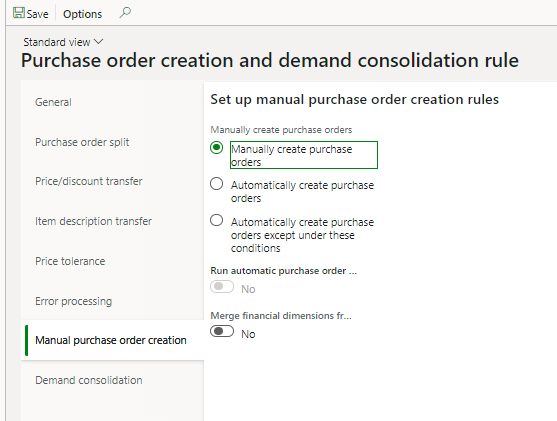
2. A purchasing policy for creating PO from purchase order creation and demand consolidation rule.
msedge_5F00_x7ojBW9fev.png

Now I created a purchase request in the system.

Added the line items.

Sent the purchase request for approval and everything seems good.

The purchase requisition lines "Valid" field has a check mark.

Now I am on the release approved purchase requisitions form and will now create a new PO.

So I click that button, select the vendor and click Ok.

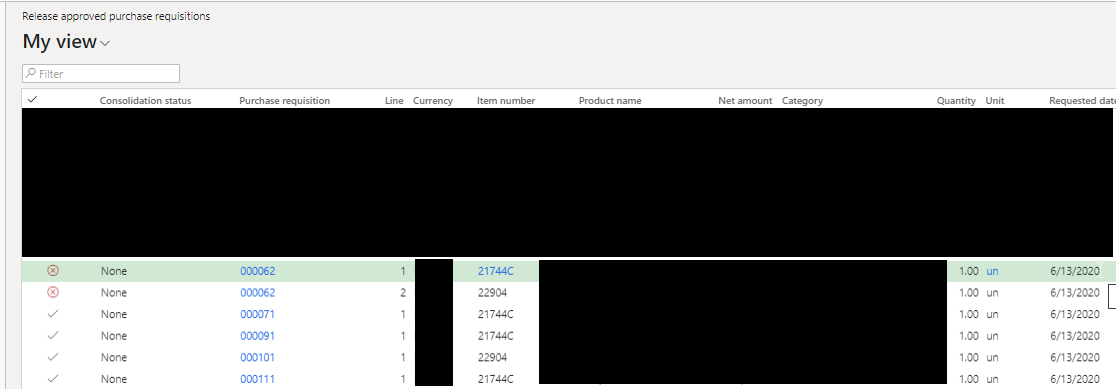
Now the system does not create a PO.

And the valid lines from previously check icon now have a red x icon on it.
RRAdmIyB1A.png

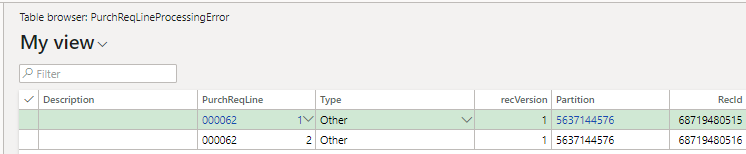
Checking the "PurchReqLineProcessingError" table I got this.
msedge_5F00_W5bhlmsfZp.png

Please I need your help on this.

Regards,

RIEL

I have the same question (0)
  • Suggested answer
    SouravDam Profile Picture
    11,730 on at

    Hello Riel Mallorca,

    Can only see the red cross marks in your screenshot and nothing else.

    Any budget check validation? However that will be validated during the PR processing itself.

    Is there any authorized vendor setup made for those items where you are getting this cross check mark?

    What is the exact error message you got in system? Once you select that line (showing crossed mark), you will possibly get the error message notification. Appreciate if you kindly share that to know the issue.

    Will be waiting to hear from you on this.

    Best regards,
    Sourav Dam

    Kindly mark this thread 'Yes' if this is answered your query which may help other community members in this forum.

  • Riel A. Mallorca Profile Picture
    175 on at

    Hi Sourav,

    Budget check is not in place on my setup.

    There is currently "No check" for approved vendors on my item setup.

    And lastly which is very wierd is system does not give me error message. Just marks the purchase requisition lines as invalid afteran attempt of creating a new PO from approved purchase requisition line.

    Regards,

    Riel

  • Suggested answer
    SouravDam Profile Picture
    11,730 on at

    Hello Riel Mallorca,

    Is that item marked as Stopped in default order settings in "Released products" form for 'Purchase order' ?

    12.JPG

    Also check if there is any chance that the procurement category which you selected in the PR line is set to Inactive or not. It should be "Active".

    14.JPG

    Best regards,
    Sourav Dam

    Kindly mark this thread 'Yes' if this is answered your query which may help other community members in this forum.

  • Riel A. Mallorca Profile Picture
    175 on at

    Hi Sourav,

    Please see related setups:

    b74rB8jKtG.png

    0wvL4x9qqn.png

    Thanks,

    RIEL

  • Suggested answer
    Rahul Mohta Profile Picture
    21,032 on at

    pls check vendor assingment

    as item and category are not stopped, other way would be to check policies

    is this the only PREQ having issues?

  • Riel A. Mallorca Profile Picture
    175 on at

    Hi Rahul,

    This happens to all my requests even if I try to create a new item.

    I only have one purchasing policy configured and that is the purchase order creation and demand consolidation.

    Are there any other policy setups that may affect this? Also if system can give me an error message it would be helpful, unfortunately there is no error message at all.

    Regards,

    RIEL

  • Suggested answer
    SouravDam Profile Picture
    11,730 on at

    Hello Riel Mallorca,

    Are you getting this all environments or only in PRD?

    Try with below options if solve this case.

    Category policy rule: - Set this policy rule to "Allow all vendors" for the categories you created.

    6378.JPG      00680.JPG

    Purchase order creation and demand consolidation rule: - Check for the following;

    --- Is there any price tolerance you set ? If 'Yes', then set it to "No".

    --- What is the error processing rule you set ? Set it to "No action".

    6622.JPG      13.JPG

    Try this in UAT and see if you are getting this through.

    Best regards,
    Sourav Dam

    Kindly mark this thread 'Yes' if this is answered your query which may help other community members in this forum.

  • Riel A. Mallorca Profile Picture
    175 on at

    Hi Sourav,

    There seems to be a little progress, now system gives me an info in the error message.

    See screenshot.

    IkJGUEtoOQ.png

    Regards,

    RIEL

  • Suggested answer
    Rahul Mohta Profile Picture
    21,032 on at

    is the PO now created or still not?

    Purchasing policies is key and once the access policy is done pls try after few mins for it be sync

  • Riel A. Mallorca Profile Picture
    175 on at

    Hi Rahul,

    Still no luck, the error is triggered when I click the new "Purchase order" button in the Release approved purchase requisition form.

    I might as well request from dev to debug the issue.

    Regards,

    RIEL

Under review

Thank you for your reply! To ensure a great experience for everyone, your content is awaiting approval by our Community Managers. Please check back later.

Helpful resources

Quick Links

Responsible AI policies

As AI tools become more common, we’re introducing a Responsible AI Use…

Neeraj Kumar – Community Spotlight

We are honored to recognize Neeraj Kumar as our Community Spotlight honoree for…

Leaderboard > Supply chain | Supply Chain Management, Commerce

#1
Laurens vd Tang Profile Picture

Laurens vd Tang 305 Super User 2025 Season 2

#2
André Arnaud de Calavon Profile Picture

André Arnaud de Cal... 123 Super User 2025 Season 2

#3
Gerardo Rentería García Profile Picture

Gerardo Rentería Ga... 67 Most Valuable Professional

Last 30 days Overall leaderboard

Product updates

Dynamics 365 release plans



