web
You’re offline. This is a read only version of the page.
close
Skip to main content

Notifications

Announcements

No record found.

Community site session details

Community site session details

Session Id :
Finance | Project Operations, Human Resources, ...
Suggested Answer

My D365FO Onebox Dev env is almost running out of HDD space, how can I apply LCS update to it?

(0) ShareShare
ReportReport
Posted on by 314

Hi Experts,
Currently I have D365FO Dev environment (Onebox VM) that deployed in local server.
I want to apply Application and Platform Update from LCS to this env.
But this env HDD is almost out of space. The size is 127Gigs with 5Gigs free space, I am already cleaning up the unused files like C:/Temp or DeployablePackages, only leaving with D365FO project and application.
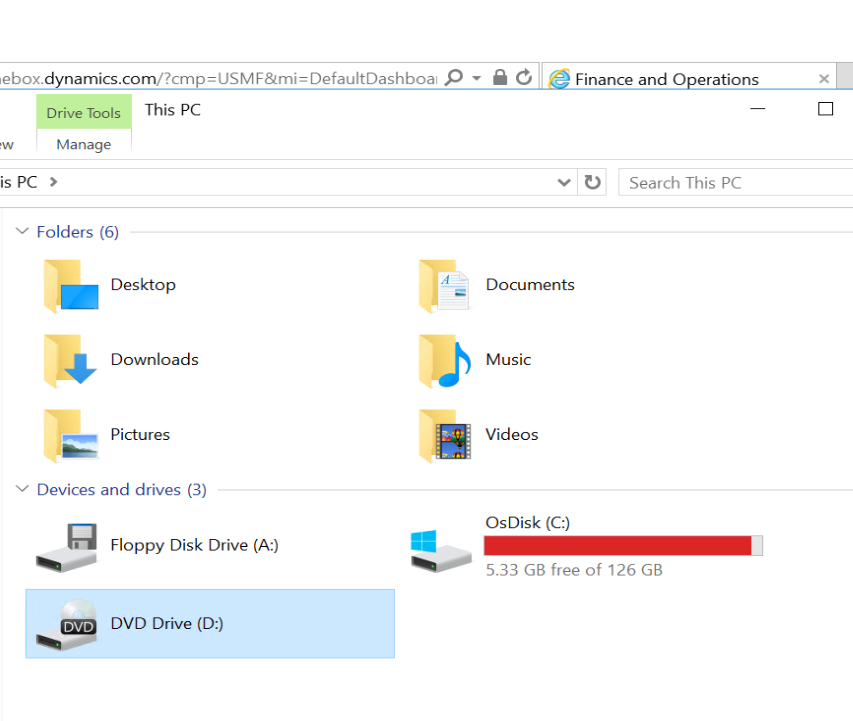
pastedimage1643010994084v2.png

So this leaves me with 2 option:
Put extra space to the HDD in this VM, but the VM HDD space cannot be adjusted. It is displayed 127Gigs, but not available to edit it
pastedimage1643014832667v7.png

Then, should I create new VM, and then move this Dev env to the new env with bigger HDD?
If yes, what is the recomended or ideal HDD storage size for Dev env?

Or there are another option than two above?

Thanks and Best Regards,
Antony

I have the same question (0)
  • Suggested answer
    ergun sahin Profile Picture
    8,826 Moderator on at

    brianjparker.tech.blog/.../

  • Michael Antony Profile Picture
    314 on at

    Hi Ergun Sahin,

    Thanks for sharing,
    But my Harddisk drive options is greyed out in the VM properties, so I cannot change the virtual disk size :(
    pastedimage1643014832667v7.png

  • Gunjan Bhattachayya Profile Picture
    35,423 on at

    Hi Michael,

    You will need to stop the VM before you can make any changes to the hard disk.

  • Michael Antony Profile Picture
    314 on at

    Hi Gunjan, thanks for the info

    I will try to stop the VM first.

  • Michael Antony Profile Picture
    314 on at

    Hi Gunjan,

    I already stop the VM, but still changes cannot be made, the properties box still greyed out.

    What should I do?

  • Mariano Gracia Profile Picture
    on at

    Hi Michael,

    I had the same problem, I finally added a new partition to the VM with the needed extra space, anyway, databases in the VM always comes with recovery system to full instead of simple that suites best for a VM machine purposes, have you checked it?, changing from full to simple allowed me to reduce the dabase size

  • Michael Antony Profile Picture
    314 on at

    Hi Mariano, thank you for your reply.

    After you change the recovery model from full to simple. Did the database size immediately reduced? Or you need like shrink it first to reduce the size?

  • Gunjan Bhattachayya Profile Picture
    35,423 on at

    Hi Michael,

    Your screenshot looks a little different than that properties screen on Hyper-V. Are you using Hyper-V?

  • Michael Antony Profile Picture
    314 on at

    Hi Gunjan,

    Yes I am currently using VMWare Workstation hypervisor to run the D365 VM Dev Onebox.

    Is the selection of non Hyper-V is the reason why the properties cannot be changed?

  • Gunjan Bhattachayya Profile Picture
    35,423 on at

    I have never tried with VMWare, so I am not sure. But that could be one of the reasons. Your virtual will be in a different format.

Under review

Thank you for your reply! To ensure a great experience for everyone, your content is awaiting approval by our Community Managers. Please check back later.

Helpful resources

Quick Links

Responsible AI policies

As AI tools become more common, we’re introducing a Responsible AI Use…

Neeraj Kumar – Community Spotlight

We are honored to recognize Neeraj Kumar as our Community Spotlight honoree for…

Leaderboard > Finance | Project Operations, Human Resources, AX, GP, SL

#1
Martin Dráb Profile Picture

Martin Dráb 660 Most Valuable Professional

#2
André Arnaud de Calavon Profile Picture

André Arnaud de Cal... 549 Super User 2025 Season 2

#3
Sohaib Cheema Profile Picture

Sohaib Cheema 307 User Group Leader

Last 30 days Overall leaderboard

Product updates

Dynamics 365 release plans
